Matrix ETERNITY NE System Manual 995
• You must also configure the Trusted IP Address/es table for this SIP Trunk to receive incoming calls.
If you do not configure this table, all incoming calls on this SIP Trunk will be rejected. For instructions,
see “Trusted IP Address/es” under “SIP Trunks”.
• Set the Send CLI option on the SIP trunk as Calling Party Wise. See “Send CLI in FROM field” under
“SIP Trunks” for instructions.
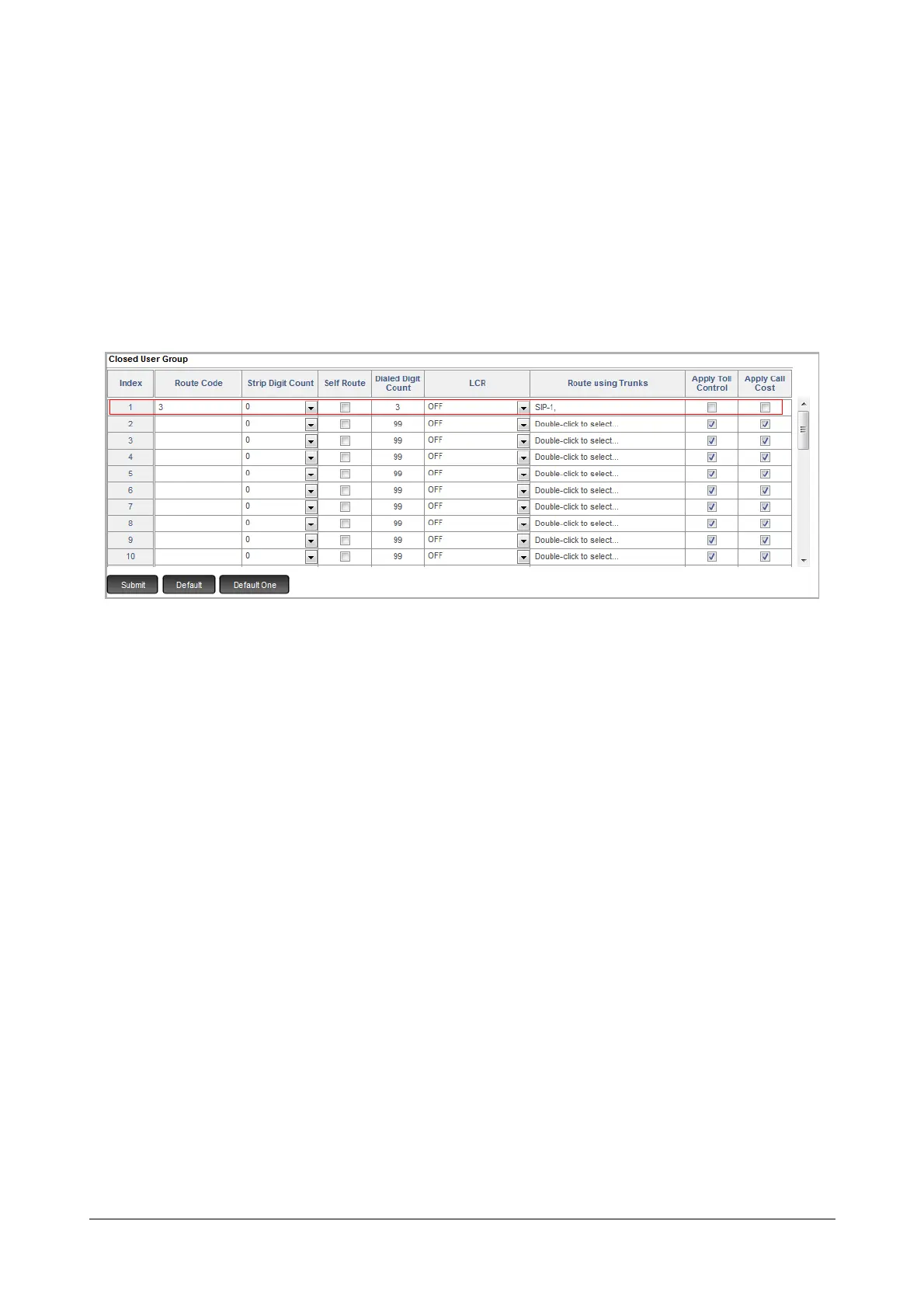
• You may also configure the Closed User Group (CUG) Table to avoid dialing the Trunk Access Code
for the outgoing calls made from this SIP Trunk, i.e. SIP 1.
At Location A, you may configure the CUG table as follows:
•In Route Code, enter the extension numbers of the PBX at Location B. Instead of entire number
strings, you can configure a single digit, the starting digit of the extension numbers as Route Code.
In this case, you may configure Route Code as ‘3’, as all extensions at Location B start with ‘3’.
• Keep the Strip Digit Count as ‘0’.
• Keep the Self Route check box disabled.
•In Dialed Digit Count, enter the digit length of the extension numbers at Location B. In this case,
‘3’.
•In Route using Trunks, select the SIP trunk number to be used for routing the Peer-to-Peer calls.
In this case, SIP 1.
• When Self Route check box is disabled, system will check Apply Toll Control parameter. By
default, it is enabled. The system will apply toll control to all the outgoing calls.
Disable this check box, if you do not want to apply toll control to the CUG numbers dialed by you.
• By default, Apply Call Cost check box is enabled. Clear this check box as for Peer to Peer calls
you do not require the call cost calculation.
See “Closed User Group (CUG)” for more details.



 To Next Page