Matrix ETERNITY NE System Manual 1189
How to configure
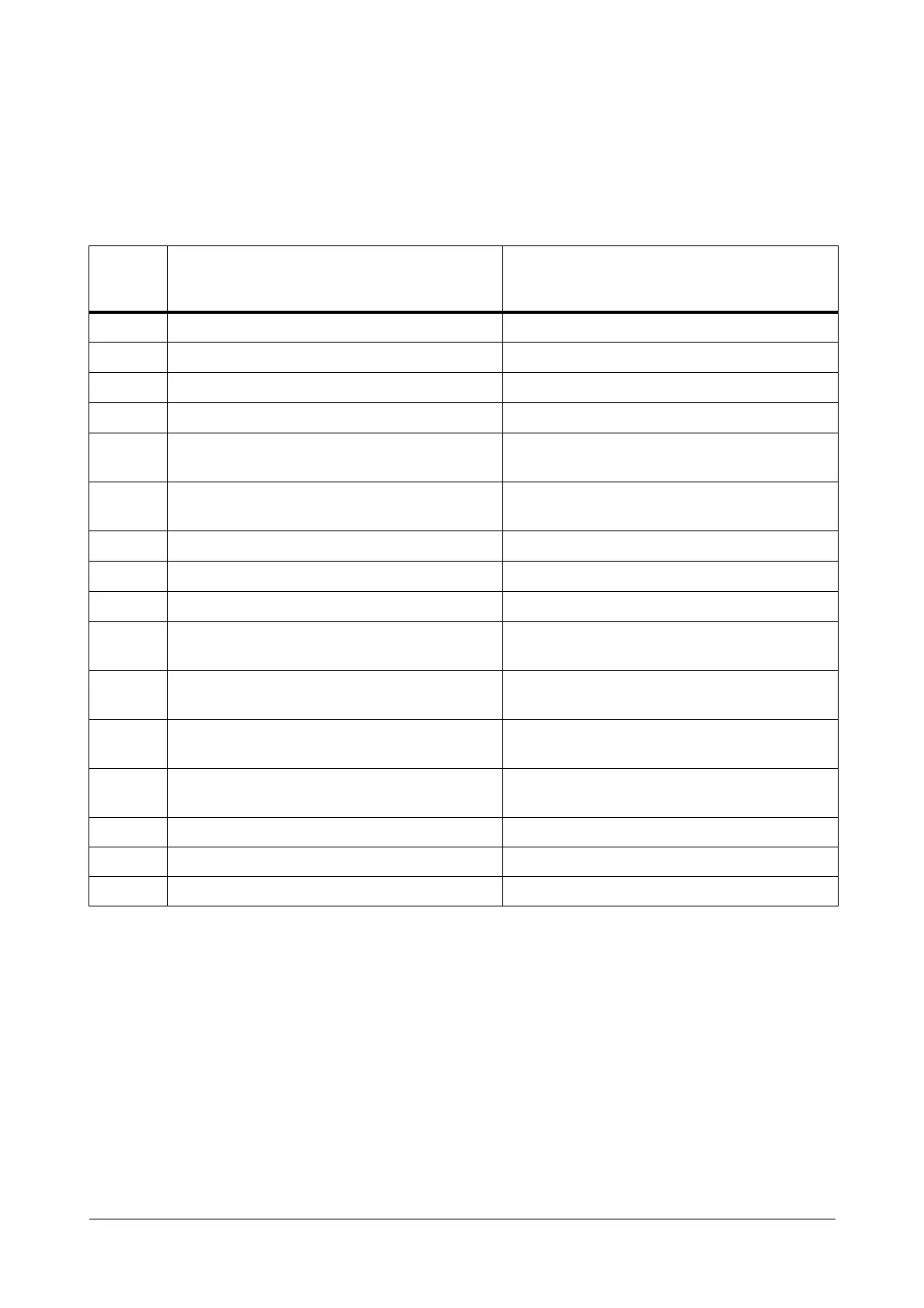
By default, Voice Module Number 01 to 13 are assigned to certain applications like Music on Hold, Built-In Auto
Attendant and Trunk Auto Answer Greeting and Built-In Auto Attendant Guidance Messages. Each voice module
also contains a pre-recorded voice message (in WAV format) for the particular application to which the module is
assigned. See the table for details.
If these default Voice Modules and Voice Messages serve your purpose, you may use them. No further
configuration is required, as these modules are loaded in the system by default.
However, if you want to use custom messages, you must first record the messages on voice modules.
For example, if you want to use a different voice message for the Built-In Auto Attendant Welcome Greeting for
Night Time, record a suitable message of your choice on Voice Module number 06.
If you want to use a voice message for DND Notification, you may record a suitable message on a blank module
and assign this module to the DND Notification application.
You can reassign the default Voice Modules to other Voice Message Applications as required. The same Voice
Module can also be assigned to multiple Voice Message Applications.
Voice
Module
Number
Voice Message Application Voice Message
01 Music-On-Hold
02
Morning Greeting (
Built-In Auto Attendant)
Good Morning!
03
Afternoon Greeting (
Built-In Auto Attendant)
Good Afternoon!
04
Evening Greeting (
Built-In Auto Attendant)
Good Evening!
05
Built-In Auto Attendant Welcome Greeting for Day
Time (Working Hours)
Welcome!
06
Built-In Auto Attendant Welcome Greeting for
Night/Break time (Non-working hours)
Welcome! I am sorry, we are closed.
07
Built-In Auto Attendant - Dial prompt
Please dial the desired number.
08
Built-In Auto Attendant - No Dial message
Sorry! You have not dialed any number.
09
Built-In Auto Attendant - Wrong Dial message
Sorry! The number is not valid.
10
Built-In Auto Attendant - Destination Busy
message
The person you dialed is busy.
11
Built-In Auto Attendant - Destination Ringing
message (Ring Back Tone)
The number you have dialed is ringing.
12
Built-In Auto Attendant - Destination No Reply
message
The person you dialed is not responding.
13
Built-In Auto Attendant Call Transfer to Operator
message
Please hold, transferring your call to the Operator.
14 Not assigned to any application Blank
15 Not assigned to any application Blank
16 Not assigned to any application Blank


 To Next Page