Matrix ETERNITY NE System Manual 379
•In STUN Query Interval (min), enter the time interval between each STUN query for the Public IP
Address of the NAT Router. The range of this interval is from 0001 to 9999 minutes. By default, it is set to
120 minutes.
• To allow the SIP Port number to be fetched using STUN in the SIP message, you must select Use SIP
Port fetched using STUN check box. Default: enabled.
If you are using Port-Forwarding in the Router for SIP messages, disable Use SIP Port fetched using
STUN by clearing the check box.
• To allow the RPT Port number to be fetched using STUN in the SIP message, you must select Use RTP
Port fetched using STUN check box. Default: enabled.
If you are using Port-Forwarding in the Router for SIP messages, disable Use RTP Port fetched using
STUN by clearing the check box.
You also need to select 'Use IP Address fetched using STUN’ as the 'Source Port IP Address' in the 'SIP
Extension General Parameters', when you configure SIP Extensions'. Refer “VoIP Parameters”.
Since STUN does not work with symmetric NAT, as an alternative to STUN you can use the Router's Public
IP Address as NAT Traversal mechanism. Ask your Network Administrator about the NAT Traversal
mechanism that suits best for your voice network and configure this parameter.
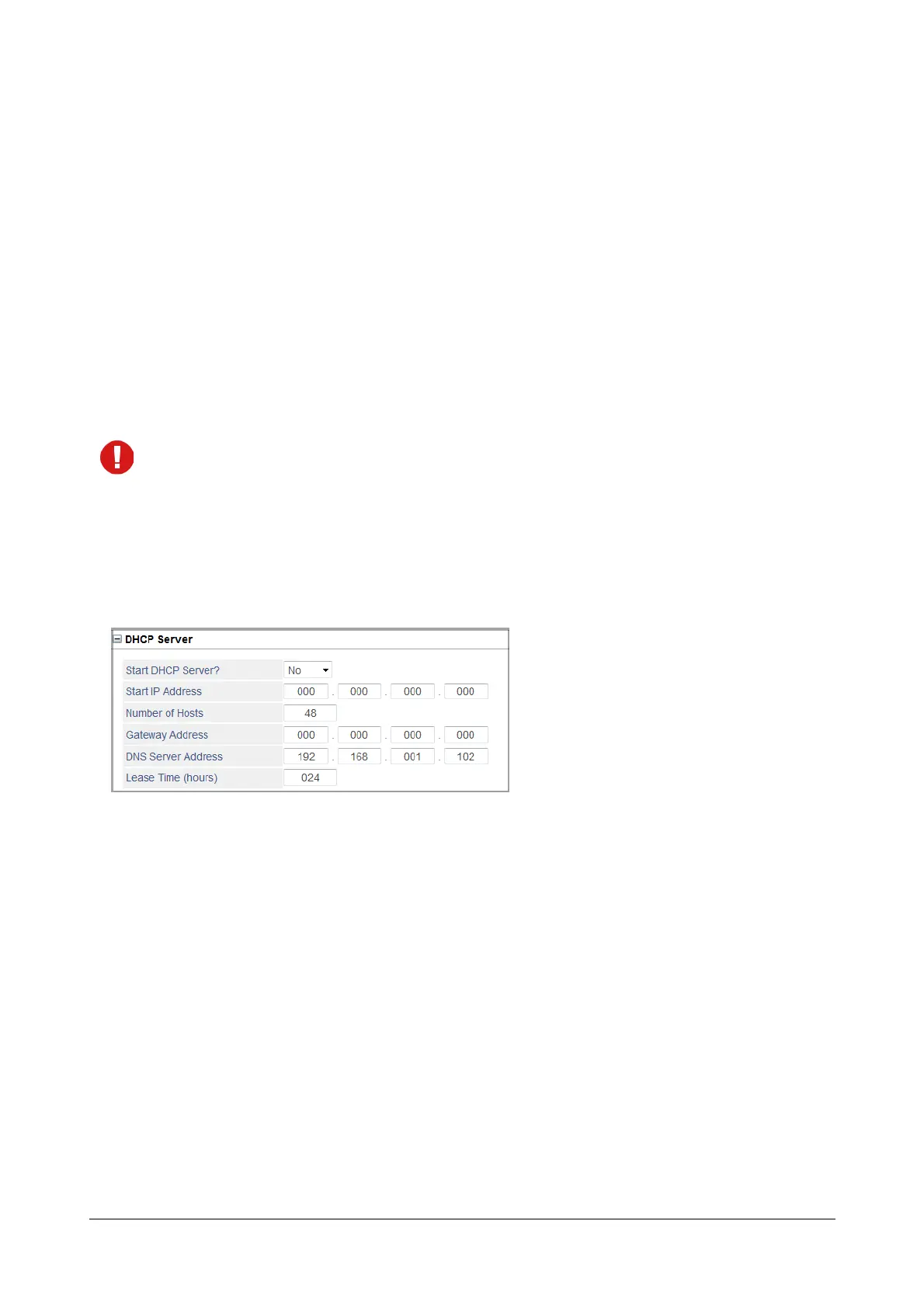
DHCP Server
SARVAM UCS has an in-built DHCP server for registering the Matrix Extended IP Phones. Configure DHCP Server
settings if you are connecting Extended IP Phones.
• Click DHCP Server to expand.
• To enable the DHCP Server, set Start DHCP Server? to Yes. Default: No.
• In the Start IP Address, define the starting IP Address to be assigned to DHCP client. SARVAM UCS will
allocate the first available free IP Address to DHCP clients.
• In the Number of Hosts, define the maximum number of DHCP Clients to be assigned IP Addresses by
the DHCP server. You can define the Number of Hosts from 2 to 48. Default: 48.
•In the Gateway Address, enter the Gateway IP Address to be assigned to the DHCP Clients.
• In the DNS Server Address, enter the DNS address to be assigned to the DHCP Clients.
• Define the maximum Lease Time (hours) for which the IP Addresses should be allocated to the DHCP
Clients. The Lease Time may be from 1 to 192 hours. Default: 24 hours.


 To Next Page