510 Matrix ETERNITY NE System Manual
• you must configure the SMS Server parameters as well as the multi-part SMS parameters for sending/
receiving SMS (if required). See “How to configure”.
Forwarding an incoming SMS as Email
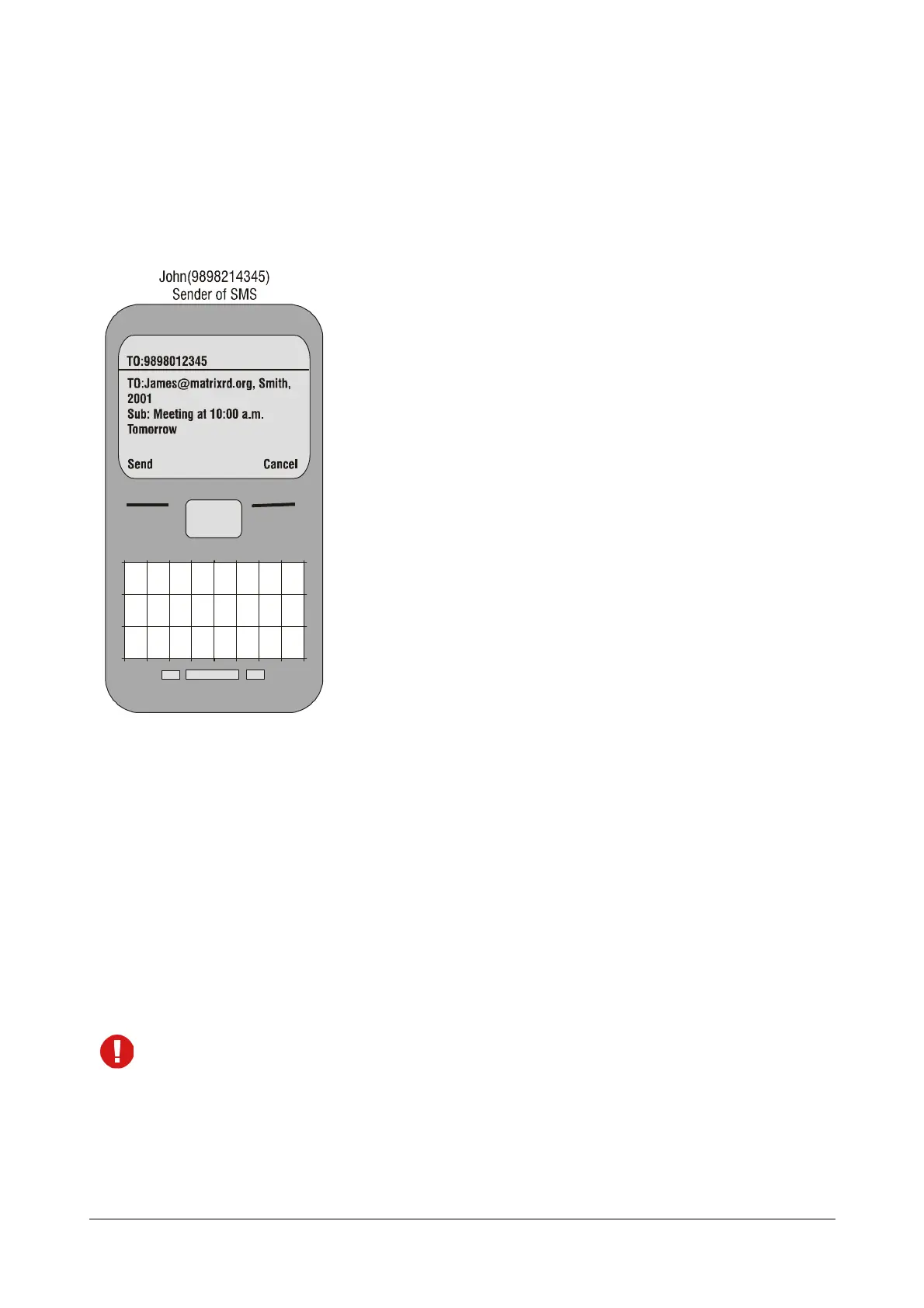
• To forward an SMS to an Email ID, the SMS received on the Mobile Port must be in a specific format.
Illustrated below is as example of the format.
Here,
• The sender of the SMS is John (9898214345).
• The sender must send the message to the SIM Number of the Mobile Port of ETERNITY, that is
9898012345.
• The body of the message must contain the following:
• To: This is the destination where the Email is to be sent. In this case, James@matrixrd.org, Smith,
2001.
• Sub: This is the message that will be displayed to the recipients. In this case, ‘Meeting at 10.00 a.m.
tomorrow’.
• When the SMS is received on Mobile Port (9898012345) in the above format, the system checks the
senders number (9898214345 - John) in the Denied numbers list of the SMS Server.
If the SMS is received in multiple parts the SMS Server combines it into a single SMS.
• If a match is found in the Denied list, the SMS will be rejected. If no match is found, then it checks the
destination where the SMS is to be forwarded as an email.



 To Next Page