Matrix ETERNITY NE System Manual 571
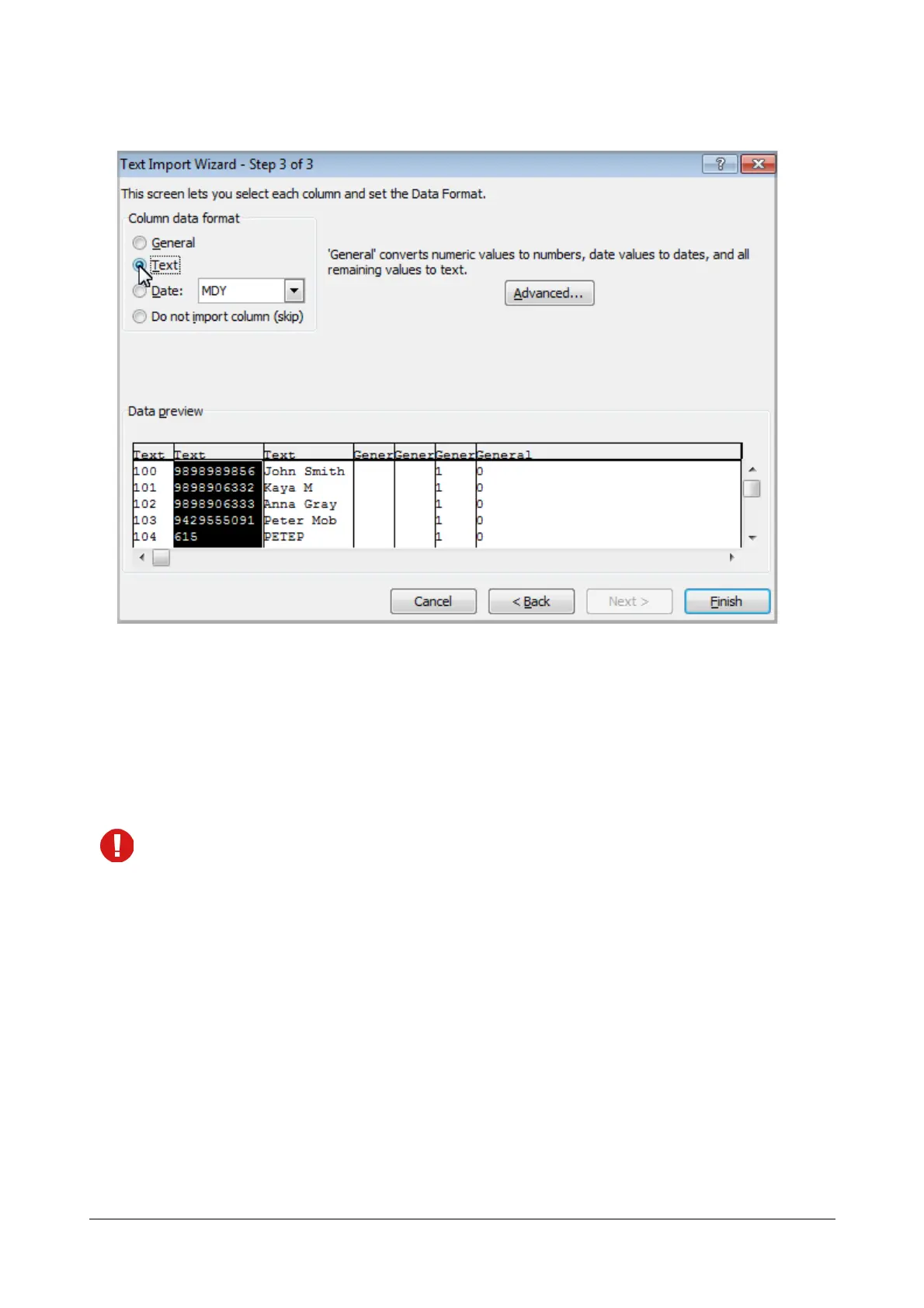
You will have to do this for each column where the data contains leading zeros.
• Click Finish.
• The leading zeros will still be there in the new worksheet with the imported data.
Configuration of Personal Directory by Extension Users
Extension users can configure their own Personal Directories using their extension phones. The personal directory
may be configured using SLT or Extended IP Phone.
If you are using a SLT, you will not be able to configure the Name of the contact in the directory.
For Extended IP Phone Users
• Press DSS Key assigned to Personal Directory (if programmed).
OR
• Dial 1071.
• Enter Personal Memory Index (001 to 025)
• Enter Number of the contact (max. 16 digits).
• Press 'Enter' key.
• Enter Name of the contact.
• Press 'Enter' key.
• Enter Trunk Access Code.
• Press 'Enter' key.
• You get confirmation tone and the message on your phone's display.


 To Next Page