Matrix ETERNITY NE System Manual 845
How to configure
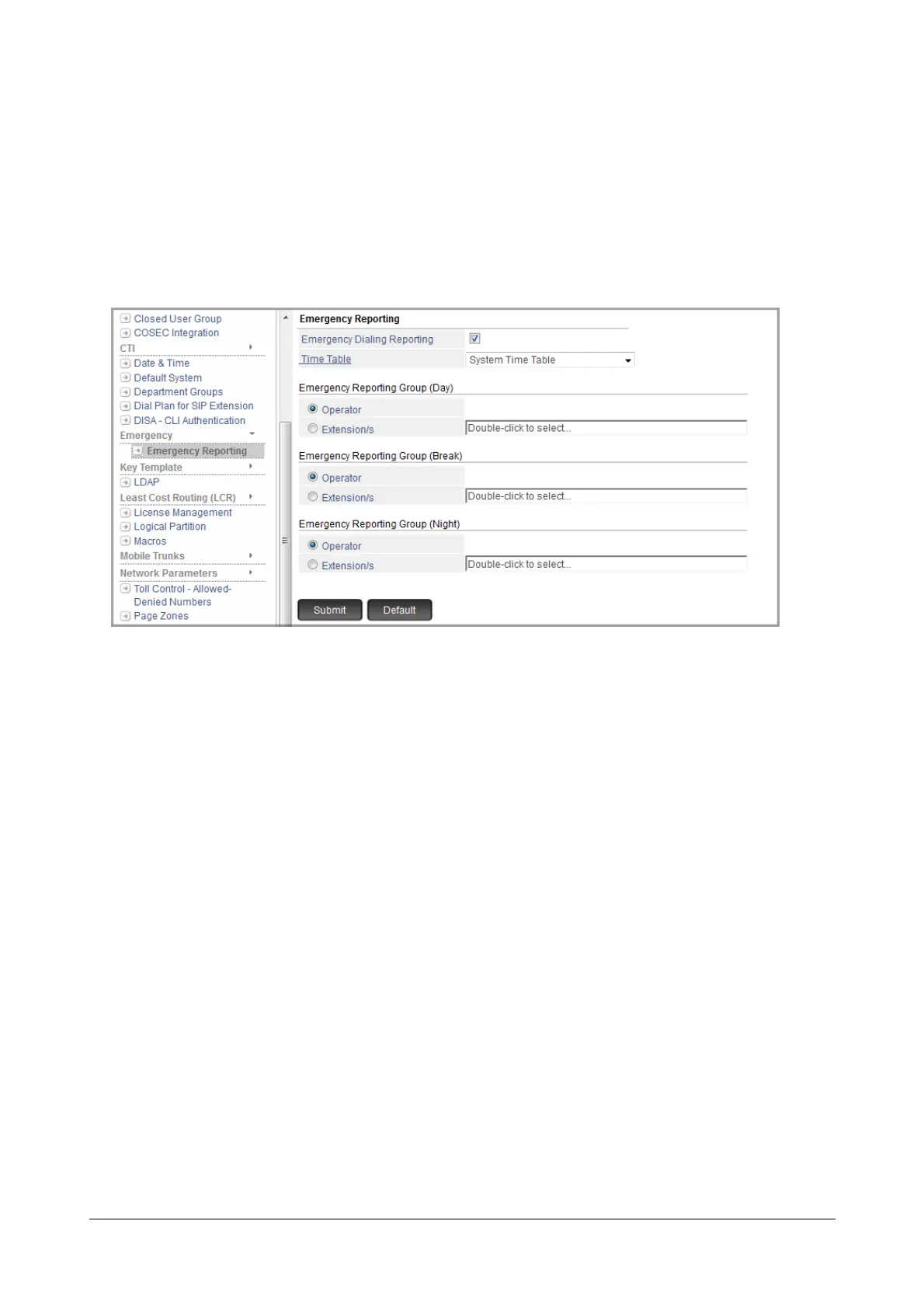
To configure Emergency Reporting,
• Login as System Engineer.
• Under Advanced Settings, click Emergency.
• Click Emergency Reporting.
• Emergency Dialing Reporting: By default this check box is enabled. The system will detect the extension
that makes an emergency call.
• Time Table: A Time Table is a schedule for the three Time Zones, namely Working hours and Break
hours. You can define and select the Time Table as per you requirement.
There are 4 different Time Table templates to select from. By default, System Time Table is selected. In
System Time Table, six days of the week - Monday to Saturday -have working hours from 9:00-18:00 and
non-working hours from 18:00 to 09:00. Sunday is a holiday, with all three Time Zones set to 00:00 hours.
You may also customize the default System Time Table OR customize and assign a different Time Table.
Refer to “Time Tables” for more details.
• Emergency Reporting Group: You can either select Operator or can define an Emergency Reporting
Group as the landing destination for placing the emergency reporting calls.
By default, Operator is selected as the landing destination.
To customize the Emergency Reporting Group (Day), double click the Extension/s field. The extensions
to be selected in the routing group for the Day time appear in a new window.



 To Next Page