910 Matrix ETERNITY NE System Manual
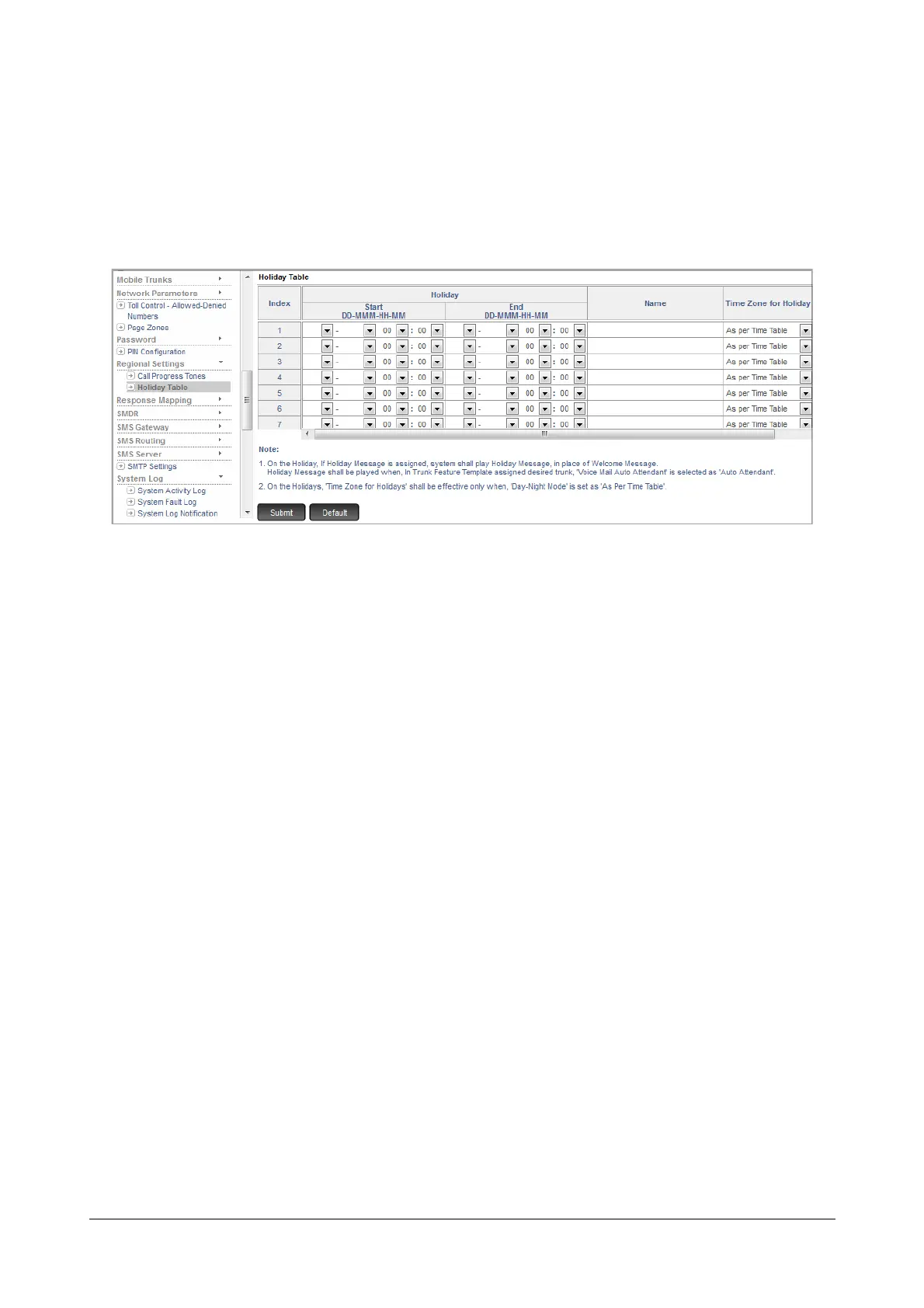
To configure the Holiday Table,
• Login as System Engineer.
• Under Advanced Settings, click Regional Settings.
• Click Holiday Table.
Against each Index configure the following parameters:
•In Holiday, configure the Start Date, Month and Time of the holiday and End Date, Month and Time of
the holiday.
Default, Start and End Date are Blank. Valid Range is from 01 to 31.
Start and End Month are Blank. Valid Range is from January to December.
Start and End Time is 00:00 (Hours:Minutes). Valid Range is from 00:00 to 23:59
• You can assign a Name to each time period you have defined as Holiday. For example, Christmas,
Independence Day, Thanksgiving. Default: Blank
• In the Time Zone for Holiday, select the time zone according to which you want the trunks, extensions
and time dependent features and facilities to work during the period you defined as Holiday. You may
select Day (Working Hours), Night (Non-working Hours) or As Per Time Table. Default: As Per Time
Table.
• If the incoming calls are routed to the Voice Mail Auto Attendant, select the Holiday Message number
that you want the system to play to the callers. Default: Auto_Attendant_01.
• Click Submit.
You can also configure the Holiday Table from the SA mode also. To do this,
• Login as System Administrator.



 To Next Page