Element Description
l Read-Write
Root Folder Folder to be used as root for FTP access. This is a relative path.
Additional folder Extra folders to be used as root for FTP access (for example, on USB drive or SDcard)
Allowed IP Addresses List of IP addresses from which FTP connection can be accepted.
Important: This setting is common to all users groups.
HTTP authorizations
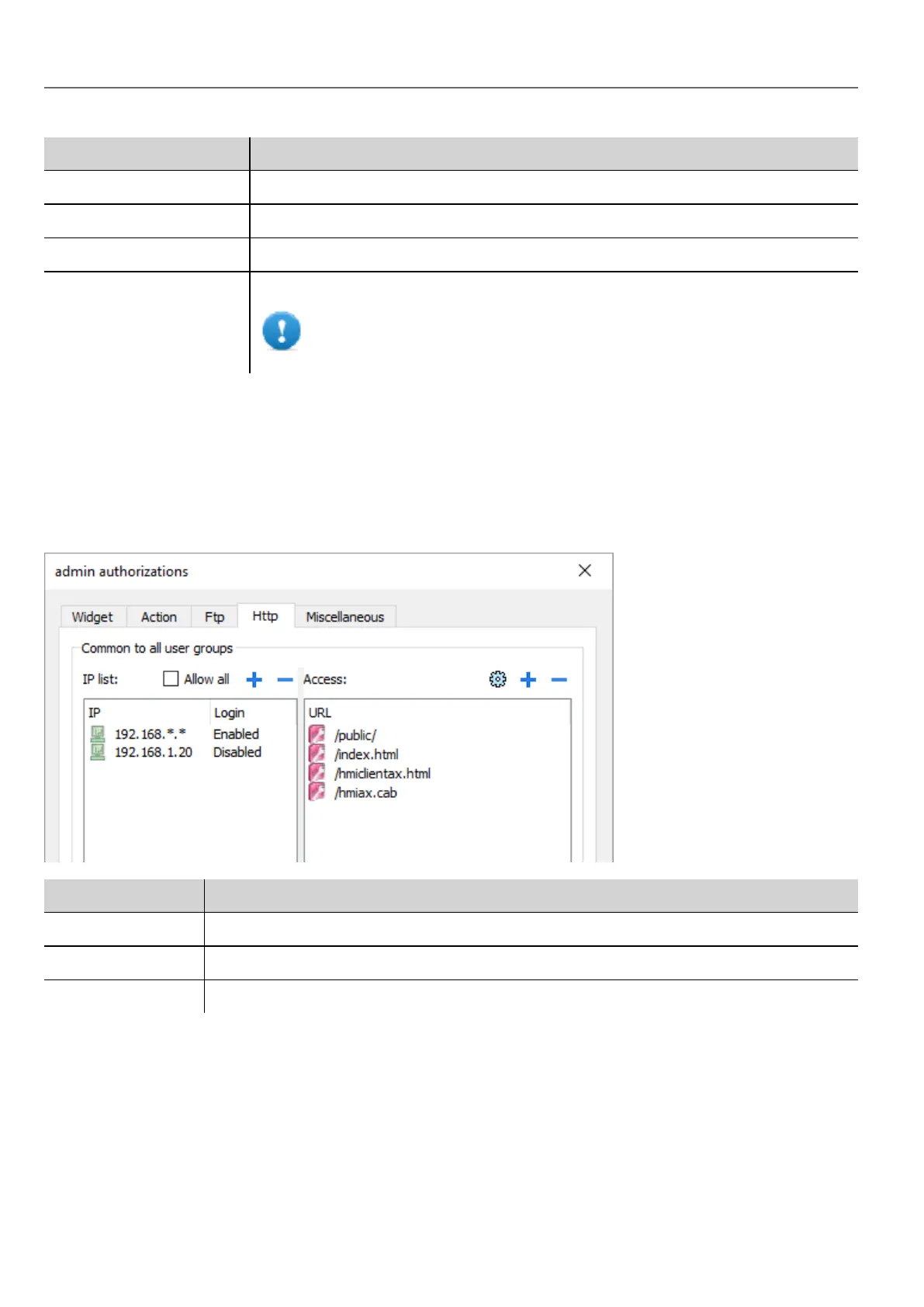
In the HTTP tab you set restrictions to HTTP access to the web server integrated in HMI Runtime.
Wildcards can be used to identify a range of IP addresses.
For example, the two following rules set the HMI device unit can only be accessed by all the IP addresses 192.168.*.* on
your local network in which only the IP address of 192.168.1.20 can access the device without entering a login name.
Element Description
IP list IP addresses authorized to access the HTTP server. By default all.
Login When disabled, the username and password are not required.
Access limits List of resources for which access is limited
Effect of these settings depends on whether the option Force Remote Login has been selected. See "Force remote login"
on page238 for details.
234
HMWIN Studio |User Manual|v206 (2017-06-30) |EN|© 2014-2017 Panasonic Electric Works Europe AG
Modifying access permissions



 To Next Page