l Automatically via DHCP server. This option is enabled by default. If a DHCP server is available on the network IP
address will be assigned automatically by the server.
l Automatically via Auto-IP feature. If DHCP assignment is enabled but no DHCP server is available on the network
the HMI assigns itself an IP Address into range 169.254.x.x with subnet mask 255.255.0.0
l Manually via System Settings. From System Settings menu, in Network section the IP address can be manually
assigned, disabling the DHCP server assignment feature.
Install Runtime via USB Memory
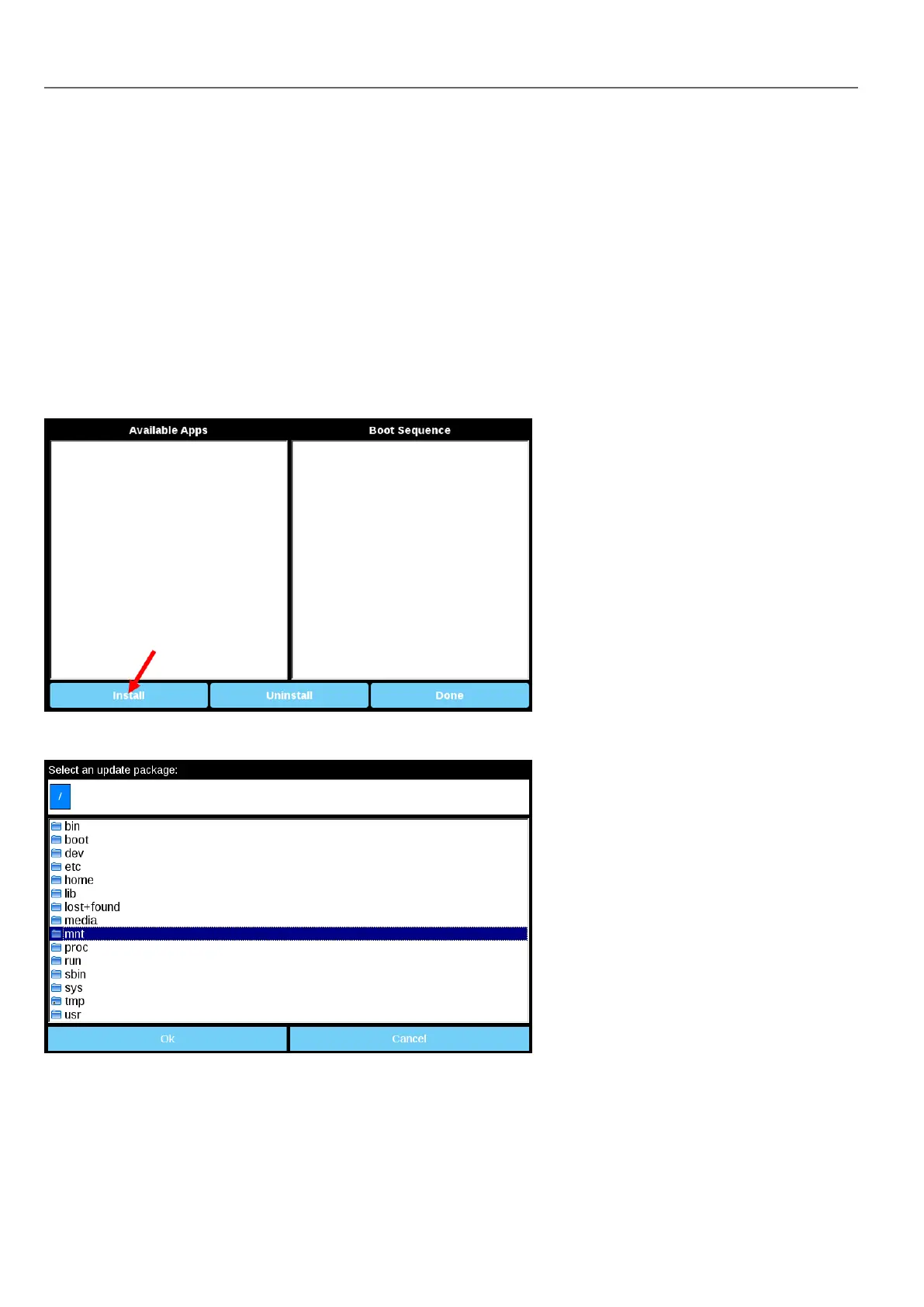
To install Runtime, UpdatePackage or Backup Package via USB device follow this procedure:
1. Create an Update Package from HMWIN Studio and copy into an empty USB memory stick
2. On HMI select [Startup sequence], then [Install]
3. Double click on “mnt” to access this folder
4. Then on “usbmemory”
388
HMWIN Studio |User Manual|v206 (2017-06-30) |EN|© 2014-2017 Panasonic Electric Works Europe AG
Linux Devices



 To Next Page