Parameter Description
Horizontal underflow
Vertical underflow
This parameter defines the behavior of the grid when it is larger
than the size defined for the rows and columns
l Blocked
The grid can not be made larger than the maximum size of
rows and columns
l Left, Center, Right - Top, Middle, Bottom
Defines the position of the widgets when cells are bigger
than the maximum defined sizes
Scrollbar color
Scrollbar image
Scrollbar offset
Scrollbat size
Scrollbar autohide
Parameters to define look and position of the scroll bars
Margin collapsed Collapse all left-right and top-botton margin using the parameters
of the stroke with greater width.
External margin width
External margin color
External margin parameters
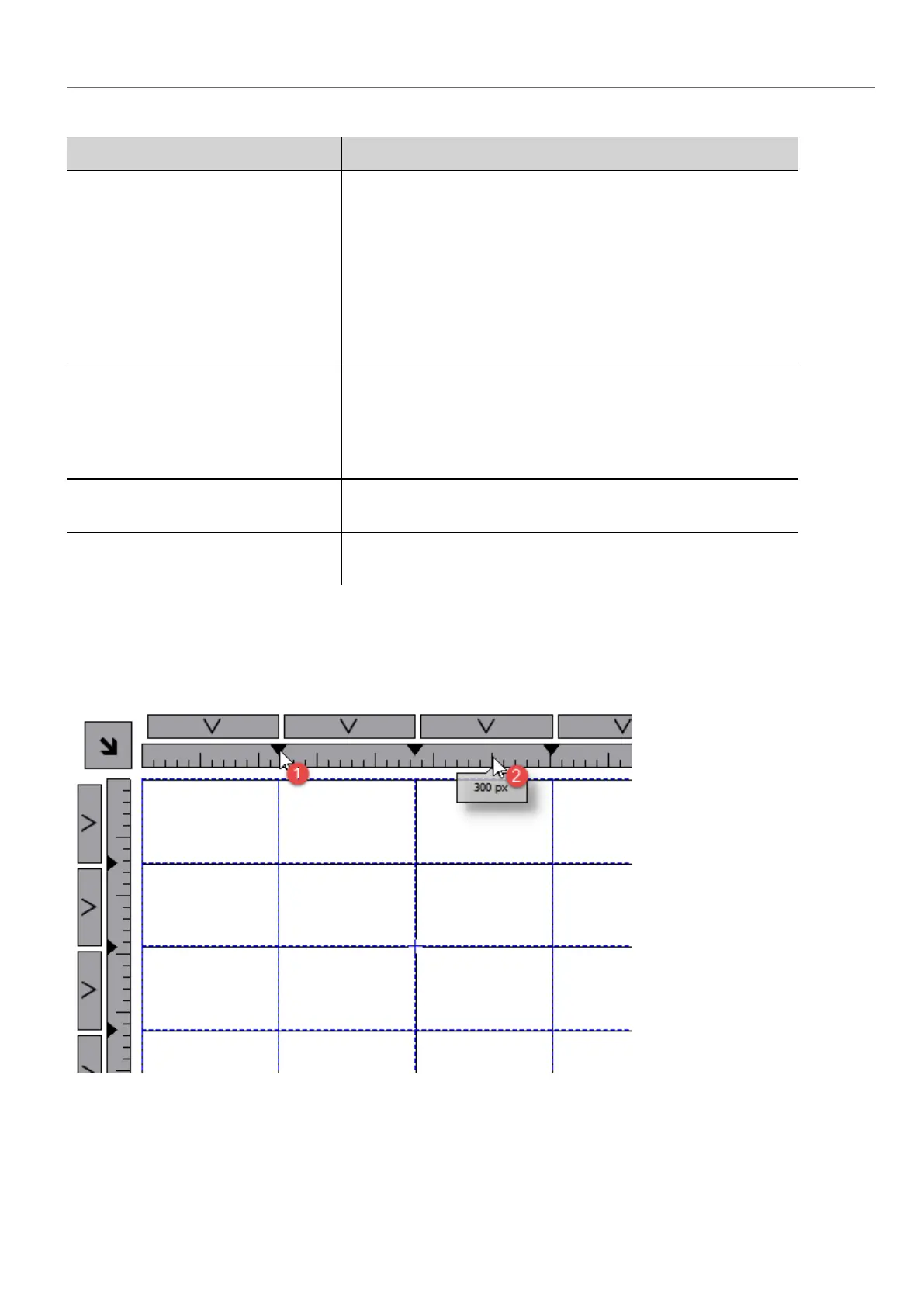
To merge or split rows or columns, double click over the grid, to enter in edit mode, and move the cursor over the ribbons:
l Double click the black triangle to merge the two adjacent rows or columns (1)
l Double click on ribbon to split the selected row or column (2)
Rows, Columns Properties
Row and columns properties are available inside a pop up dialog after clicking on the row and column selectors, that are
visible after double clicking the group of widgets.
HMWIN Studio |User Manual| v206 (2017-06-30) | EN| © 2014-2017 Panasonic Electric Works Europe AG
43
4 Programming concepts



 To Next Page