CAPINTEC, INC. CAPTUS
®
4000e
9-4 ABSORBED DOSE ALERT August 15
INCIDENT SETUP
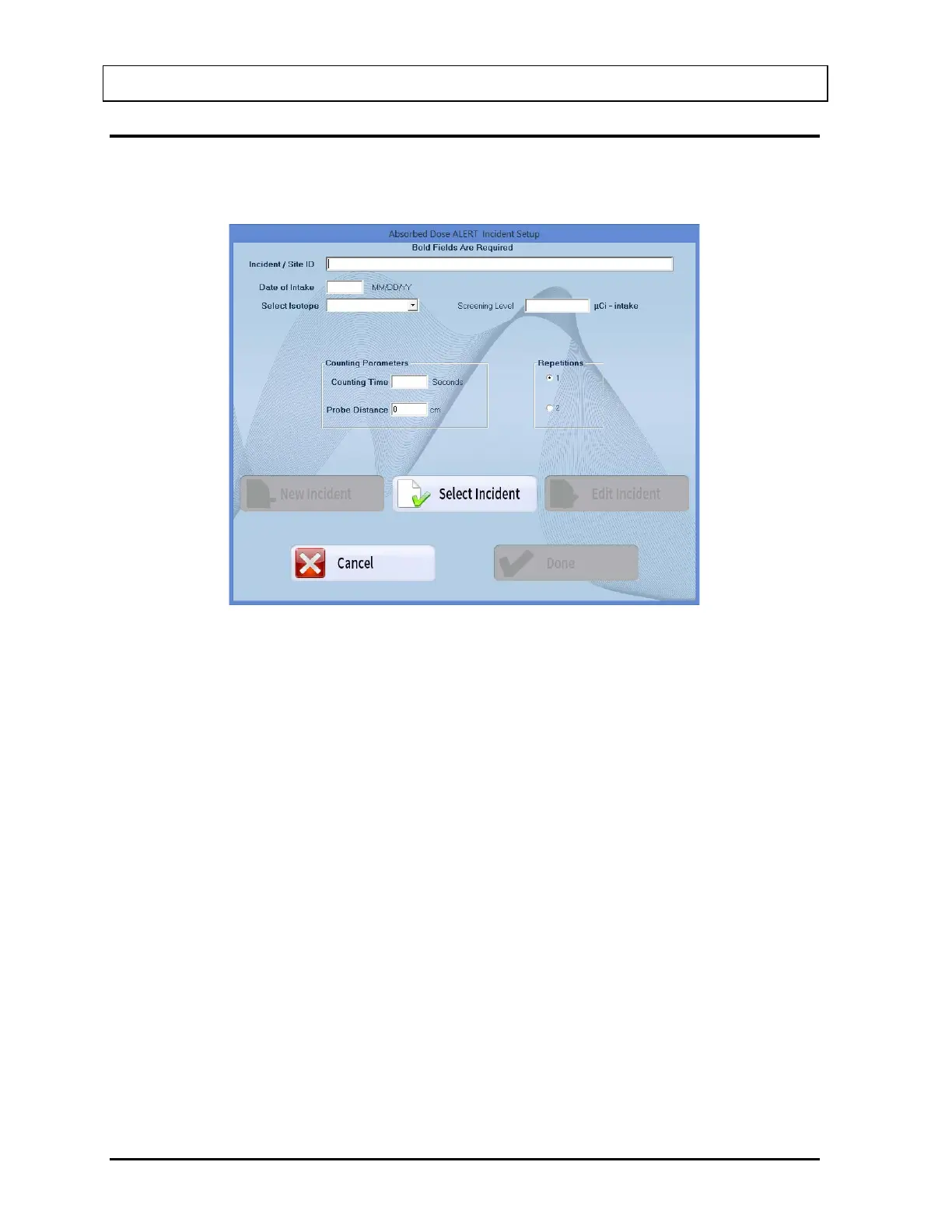
Select the Incident Setup button on Figure 9-3 Absorbed Dose ALERT Main Screen. Figure
9-4 Incident Setup Screen will appear.
Figure 9-4 Incident Setup Screen
The New Incident, Select Incident and Edit Incident buttons will be disabled until an initial
incident has been set up.
Setup Incident Parameters
The parameters for a specific incident must be set up before any patients exposed to that
incident are measured. If any parameter must be changed for a particular patient, it can be
done when that patient is added.
Incident / Site ID
The Incident/Site ID text box is used to describe the incident and location where the
measurements are being made. This is a required field and the description can be
any combination of alphanumeric characters to a maximum of 70 characters.
Date of Intake
The Date of Intake text box is most often used to describe date the incident occurred.
If a patient was exposed at a later date, this can be changed when the patient is
added. This is a required field and the date must be entered in the format MM/DD/YY,
DD/MM/YY or YY/MM/DD depending on the selected date format in setup (Refer to
CHAPTER 4: GENERAL SETUP, SECTION: FIRST TIME STARTUP).



 To Next Page