CAPINTEC, INC. CAPTUS
®
4000e
9-12 ABSORBED DOSE ALERT August 15
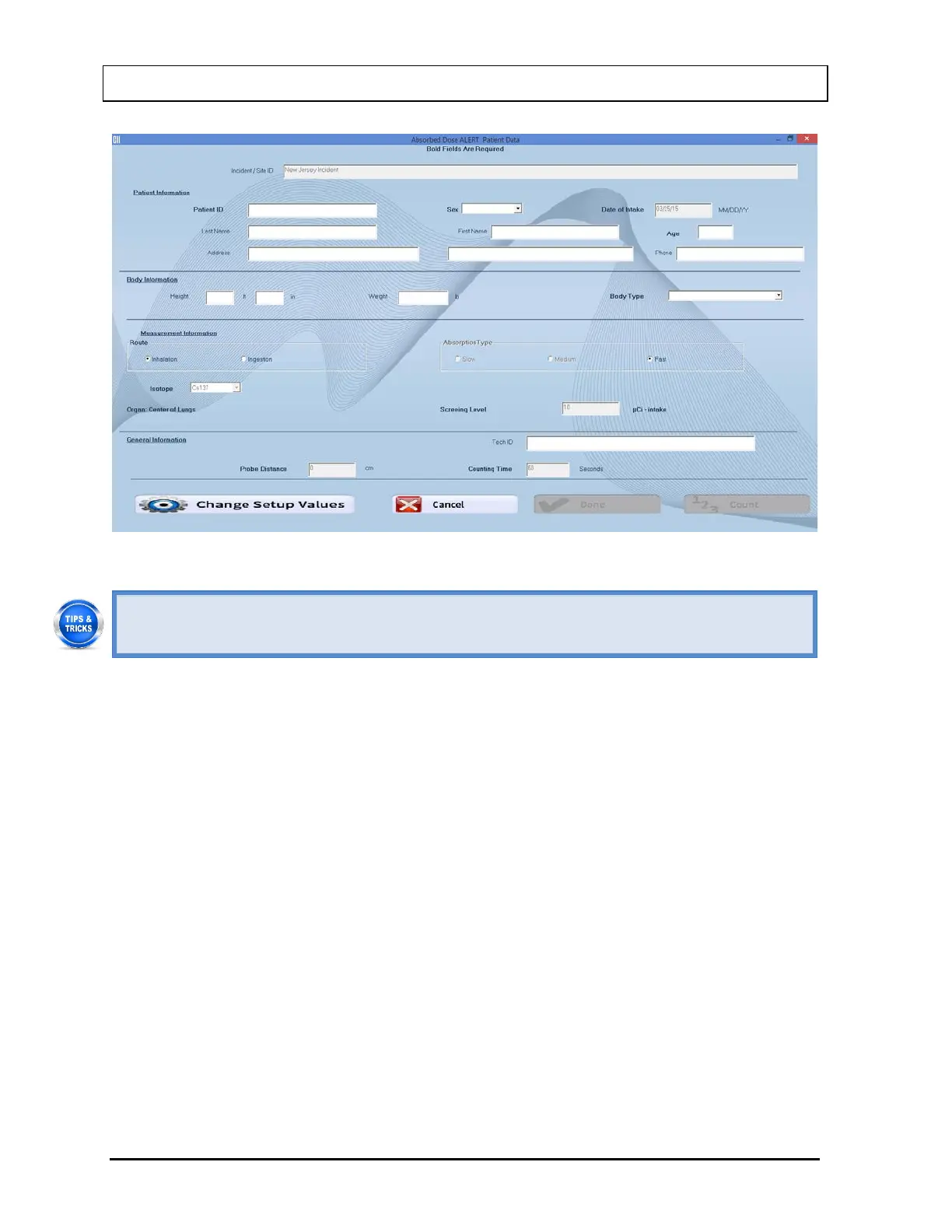
Figure 9-13 Patient Data Screen
• Click in the text box or use the Tab key to move from one text box to another. To
select from drop-down list, use or keys.
3. Patient Information.
• Patient ID: A unique ID assigned to each patient (ex. social security number). This
field is required and can be any combination of alphanumeric characters to a
maximum of 20 characters.
• Sex: Select male or female from the drop-down list box or press the M or F key. This
field is required.
• Date of Intake: If the date of intake differs from the date stored in the Incident Setup,
the date should be changed. The Date must be entered in the format indicated. This
field is required.
• Last Name and First Name: The first and last names of the patient. These fields are
optional and can be a maximum of 20 characters.
• Age: The patient’s age in years. This field is required and can be from 1 to 99.
• Address: The patient’s 2 line address. These fields are optional and can be a
maximum of 50 characters.
• Phone: The patient’s phone number. This field is optional and can be a maximum of
20 characters.
4. Body Information.
• Height: The patient’s height. If the system is set to Curie Mode, the height is input in
feet (1 to 9) and inches (0 to 11.5). Inches may be input to the half-inch. If the system



 To Next Page