CAPINTEC, INC. CAPTUS
®
4000e
August 15 BIOASSAY 11-3
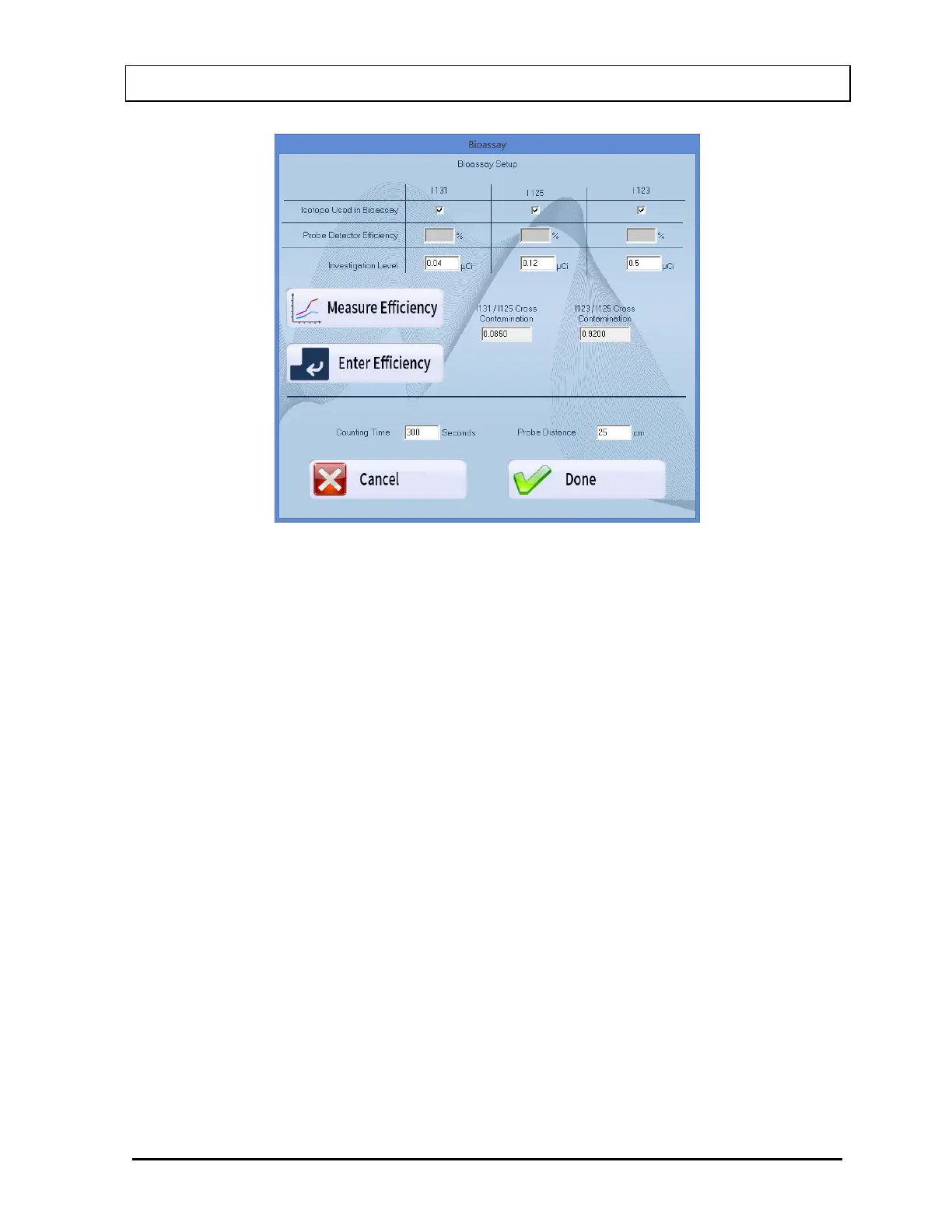
Figure 11-2
Note: No values can be entered directly into the grayed text boxes.
2. In the section Isotope Used in Bioassay, select which Isotopes are to be used for the
Bioassay Test by placing a check in the corresponding check box of the appropriate
isotopes (I 131, I 125 and I 123).
3. Click in the appropriate boxes mentioned below to input new values if desired.
Investigation Level – The upper limit on the acceptable level of activity measured for
each of the three isotopes. Measured activities above this level are flagged (0.01-9,999
µCi).
Counting Time – This is the duration for counting, in seconds, each time a measurement
is performed (10-9,999 seconds).
Probe Distance – The distance of the Probe from the Staff Member to be measured in
centimeters (cm) (10-50 cm).
4. Measure or Enter efficiency.
a. To measure the efficiency of any one or all of the isotopes, select the Measure
Efficiency button or press Alt+M. The screen appears as shown in Figure 11-3
below. Note that none of the isotopes have been selected (e.g. no check mark is in
the box) and therefore, the boxes below each isotope are gray and inaccessible.



 To Next Page