CAPINTEC, INC. CAPTUS
®
4000e
15-4 CUSTOM PROTOCOLS December 15
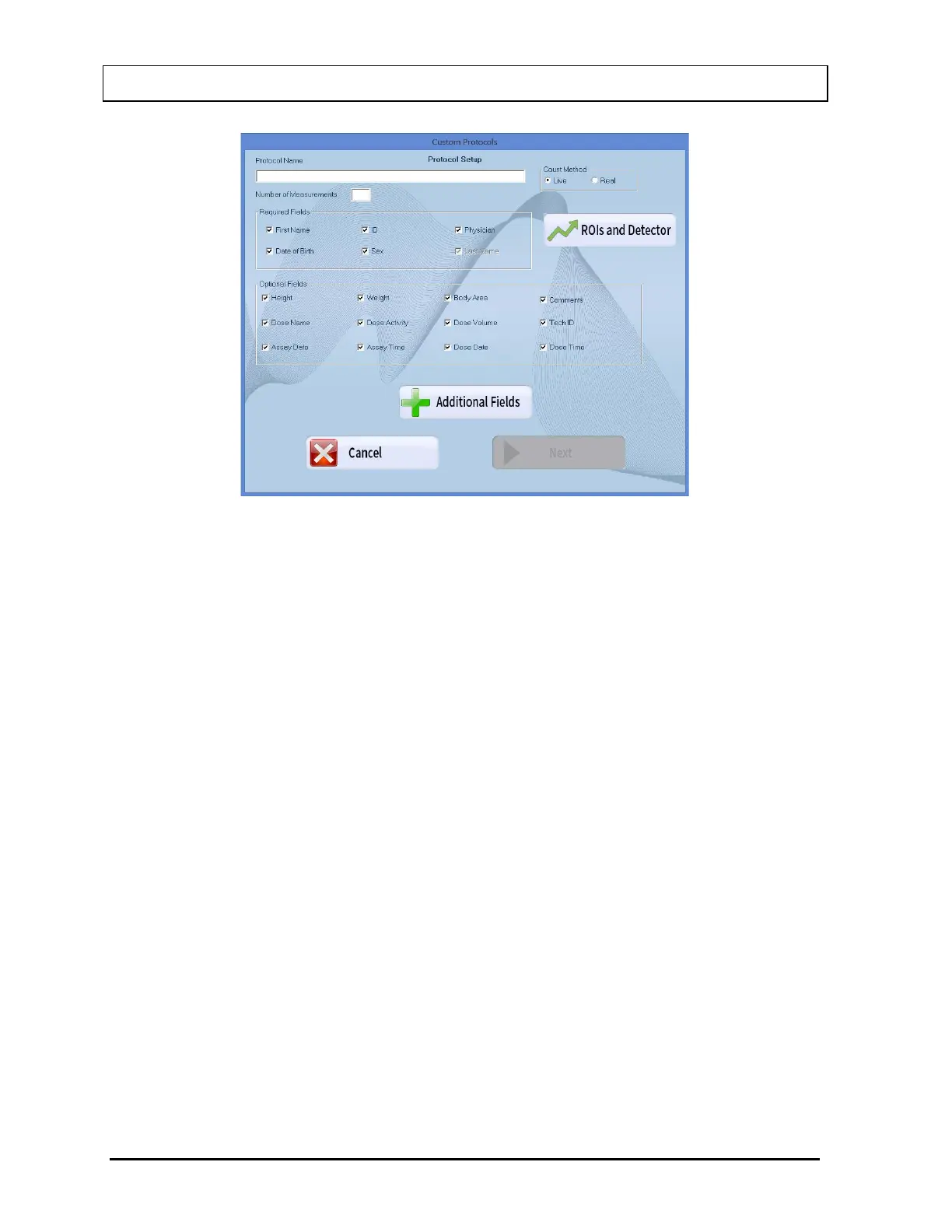
Figure 15-3
2. Enter a descriptive name for the protocol being defined in the Protocol Name text
box. (32 characters max)
3. Input the number of measurements that will be made for the protocol in the Number
of Measurements text box. (1 to 50)
4. Select the appropriate radio button in the Count Method frame to select a count
method (Live time counting or Real time counting).
5. Click the appropriate check box(es) in the Required Fields frame to select the
demographic fields that will be required. Fields that are not checked will be optional
entries when adding or editing a patient.
Note: The Patient's Last Name is a mandatory field when adding a patient. This box
is checked and disabled from the user.
6. Click the appropriate check box(es) in the Optional Fields frame to select any of the
optional fields, which will be needed for the protocol. Optional fields which are
checked, will appear when adding or editing a patient and will be required entries.
Optional fields, which are not checked, will not appear on the Patient entry form.
7. If the protocol needs values which are not displayed, select the Additional Fields
button. The screen will appear as shown in Figure 15-4.



 To Next Page