3 - 52
Chapter 3 Removal and Replacement Procedures (RRPs)
Version 2 2007.03.20
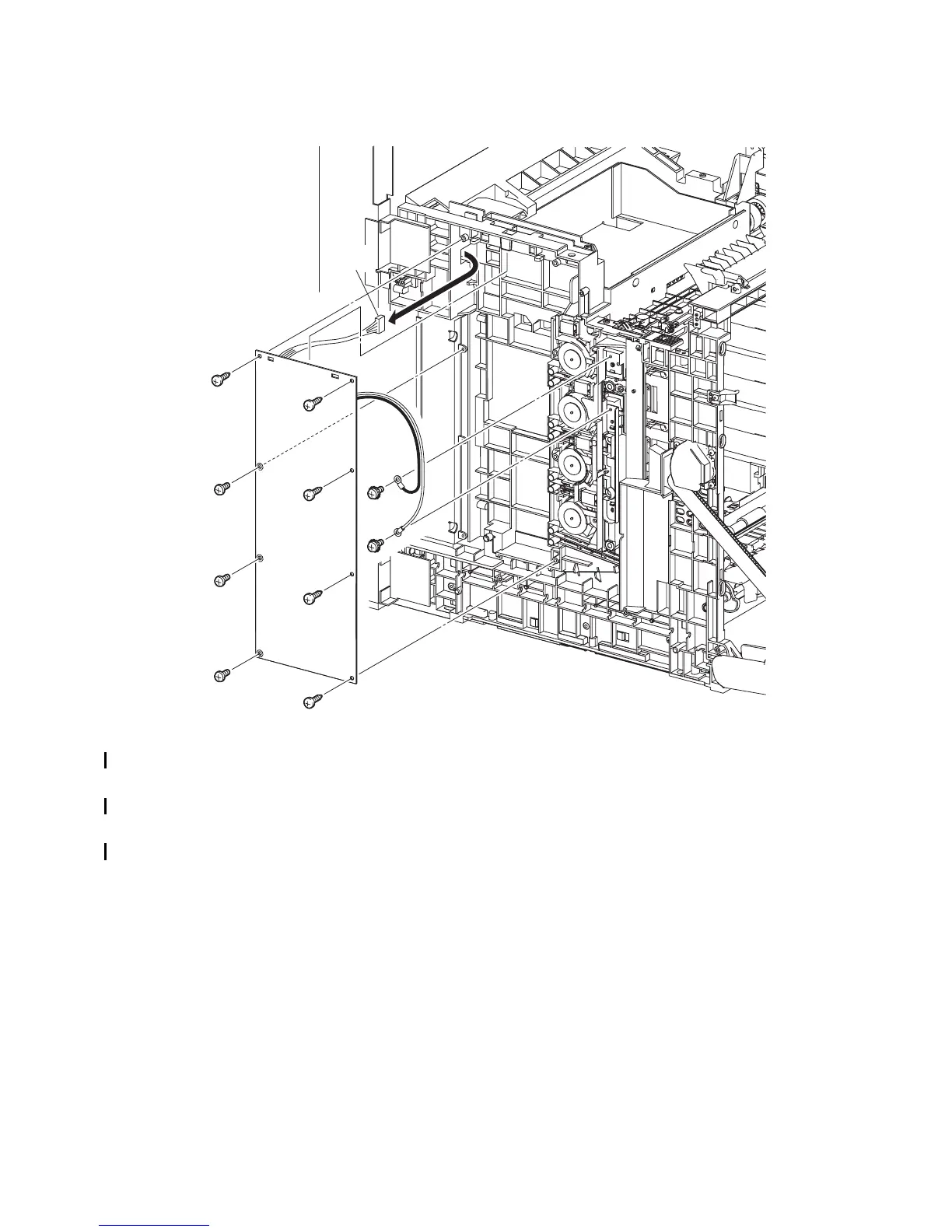
Removal 32 HIGH VOLTAGE POWER SUPPLY (PL5.1.17)
19) Remove the two screws (silver, with washer, 6mm) that fix the two harnesses of the HIGH
VOLTAGE POWER SUPPLY.
20) Remove the five screws (silver, tap, 10mm) and the three screws (silver, 6mm) that fix the
HIGH VOLTAGE POWER SUPPLY to the printer.
21) Remove the HIGH VOLTAGE POWER SUPPLY by releasing the upper part of the HIGH
VOLTAGE POWER SUPPLY from the two lugs on the printer. Pull out the connector of the
HIGH VOLTAGE POWER SUPPLY from the hole on the printer.
Gnb03046KA
19)
19)
20)
20)
20)
20)
20)
20)
20)
20)
21)-1
21)-2















 To Next Page