3 - 105
Chapter 3 Removal and Replacement Procedures (RRPs)
Version 2 2007.03.20
Removal 72 ADF SCANNER ASSY (PL13.8.1)
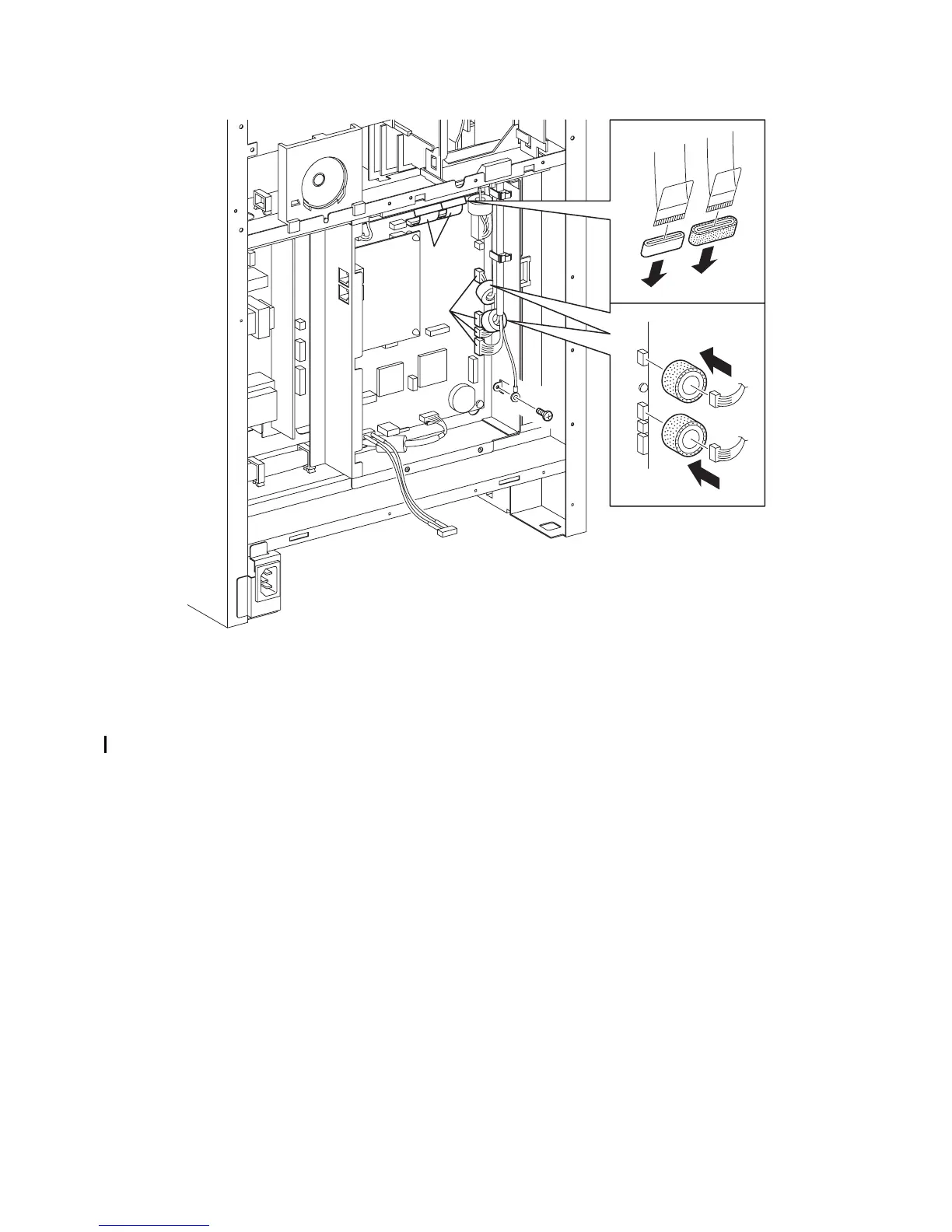
14) Disengage the four connectors (P/J60,61,62,63) and two flat cables (P/J64,65) of the ADF
SCANNER ASSY from the PWBA HYUI (PL13.4.1).
15) Remove the one screw (silver, 6mm) that fixes the ground wire of the ADF SCANNER ASSY to
the BOX ASSY FAX AIO (PL13.4.4).
16) Remove the CORE FCR27-12-1.3 (PL13.8.13) and the CORE ASSY FCR27 (PL13.8.12) from
the two flat cables.
17) Remove the two CORE ASSY SC-18 (PL13.8.14) on the connectors (J62, J63) from the
harness.
Continues to the next page.
Gnb03181KB
14)
14)
15)
16)
16)
17)
17)















 To Next Page