3 - 154
Chapter 3 Removal and Replacement Procedures (RRPs)
Version 1 2006.11.28
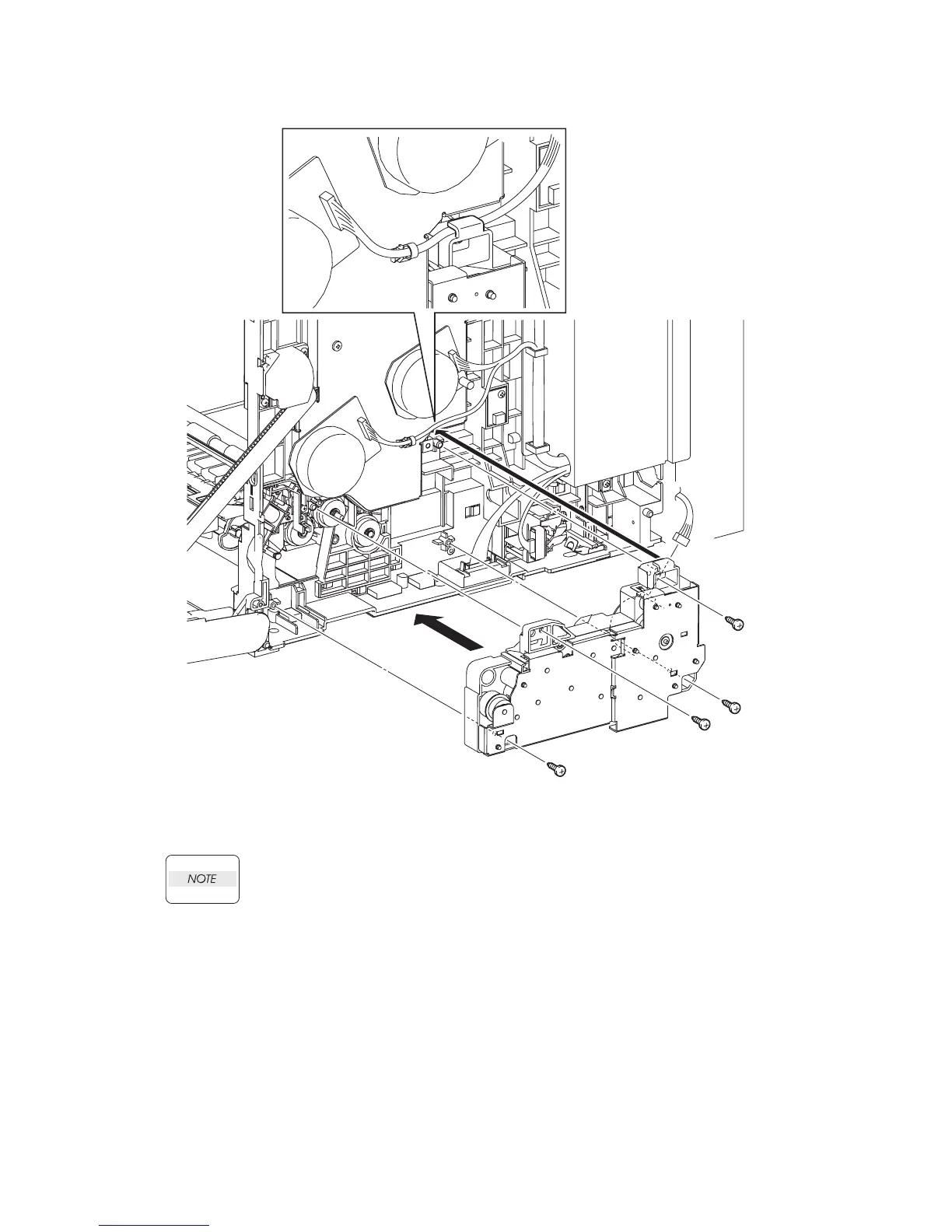
Replacement 31 FEED DRIVE ASSEMBLY (PL8.1.7)
1) Engage the connector (P/J251) of the FEED DRIVE ASSEMBLY.
When performing the step described below, the harness of the connector to be engaged
to the DEVE MOTOR of the PHOTOCONDUCTOR (PC) / DEVELOPER (DEV) DRIVE
(PL8.1.2) must be routed through the hook above the FEED DRIVE ASSEMBLY.
2) Replace the FEED DRIVE ASSEMBLY by mating the two holes of the FEED DRIVE ASSEM-
BLY with the bosses on the printer.
3) Secure the FEED DRIVE ASSEMBLY to the printer using the four screws (silver, tap, 10mm).
Continues to the next page.
Gnb03078KA
NOTE
3)
3)
2)
1)
3)
3)















 To Next Page