3 - 180
Chapter 3 Removal and Replacement Procedures (RRPs)
Version 1 2006.11.28
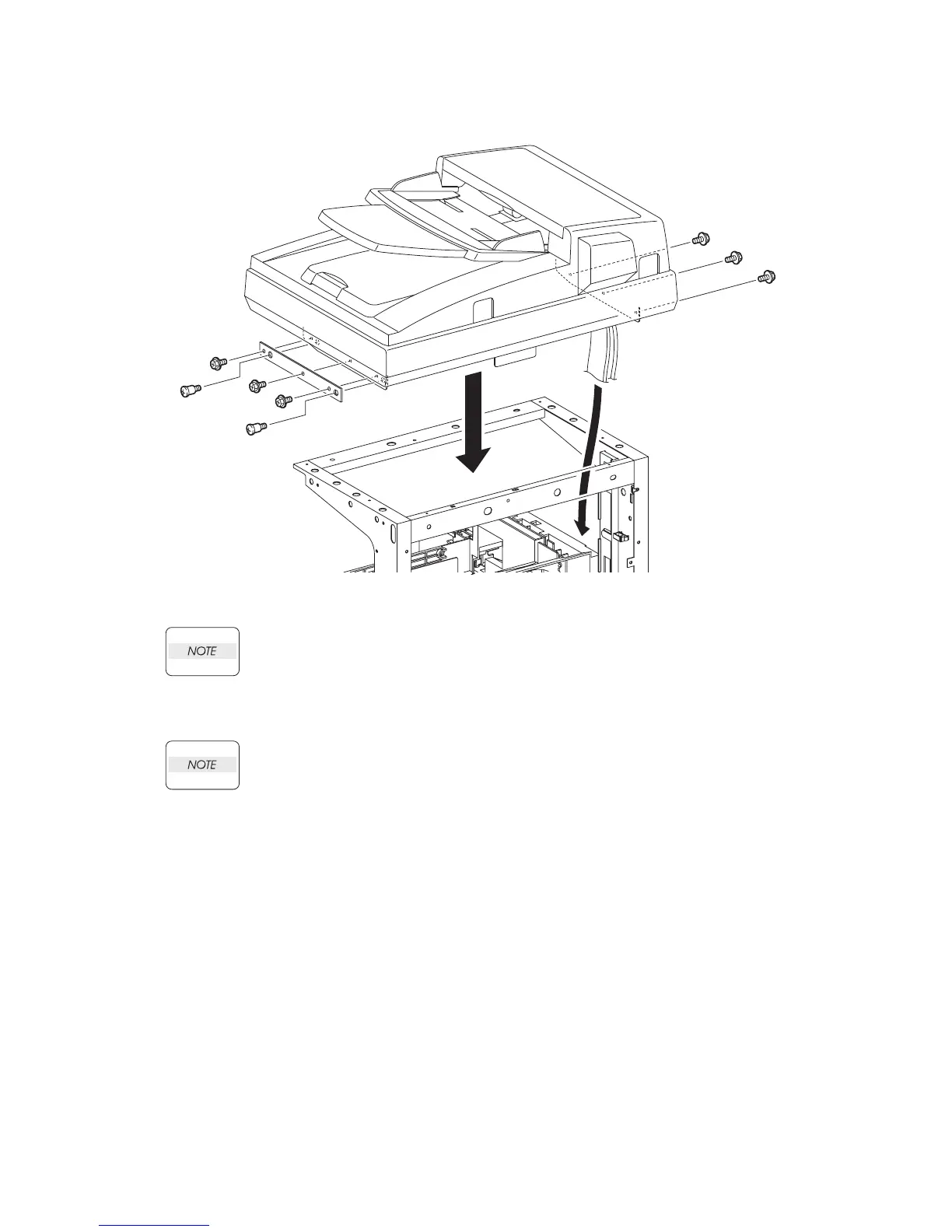
Replacement 50 ADF SCANNER ASSY (PL13.8.1)
When performing the step described below, ensure that the harness will not be caught
between the ADF SCANNER ASSY and the printer.
2) Route the harness and flat cables of the ADF SCANNER ASSY to the printer, and then
replace the ADF SCANNER ASSY to the printer.
When performing the step described below, ensure that the PLATE SUB is installed in
direction as shown in the figure.
3) Secure the PLATE SUB to the printer using the two screws (PL13.8.9).
4) Secure the ADF SCANNER ASSY to the printer using the six screws (silver, with flange,
6mm).
Continues to the next page.
Gnb03191KB
4)
4)
4)
3)-2
3)-1
2)-1
2)-2
3)-2
4)
4)
4)















 To Next Page