Matrix ETERNITY NE System Manual 1121
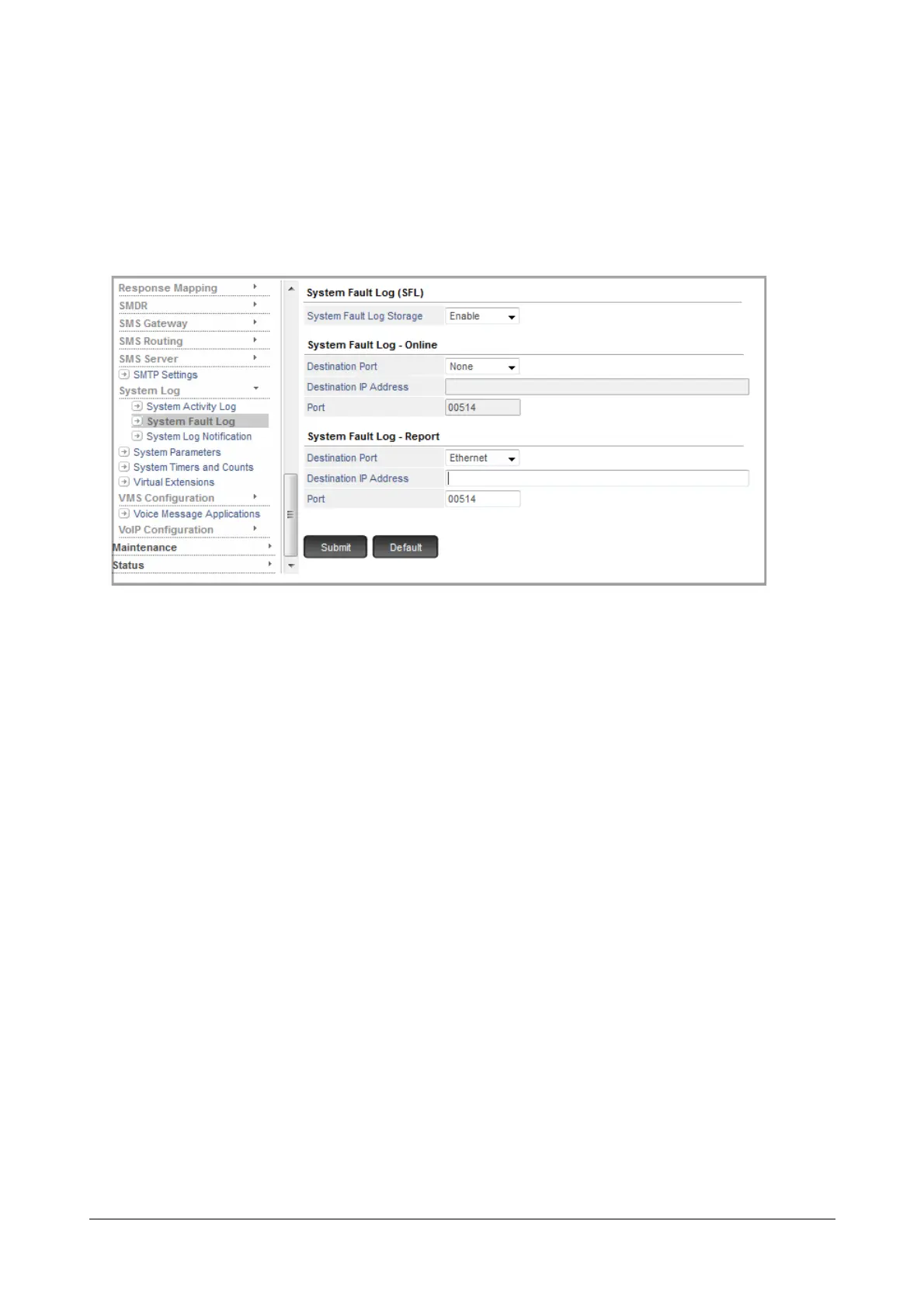
To configure System Fault Log settings,
• Login as System Engineer.
• Under Advanced Settings, click System Log.
• Click System Fault Log.
• Enable System Fault Log Storage.
• To generate System Fault Log - Online, i.e. as and when the fault occurs, select Destination Port.
Default: None.
•In Destination IP Address: Port, enter the IP Address and the port of the remote Syslog Server. The
valid range of this port is 514 or 1025 to 65535.
• To generate System Fault Log - Report, i.e. offline, whenever desired, select Destination Port. Default:
None.
•In Destination IP Address: Port, enter the IP Address and the port of the remote Syslog Server. The
valid range of this port is 514 or 1025 to 65535.
• Click Submit.
How to use
You can start and stop System Fault Log - Online and Report from the System Administrator mode using Jeeves or
dialing SA Commands from an extension phone.
To start/stop report generation using Jeeves,
• Login as System Administrator.


 To Next Page