Data Analysis 102
V4.2 LabChip GX User Manual PerkinElmer
Exporting Data
Data from a Peak Table, Well Table, Gel, or Graph can be exported
automatically and/or manually. Options selected for automatic
export do not affect manual export options, and vice versa.
• To automatically export data during the run, select the desired
settings in the Start Run Window as described in “Select the
Auto Export Settings” on page 29.
• To manually export data, see “Exporting Data Manually” on
page 105.
Peak Tables, Well Tables, and Raw Data are exported to .CSV files,
which can be imported into a spreadsheet program such as
Microsoft Excel.
Gel and Graph data is exported to the selected image format.
This section shows export examples for the following:
• Peak Table
• “Raw Data” on page 103
• “Gel” on page 104
Peak Table
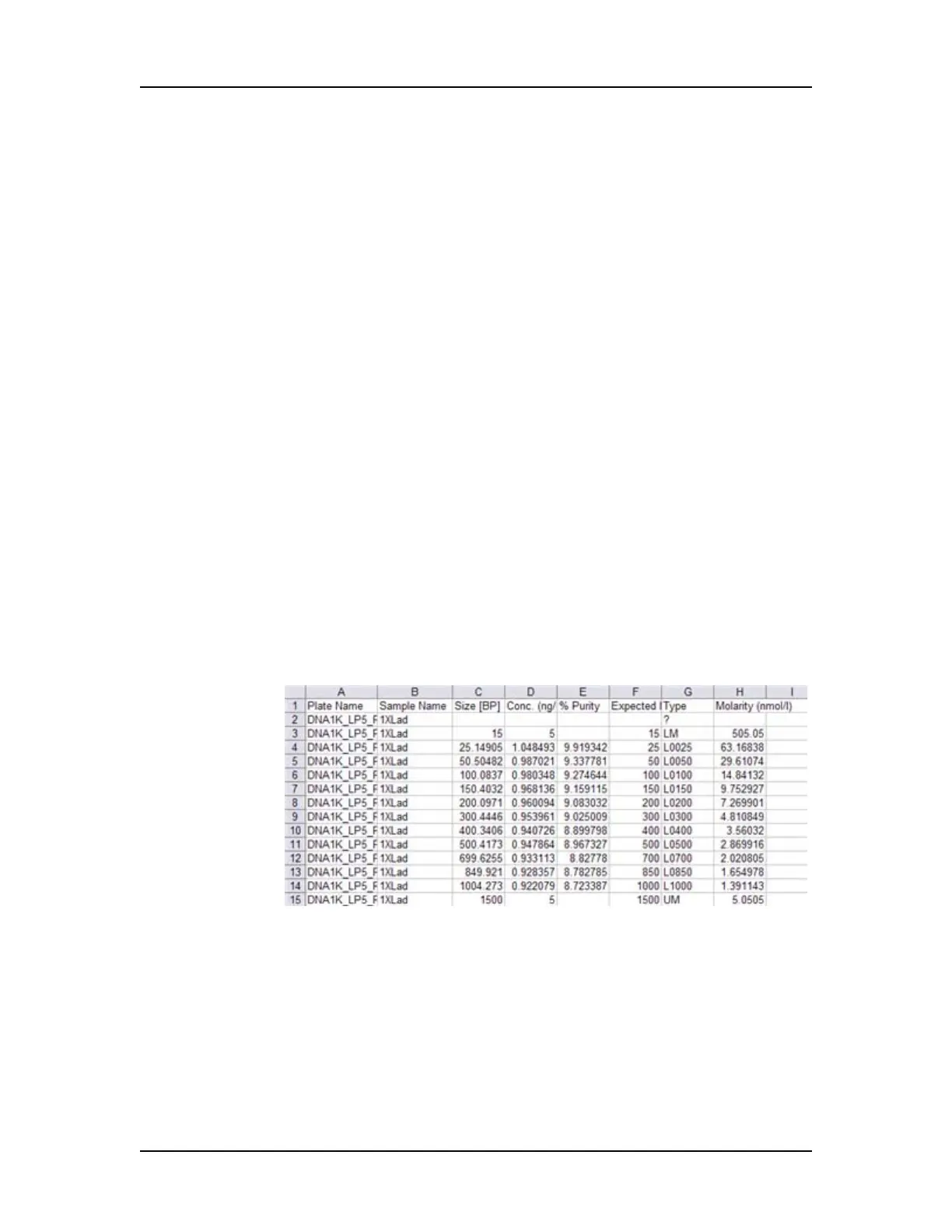
ASCII text file that contains the data in all columns in the Peak
Table. Figure 44 is an example of part of a Peak Table file exported
from a DNA assay (data truncated for this example):
Figure 44. Exported Peak Table
Peaks that are excluded are not exported and are missing in the
exported file. For example, if peaks 3, 5, and 7 are excluded, when
the data is exported into Microsoft Excel, peaks 3, 5, and 7 are not
included.


 To Next Page
 Loading...