122
3 Producing with the knitting machine
Starting the machine after a fault
Starting the machine after a fault
3.6 Starting the machine after a fault
The knitting machine control constantly controls the yarn, the fabric, all
movable parts of machine, the motors and the electronic components. If an
error occurs, the machine stops. The signal light glows yellow, a pictogram
appears on the touch screen and a horn goes off. The most common error
causes are shown in the pictographs on the touch screen. If an error occurs,
one pictograph appears, and in the case of several errors the corresponding
pictographs appear consecutively. Errors which occur seldom (e. g. hardware
er
rors)
are shown with a common pictograph.
Keys for startin g machine afte r a fault
Keys for starting machine after a fault
Starting the machine after a fault:
1. To get detailed information on an error, tap
the pictograph.
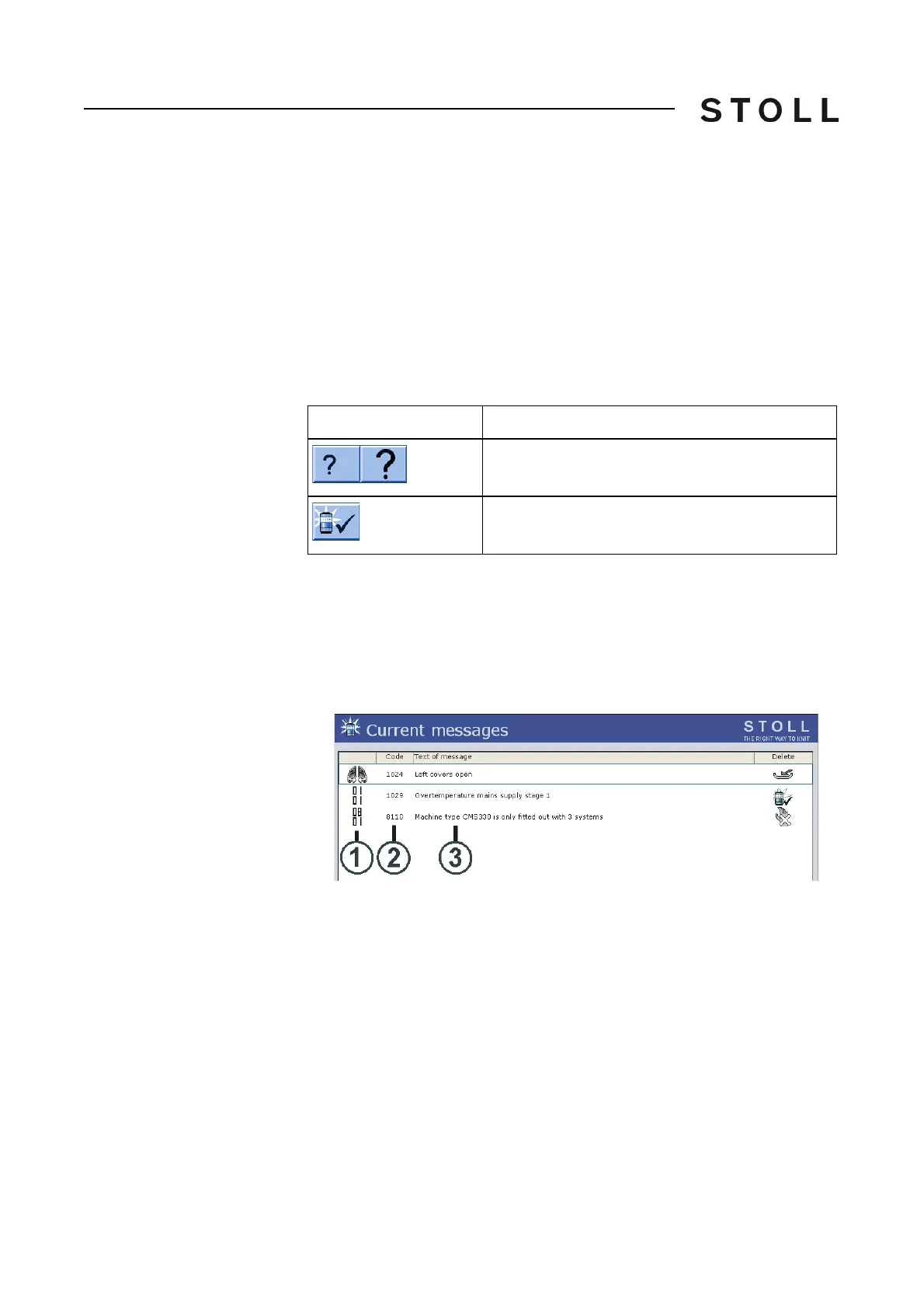
The "Current messages" window appears. If the error can be remedied
by changing t
he settings, a function key appears in the middle of the
lower screen bar.
Current m essages w indow
"Current messages" window
Key
Function
"Information on error remedies"
A big and a small mark appear alternatively
Confirm error message
1
Pictograph
3
Text of message
2
Error code



 To Next Page