189
Adjusting knitting machine 4
Advanced adjustments
Switching on and off aggregates *
4.2.1 Switching on and off aggregates *
Keys for c alling u p the Machi ne settin gs window
Keys for calling up the "Machine settings" window
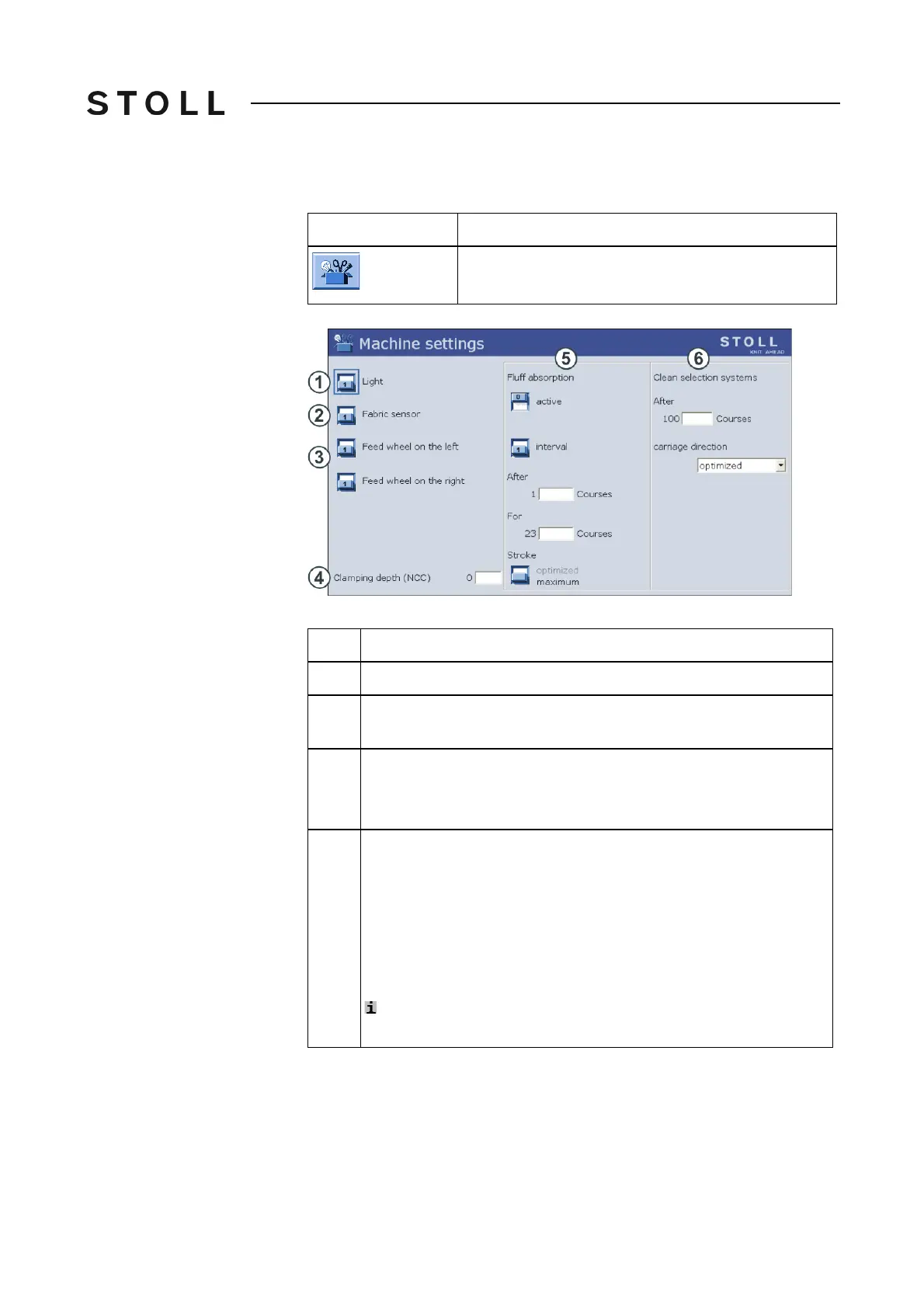
Machine s ettings wi ndow
"Machine settings" window
Key
Function
Call up the "Machine settings" window
Explanation
1
Switch on or off lighting in machine area
2
Switch fabric sensors on and off (not in the case of machines with
comb take-down)
3
Switching right or left feed wheel on or off.
If the feed wheel is not required, we recommend switching it off. This
saves energy.
4
Setting the clamping depth of the cutting needles (only in case of a
Setup1 pattern).
With negative values, the cutting needles will be taken down lower.
If a large
NPK correction is carried out, or if several threads are
processed, it may be necessary for the cutting needles to be taken-
down lower to ensure reliable cut-off.
Setting range: -10 to 10. Standard setting: "0".
With a Setup2 pattern:
Setup2 Editor -> "Yarn carrier" menu -> "
Y:Ua-b / Y:Ncc" tab



 To Next Page