201
Adjusting knitting machine 4
Advanced adjustments
Copying service dat a
4.2.7 Copying service data
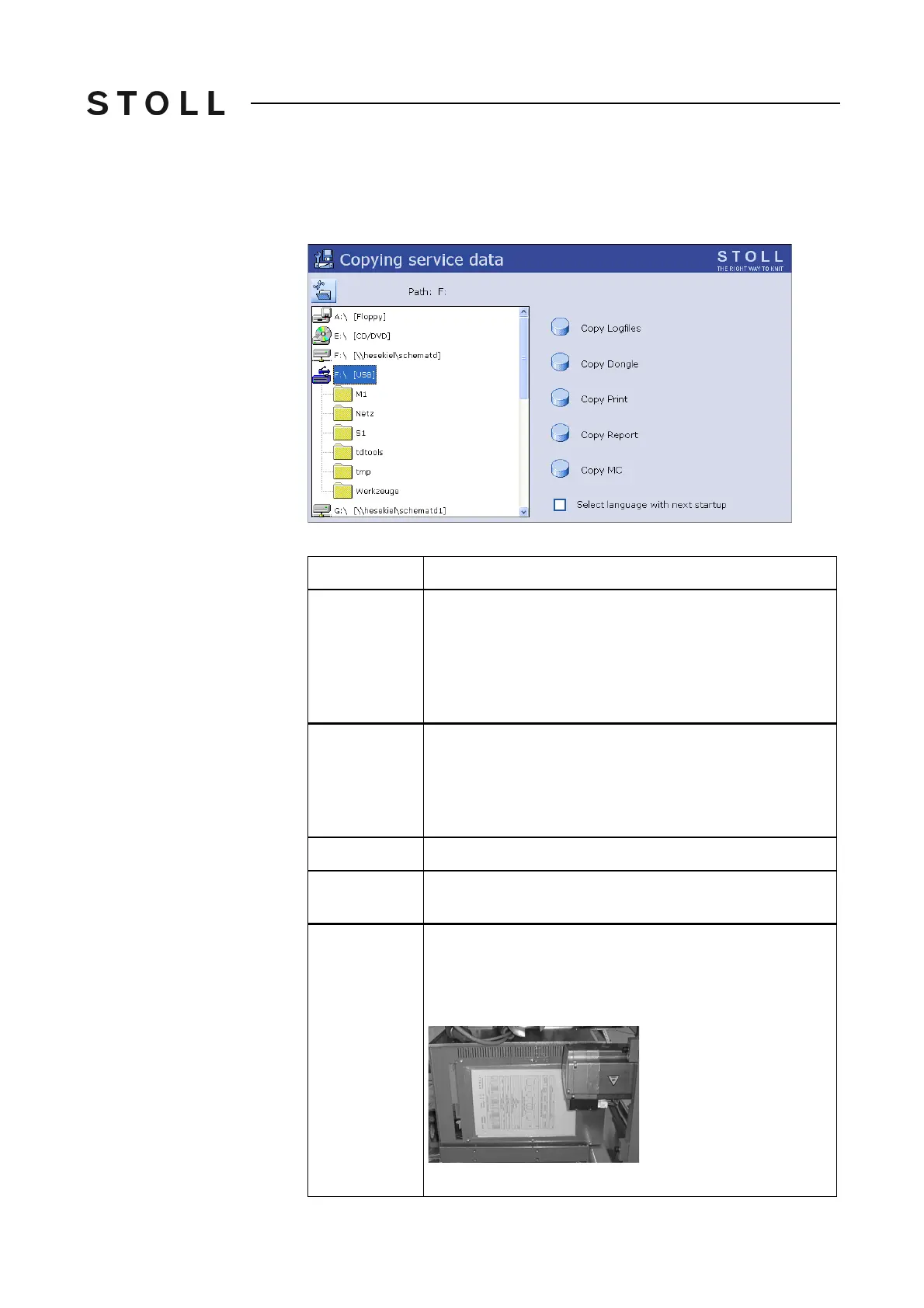
With this menu the service data can be copied on a data carrier.
Copy serv ice data wi ndow
"Copy service data" window
Keys in t he Copy s ervice dat a window
Label
Explanation
Copy Logfiles
If the machine computer has serious problems, e.g. it does
not react to any inputs or the program crashes any longer,
the cause is very important for Stoll. The computer saves
the data up to the fault internally in so-called "Logfiles".
These files can be saved and sent to the Stoll helpline so
that Stoll can carry out an exact error diagnostics.
Copy Dongle
The machine settings do not only contain the machine data,
but also the machine options, the machine configuration,
the report and other internal control information. It is
important to back up the data, e.g. when the hard disk is
replaced.
Copy Print
For the Stoll technician only
Copy Report
The operating data are saved with the STOLL machine
number.
Copy Mc
The machine data include the machine-specific settings
(correction values). The data will be saved in a zip-file.
When delivering the knitting machine, the machi
ne data
was printed out and put on the right control cabinet.
Machine data sheet at the right control cabinet



 To Next Page