109
Producing with the knitting machine 3
Producing with knitting orders (order menu)
Producing with knitting orders (order menu)
3.4 Producing with knitting orders (order menu)
This chapter contains information on:
Creating and managing order menu [109]
Setting or changing coun
ters for order me
nu [111]
Saving/loading order menu [112]
Creating and manag ing order menu
3.4.1 Creating and managing order menu
Using the order menu, the various making-up sizes of an item (knitting
program) in a list are gather together and processed one after another. The
number of pieces and cycle counters are specified for each making-up size.
A knitting order (line) is processed until the number of fabrics
in t
he "ST1" and
"ST2" columns are the same. The machine automatically switches over to the
next size and produces the set piece number. Knitting is carried out line by line
from top to bottom.
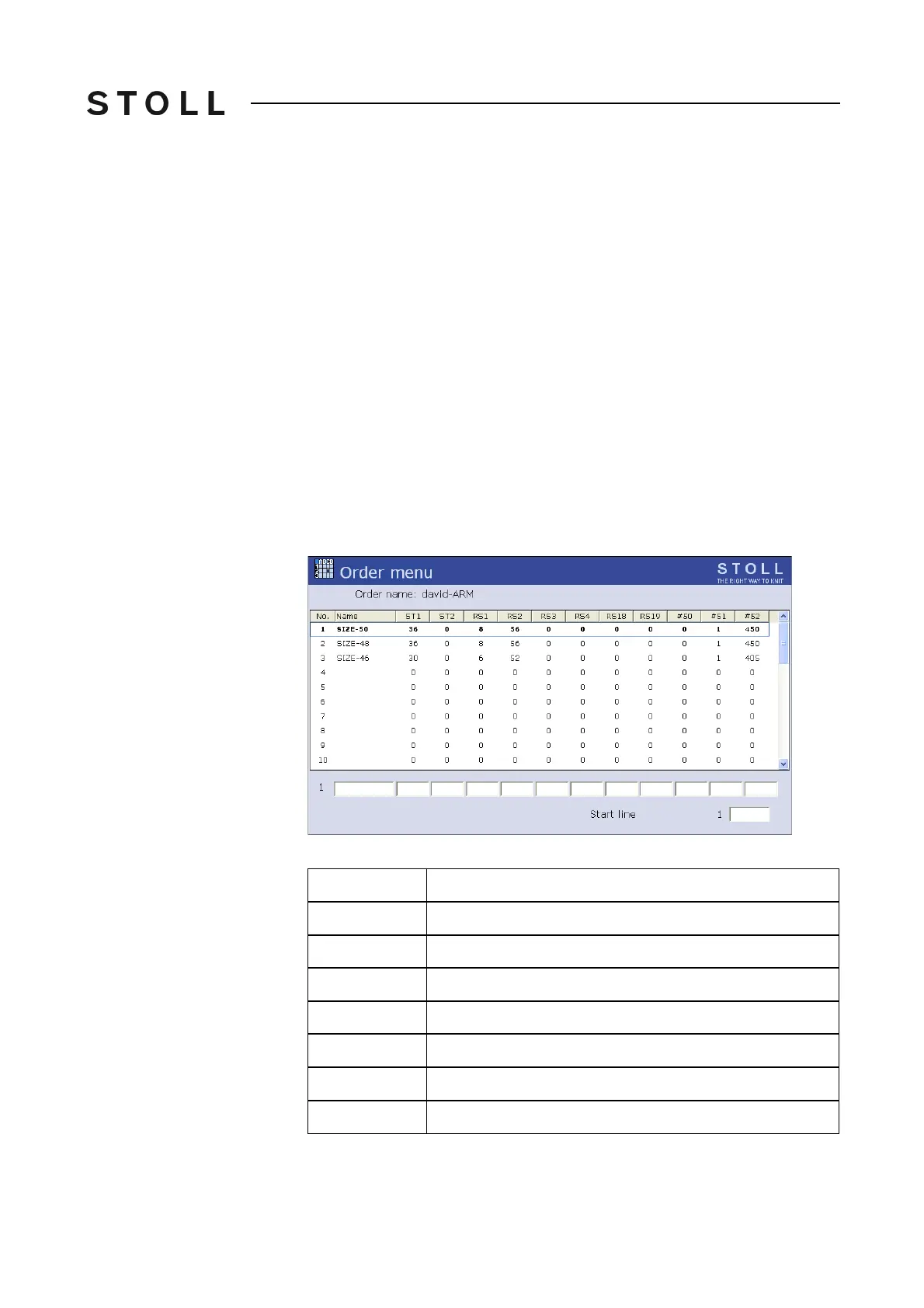
Order menu window
"Order menu" window
Data in the Order menu window
Data in the "Order menu" window
Column
Data shown
1
Current order number
2
Name of the order
3 ("ST1")
Number of pieces to be produced
4 ("ST2")
Piece number already produced
5 to 11
Cycle counters and counters
12 ("#51")
left border
13 ("#52")
right border



 To Next Page