362
6 Maintenance of the knitting machine
Lubricate knitting machine
Setting lubric ating interval for needle b ed
6.3.2 Setting lubricating interval for needle bed
For the needle bed a lubricating interval of between 1 and 65.535 courses can
be set. A mean value for a three-system machine is 25,000 courses. However,
this value depends highly on: Machine speed, temperature and number of
knitting systems. We recommend: Selecting a shorter lubricating interval
instead of a longer one. After the lubricating interval expires, a message
appears stating that the needle bed must be oiled.
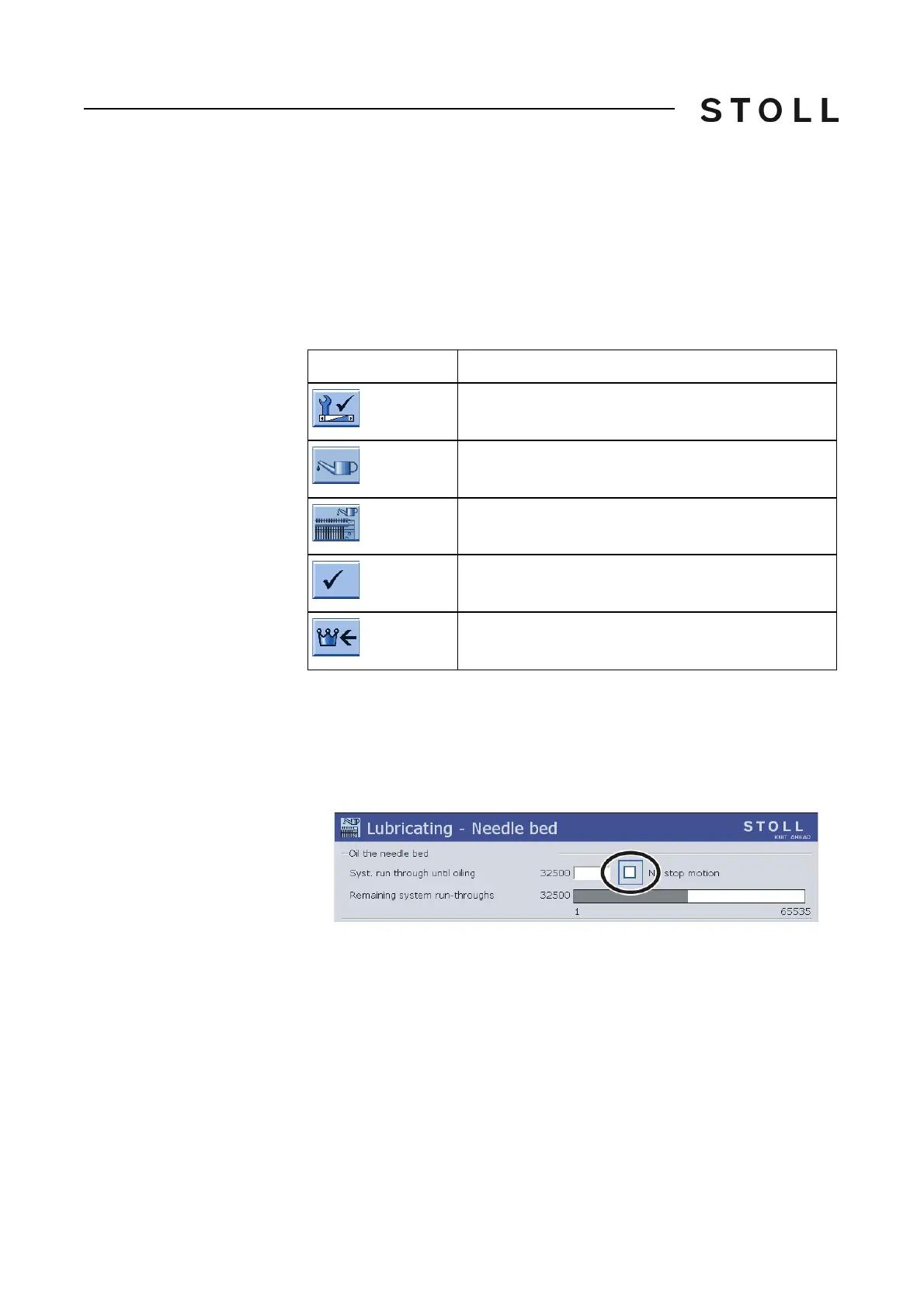
Keys for s etting th e lubricating interv al
Keys for setting the lubricating interval
Set lubricating interval:
1. Call up the "Service" menu from the "Main menu".
2. Call up the "Lubricating" menu.
3. Call up the "Lubricating - Needle bed" window.
Lubricating - Needle bed window
"Lubricating - Needle bed" window
4. Input "Syst. run through until lubric.".
5. If the machine is to be stopped after reaching the sy
stem run-throughs,
then deactivate the check box.
6. Confirm input.
7. Call up "Main menu".
Key
Function
Call up the "Service" menu
Call up the "Lubricating" menu
Call up the "Lubricating - Needle bed" window
Confirm input
Call up "Main menu"



 To Next Page