250
4 Adjusting knitting machine
Advanced adjustments
Setting
Setting
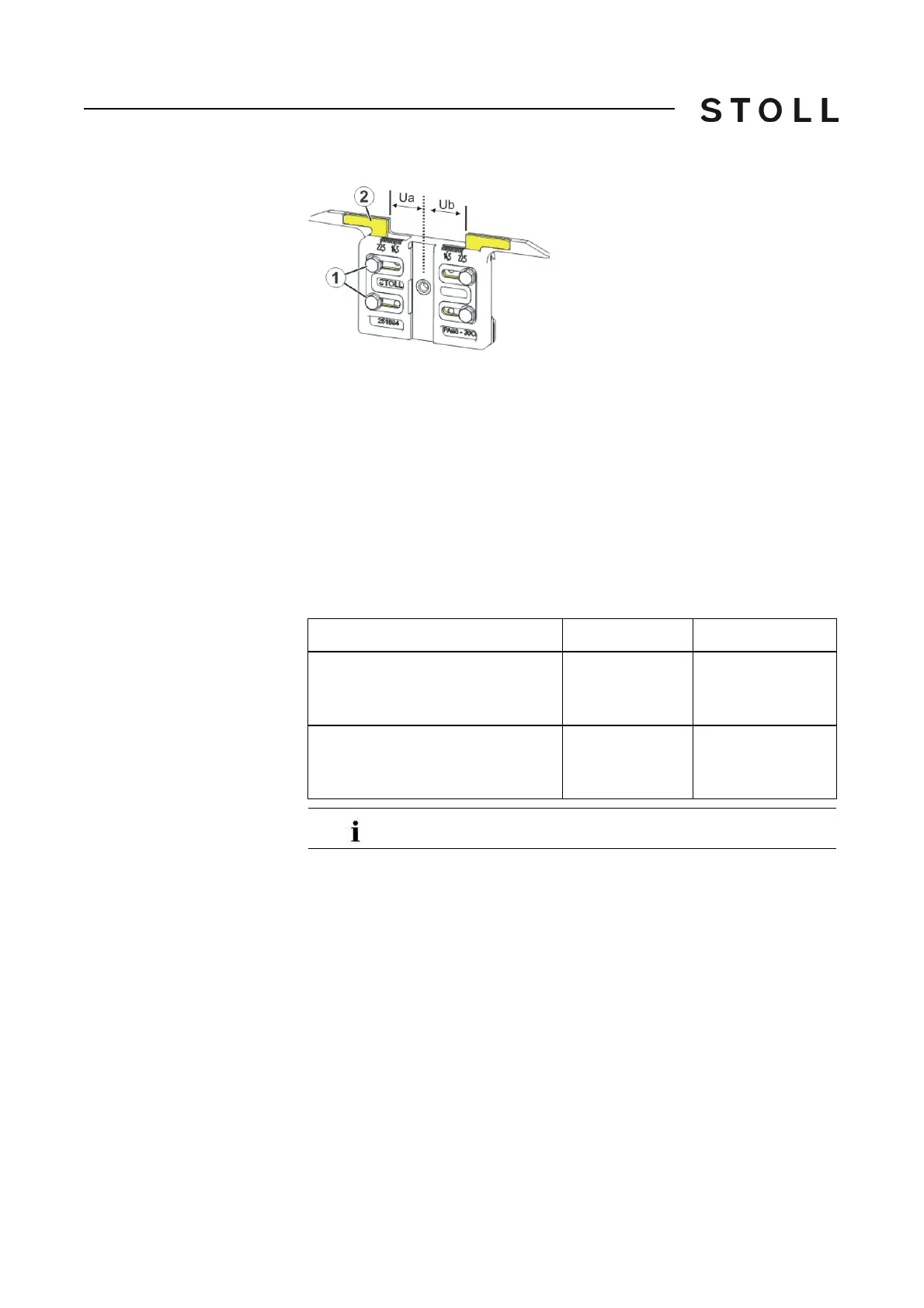
Adjust engaging width:
1. Loosen both screws (1).
2. Push insert (2) into the desired position.
A scale simplifies the ad
justment.
3
. Retighten both screws (1).
4. Repeat the setting process for the other side.
The entire engaging width consists of t
he value for t
he left (Ua) and the right
(Ub) hand-side.
Both values may be equal (symmetrical setting) or may differ.
Engaging width plati ng yarn carrier ca rriage (5 xx, 9xx, TC -T)
Recommended engaging width (specifications in millimetres)
Gauge
Leading (default)
Following
E10 │ E12 │ E14
E16 │ E18 │ E6.2
E7.2 │ E8.2 │ E9.2
29
Ua: 14.5
Ub: 14.5
43
Ua: 21.5
Ub: 21.5
E5 │ E7 │ E8
E2,5.2 │ E3,5.2
E5.2
29
Ua: 14.5
Ub: 14.5
46
Ua: 23.0
Ub: 23.0
The engaging width of the standard yarn carrier is 29 mm.



 To Next Page