X35 Monitor Air Seeder Setup
6.13
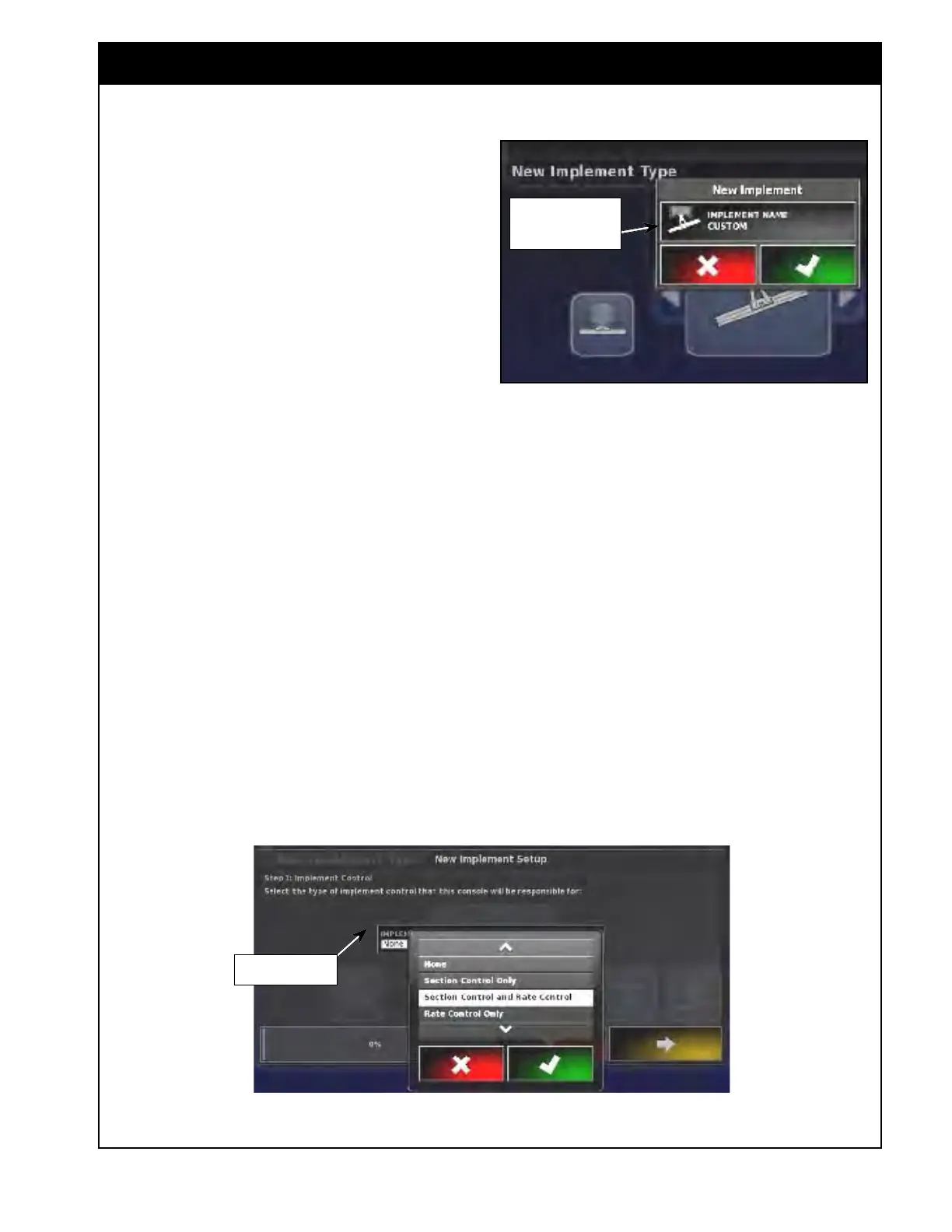
2. For Implement Name;
a. Once the air seeder type is picked, the next
window will appear asking you to enter the
air seeder name. Refer to Figure 6.13.
b. Y
ou can enter a specific name or accept
the automatically generated name, that will
consist of the picked type, date and time
stamp in formats ddmmyy and hhmm.
(example: pivoted_191212_0043).
i. To enter a name select "Implement
name" button, a keyboard will
appear.
ii. Type the desired name and select OK
to accept it.
iii. The X35 console will advance to the
next step.
Note
It is recommended you name the implement
something that specifically identifies it, to allow
you to easily select between implement profiles at
a later date.
3. For Implement control;
a. Select the type of control, that the X35
console will be responsible for.
Figure 6.13 - Air Seeder Name
Select This Button To
Enter New Name
b. Select the "Implement Control" button to
open up drop down list:
i. None - not applicable.
ii. Section Contr
ol Only - not
applicable.
iii. Section Contr
ol and Rate Control
- select if the unit equipped with
granular sectional control or NH3/
liquid sectional control.
iv. Rate Control Only - select if the
unit does not have granular or NH3/
liquid sectional control.
c. Select the appropriate option and select
OK.
i. Press
the right arrow to advance to
the next step.
Figure 6.14 - Control Type
Implement Control
Button



 To Next Page