X35 Console Setup
3.5
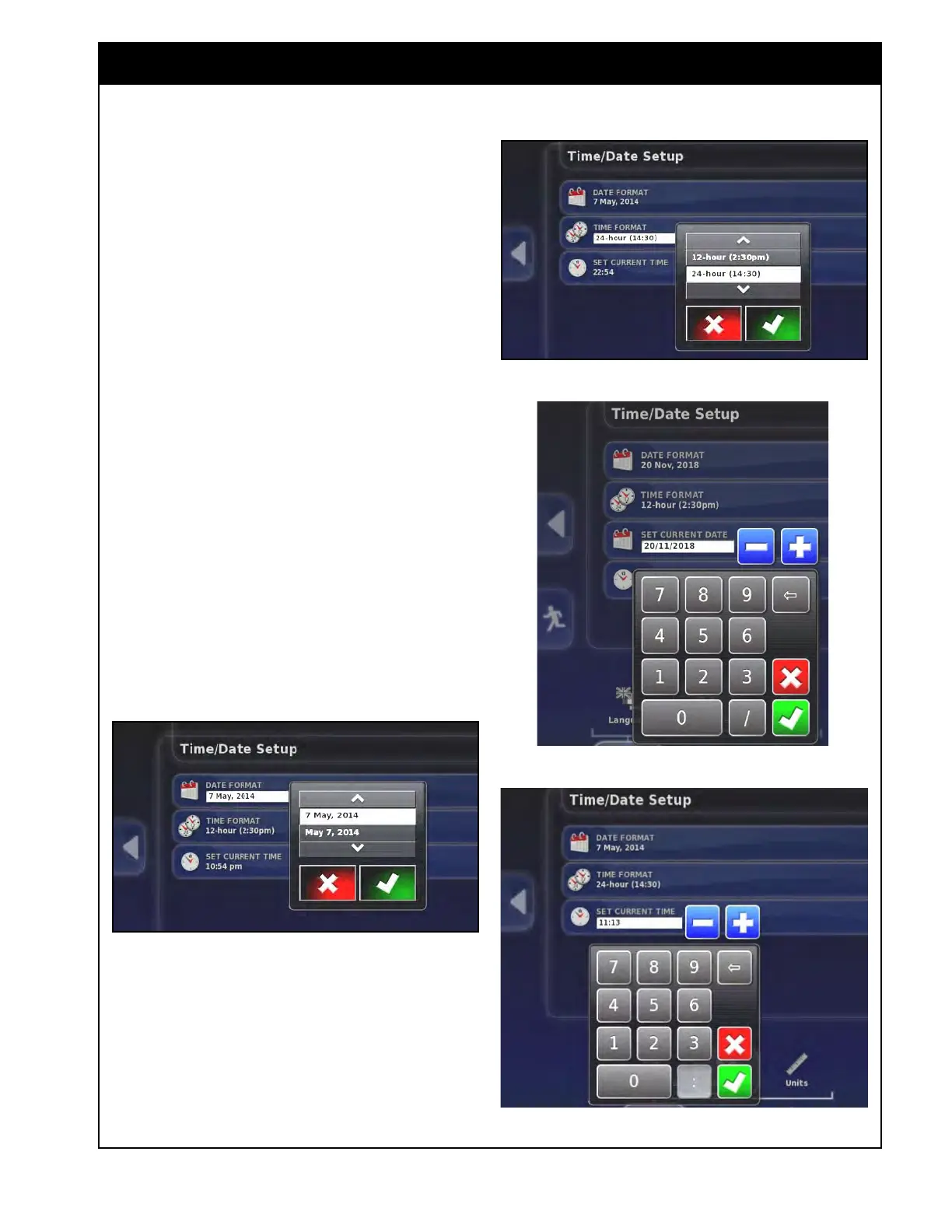
3.2.1.2 Time/Date
From the Main Setup menu select User/Region/
Time/Date. There are three settings:
1. Date
format - select a format for how you
would like the date to appear on the console:
a. 15 Dec, 2012 (Day Month, Year)
b. Or as Dec 15, 2012 (Month Day, Year).
2. T
ime Format - select either:
a. 12-hour format (ex. 2:30 p.m.);
b. Or as a 24-hour format (ex. 14:30).
3. Set
Current Date - using the numeric keypad
enter the date in the appropriate format.
4. Set
Current Time - using the numeric keypad
enter the time in the appropriate format.
Note
A GPS signal is required to keep a set time/date.
Figure 3.7 - Date Format Setting
Figure 3.8 - Time Format Setting
Figure 3.10 - Current Time Setting
Figure 3.9 - Current Date Setting



 To Next Page