X35 Console General Operations
8.29
8.7 Wheel Sensor Calibration
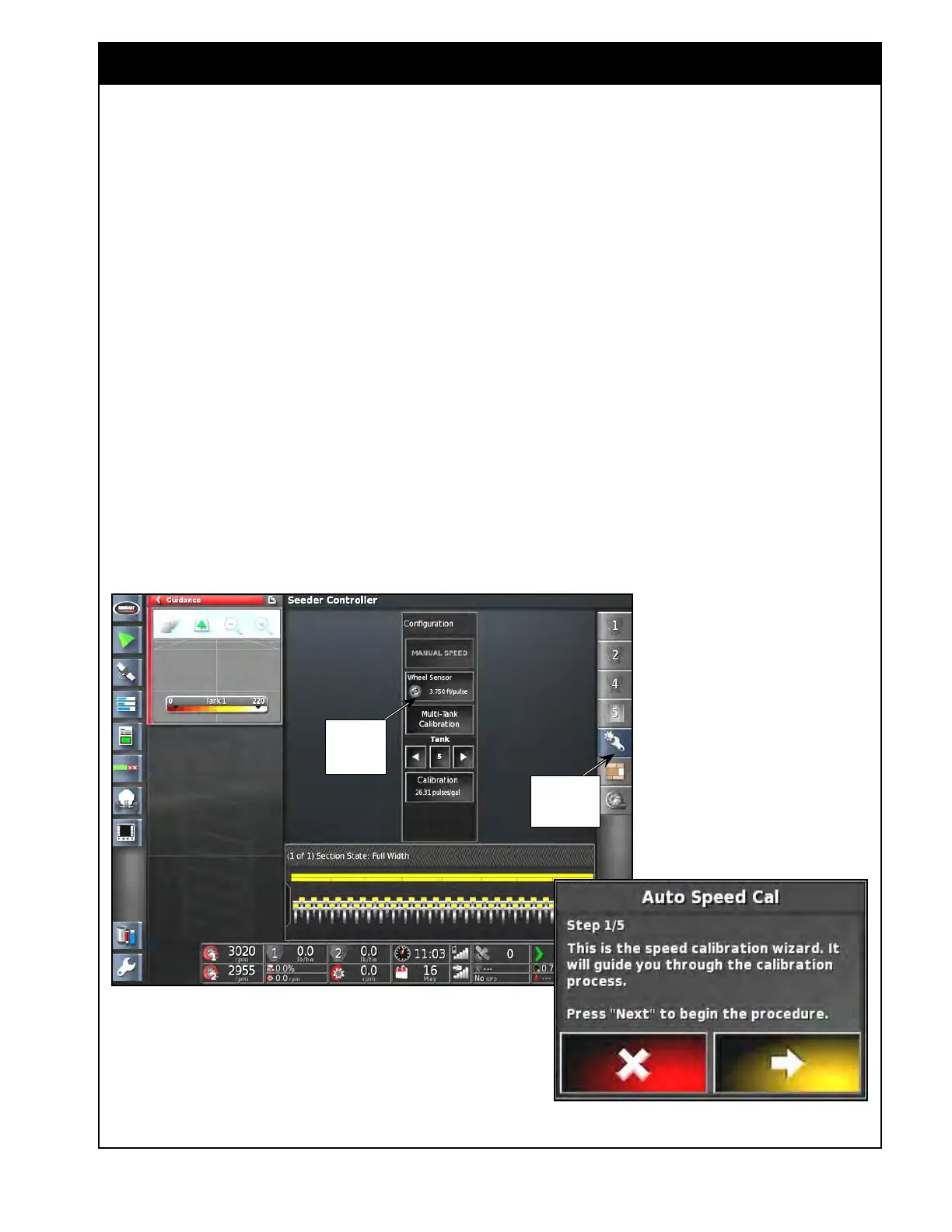
Figure 8.57 - Wheel Sensor Calibration Wizard - Step 1
1. Open the Wheel Sensor Calibration wizard.
a. In the Seeder Controller window (full
screen mode) select the configuration icon
from the menu.
b. Select the Wheel Sensor button to bring up
the Auto Speed Cal wizard window (button
appears ONLY when Speed Source or
Fallback Type is set to Wheel Sensor, refer
to Section 6.7.8 - Speed Source).
Open
Configuration
Window
Open Auto
Speed Cal
Wizard
Information in this section is applicable when
the Speed Source is set to Wheel Sensor, refer to
Section 6.7.8 - Speed Source.
I
f the wheel factor is found to be inaccurate, a
calibration should be performed.
Alternatively, the wheel factor can just be adjusted
until the wheel speed in the X35 matches the
speed of a trusted source. For instance, GPS speed,
tractor wheel speed, tractor radar speed, etc.
Important
It is recommended to perform the calibration with
the air seeder tank half full of product. Ensure
that the tire pressure on the unit is correct. Refer
to tire pressure decal on the air seeder tank.



 To Next Page