X35 Monitor Air Seeder Setup
6.77
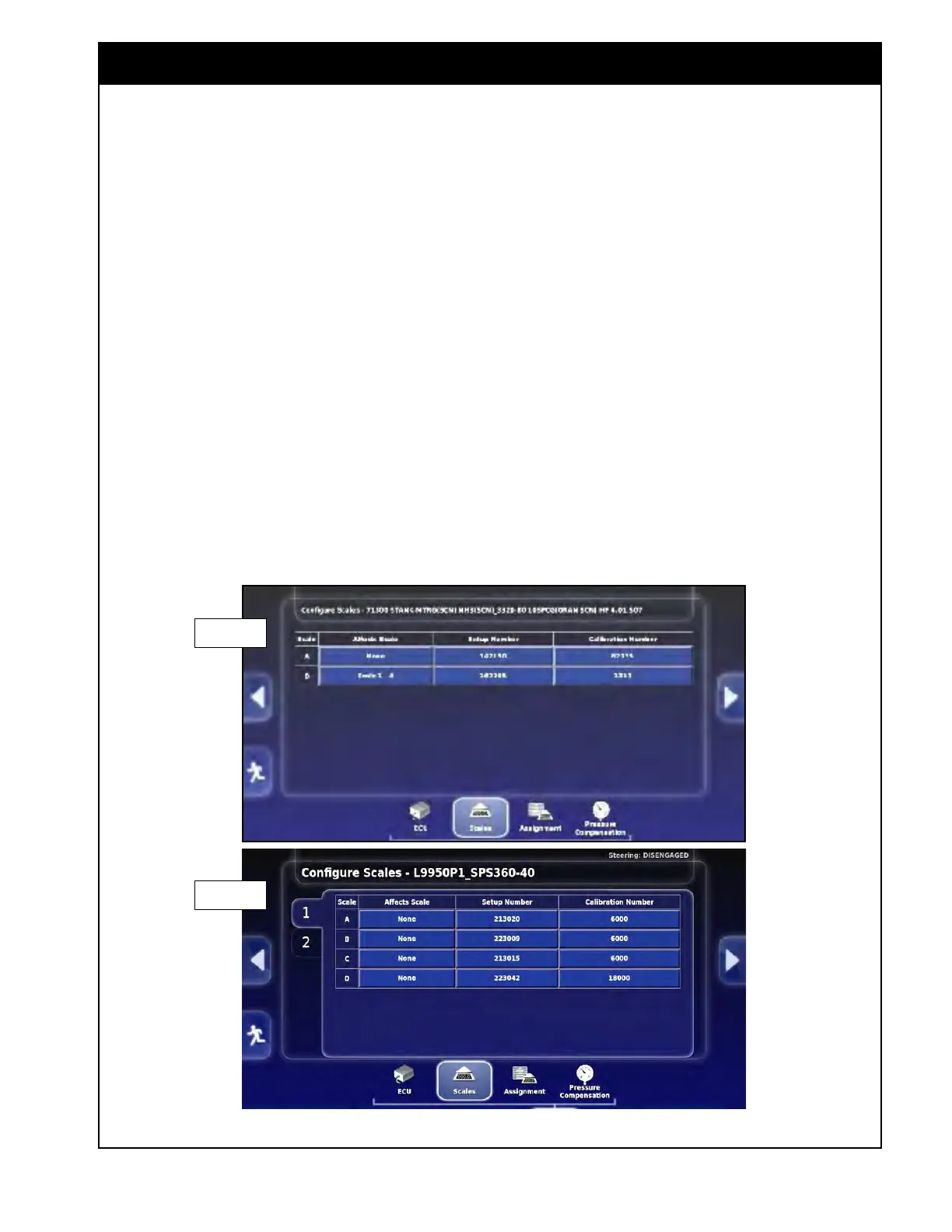
Figure 6.93 - Weigh Scale ECU - Scale Setting
6.7.7.2 Scales
This tab allows you to configure the specific scale
channels. There is a 2nd tab for the 2nd scale link
ECU if installed on the 9000 Series.
1. Affects
Scale
- this setting only applies to the
7000 Series. It ensures the weights are being
accounted for when one scale weight is also
being applied to another set of scales.
a. For the 7000 Series if there is a saddle
tank installed;
i.
For the Scale B row, set to Scale 1-A
.
b. This will ensure the saddle tank weight is
accounted for in the total weight of the air
seeder.
2. Setup Number - set the appropriate setup
number
for each scale channel.
a. This is a factory setting that is calculated
based on the specific load cells used.
Important
The setup numbers should NOT be changed from
the factory settings.
3. Calibration Number - set the appropriate
calibration number for each scale channel.
a. The theoretical value is calculated, but can
be adjusted to be more accurate based on a
known weight.
Refer to Section 13.5 - Weigh System for the model
specific
factory
setup and calibration numbers and
for the weigh scale calibration procedure.
7000 Series
9000 Series



 To Next Page