X35 Monitor Air Seeder Setup
6.34
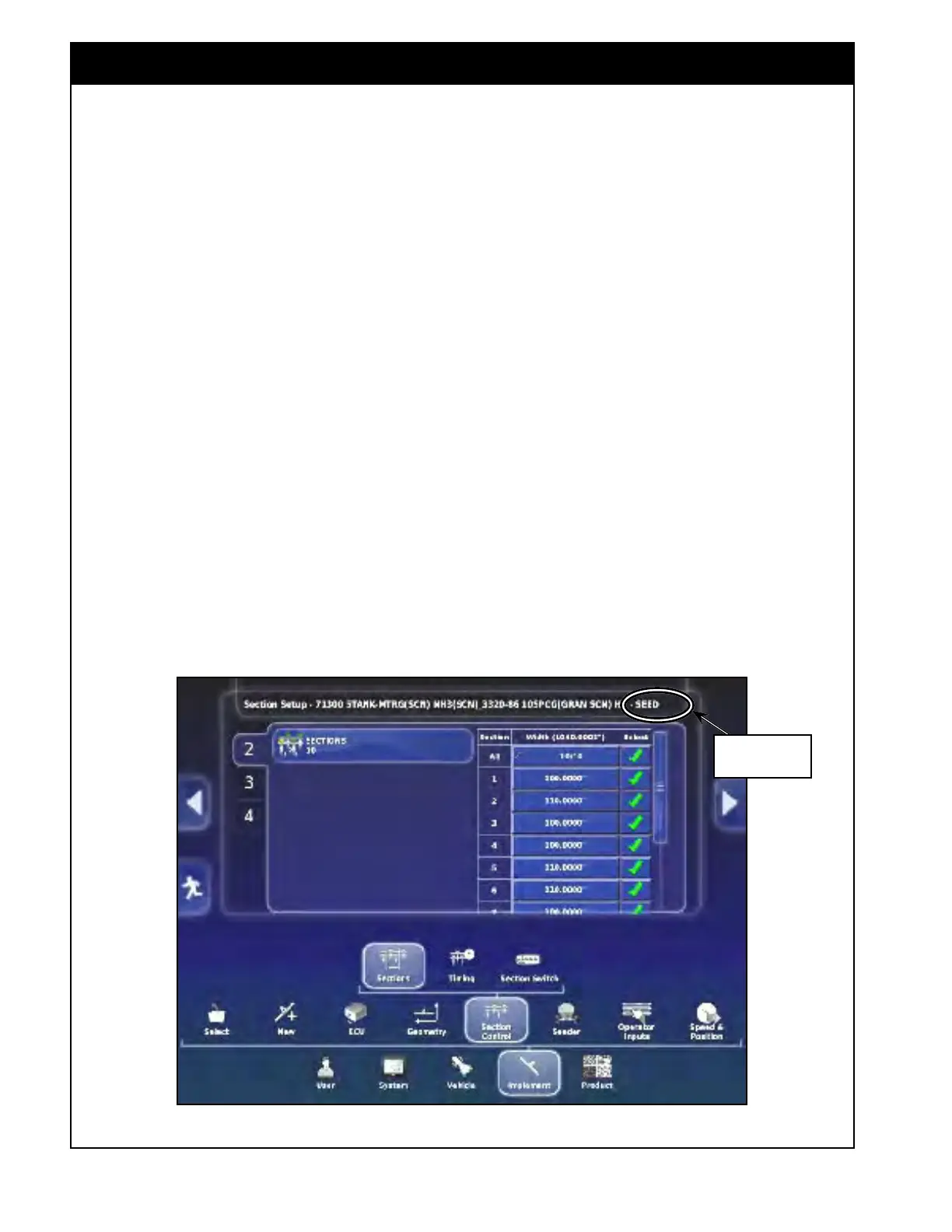
Figure 6.45 - Section Control - Granular Boom Settings
6.6 Section Control
6.6.1 Section Setup
Enter the number of sections and width of each
multi-section boom.
Note
Boom is a term derived from Sprayers and more
generally applies to a product being applied. In
seeding scenarios, your machine will have one
full-width granular product "boom" and might also
have one multi-section NH3/Liquid "boom" and/or
one or two multi-section granular “booms”.
1. Select a boom from the tabs on the left side,
the name of that boom will be shown in the
title bar.
2. Select the "Sections" button to enter number of
sections.
a. Use
the plus/minus buttons to increase/
decrease the value.
Note
Bourgault harnessing can control up to 10
sections for each boom.
Boom Name in
the title bar
Note
Factory profiles have the Fertilizer and NH3/
Liquid booms set up assuming it is using MRB’s.
If that is not the case, the section widths may
need to be adjusted for those booms to match
your unit. Also, all section widths are set as the
latest configurations coming from the factory so
should be verified for older units.
Note
The Section Control Icon only appears if the
implement was setup with Section Control
(Section Control and Rate Control was selected
for Implement control setting, factory profile
selected with ASC).
To access the sectional control settings select
Implement/Section Control. Refer to Figure 6.45.



 To Next Page