X35 Monitor Air Seeder Setup
6.26
6.4.2 ECU Manage
This section is used to detect, add or replace an
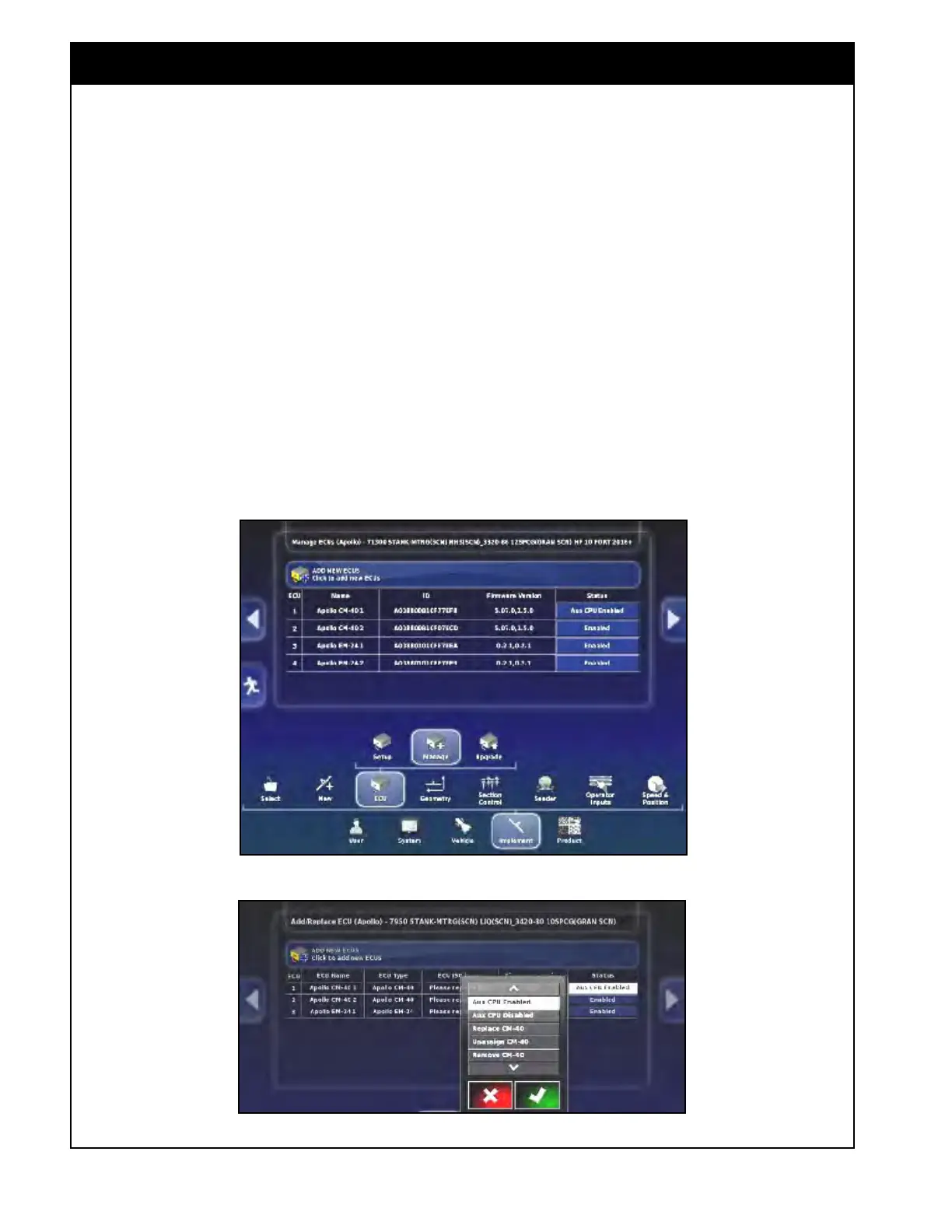
ECU. Select the Implement/ECU/Manage button.
Refer to Figure 6.35.
1.
Select the button in the Status column for the
ECU that needs to be detected or replaced. Refer
to Figure 6.36. A menu window will appear.
Figure 6.35 - ECU Manage
Figure 6.36. - Add / Replace ECU - Status
Important
When creating a new factory profile all of the
ECU’s need to be detected individually. If
detecting ECUs for the first time, make sure
that only the main ECU’s COMMS connector
(CM-40 1) is plugged in, other ECUs must be
disconnected. Once an ECU has been detected,
the COMMS connector for that ECU can remain
plugged in.
If replacing just a single ECU, all other ECU’s can
stay connected.
Note that the Drill Fold ECU for a 3420 unit needs
to be left disconnected until all the other ECU’s
are detected.
Then the Drill Fold ECU can just be
re-connected and doesn’t need to be detected.
It has special firmware so will be recognized
for controlling the 3420. The ECU will be listed
on the Implement/ECU/Upgrade page and the
firmware will show up if it is communicating.
If an ECU is not detected by the console, “please
replace ECU” will be displayed in the ECU ISO
Name column instead of the identification number.



 To Next Page