X35 Monitor Air Seeder Setup
6.41
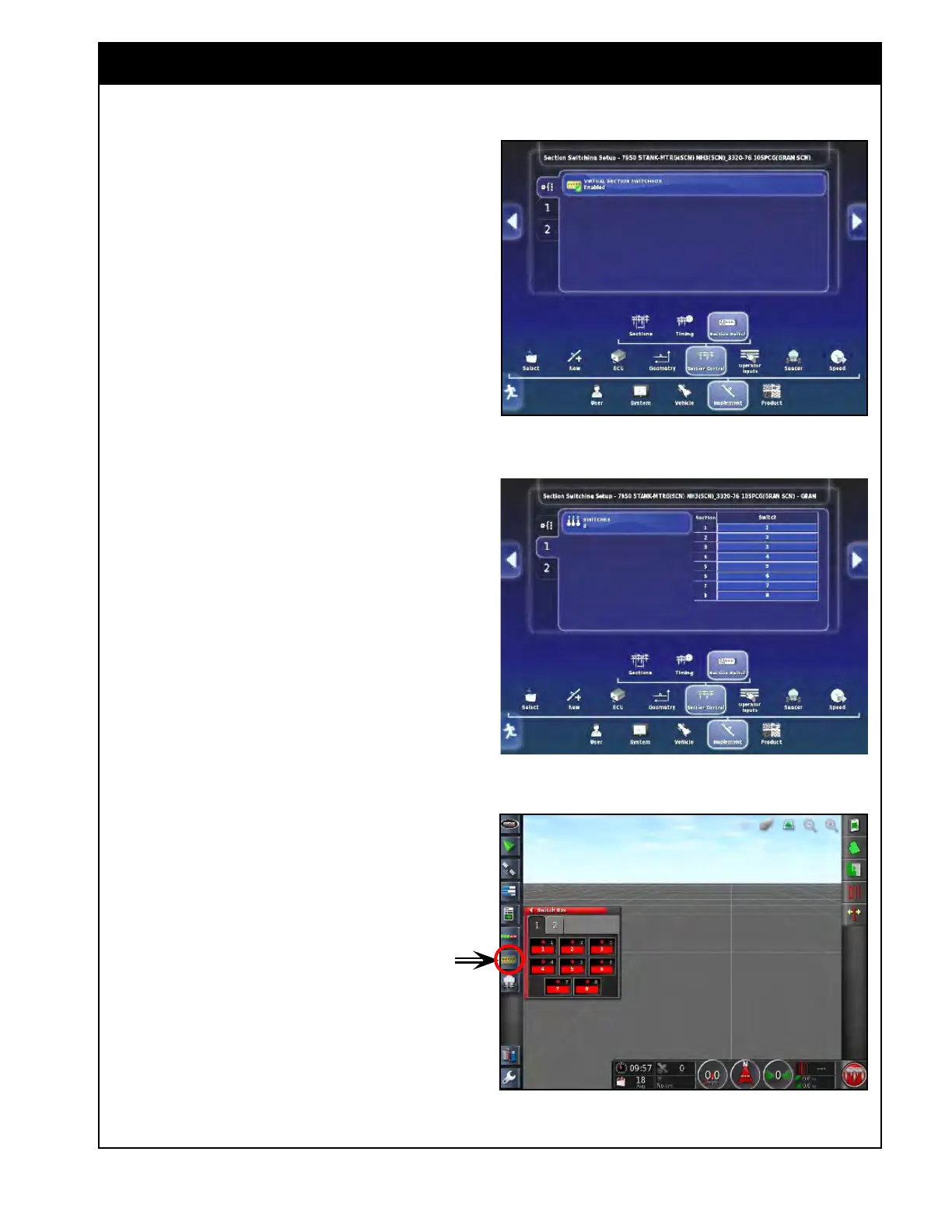
Figure 6.55 - Section Control - Switch Settings
6.6.3 Section Switch
In this section, you can enable and configure a
virtual section keypad, that allows manual override
control of the sections for each boom.
If left disabled the sections will always stay on,
unless the ASC shuts them off corresponding to
the coverage map.
1. Refer to Figure 6.55. Select the "Virtual
Section
Keypad"
button to enable or disable
the virtual keypad.
a. When enabled, it will display a tab
for each boom, that will allow you to
configure the keypad.
2. Select a "Boom" and then select the "Switches"
button to set the number of switches.
a. In the table, assign switches to the
sections. Refer to Figure 6.56.
i.
Normally
you would match the
number of switches to the number
of sections to have a switch for each
section.
Once the
virtual section control switch is enabled
and setup, a virtual keypad icon will be displayed
in the mini-view menu, refer to Figure 6.57.
1. Selecting
the "Virtual Keypad" icon will open
up the mini-view window.
a. There will be a tab for each boom.
b. You can also access the section switches
from the guidance screen, or the seeder
controller screen.
Figure 6.56 - Section Control Switch Setup
Figure 6.57 - Virtual Keypad



 To Next Page