X35 ConsoleOptional Equipment
13.4
13.2.1 Lift Master Feature
Note
Lift Master can be used to automatically raise and
lower the openers with the use of ASC. If ASC
is ON and the Drill Control Boom is enabled, the
openers will raise and lower automatically based
on coverage on the map.
The Lift Master feature allows the drill to be
lifted/lowered by the X35. Refer to Section 6.7.5.1
- Lift Master Settings for configuring settings.
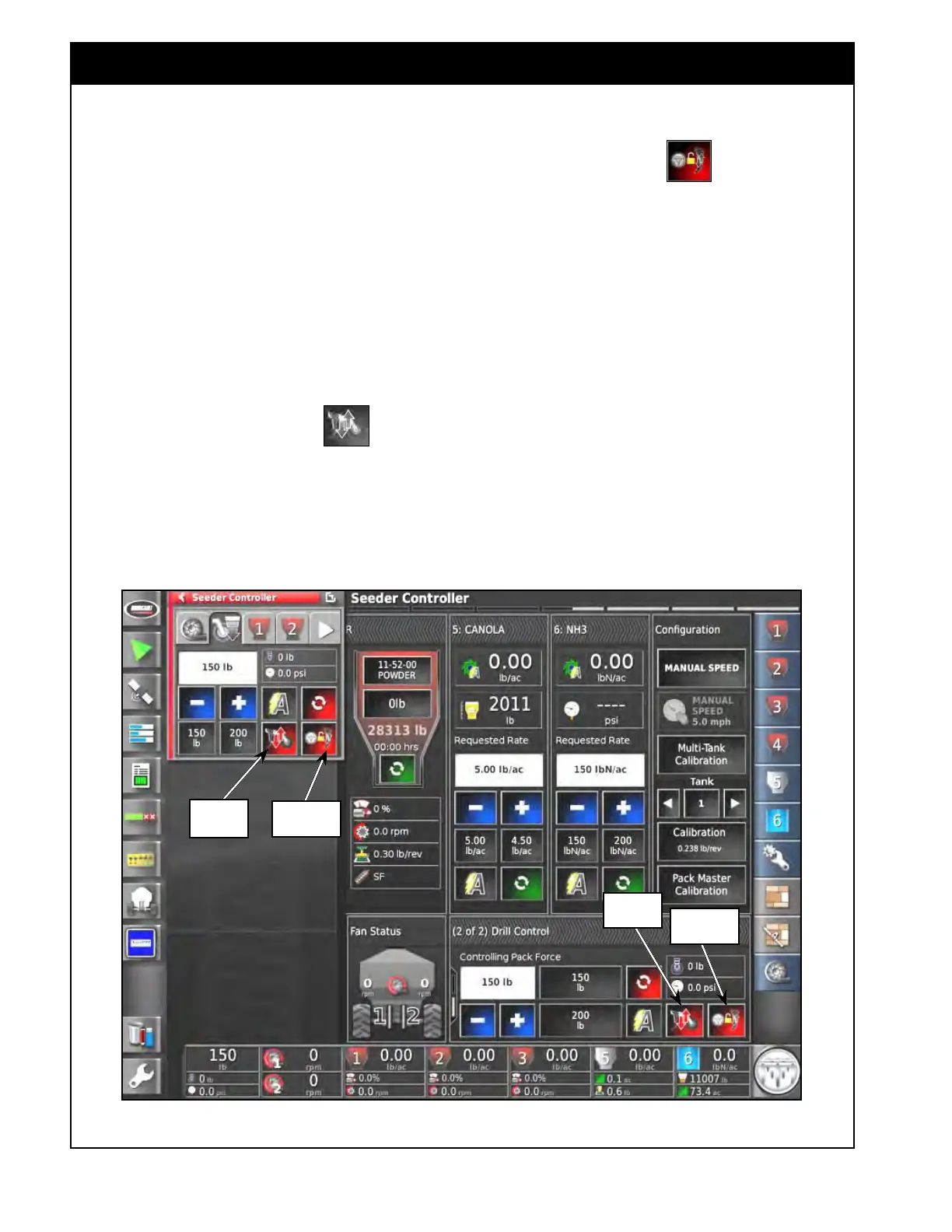
1. Select the Lift Master button
to lift or
lower the drill manually.
a. Leave engaged for ASC to automatically
raise/lower the drill.
Figure 13.5 - Drill Control - Lift Master Feature
2. Turn the Track Master ON or OFF to
set, whether the Lift Master state will track the
master state or not.
a. If turned ON, then the drill position will
follow master switch state.
i. If the master is ON, the drill will be
lowered, unless the drill is manually
lifted.
ii.
If the master is OFF, the drill will be
lifted.
b.
If turned OFF, then the drill position is
independent of the master switch state.
Note
The main purpose of enablingthe Track Master
is so the drill lifts when the master switch is
manually turned OFF and the drill lowers when
the master switch is manually turned ON.
Lift Master
Button
Track Master
Track Master
Lift Master
Button



 To Next Page