X35 ConsoleGeneral Operations
8.2
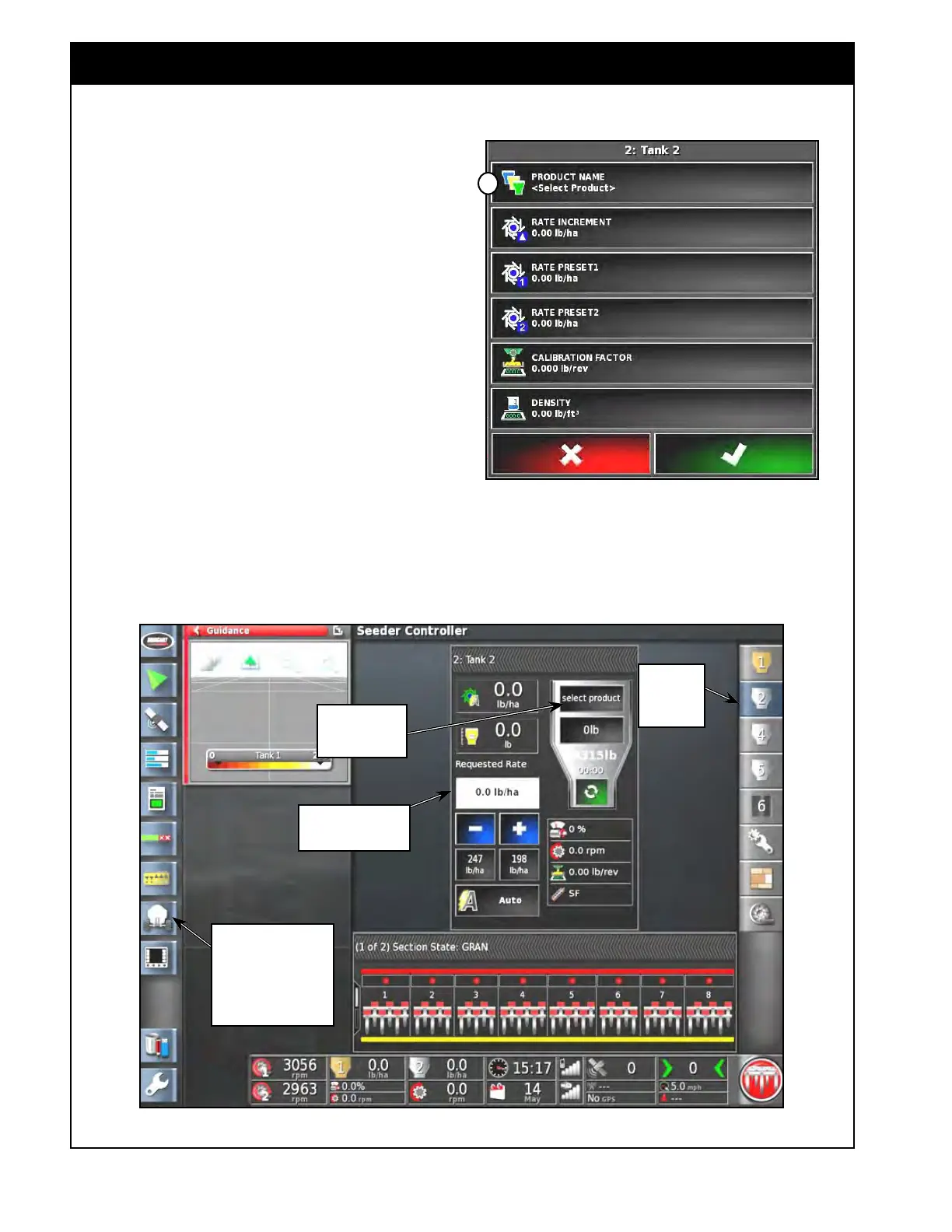
Figure 8.2 - Tank Panel Expanded View
2 - Select
Tank Icon to
open Tank
panel
Select this button
to open Product
panel
Figure 8.1 - Product Panel - No Product Selected
8.1 Selecting the Product
a
Select this window to
enter Requested Rate
1 - Select seeder icon to
open Seeder controller
mini-view, then drag
out mini-view window to
display it in full screen
mode
1. In the Seeder Controller window (full screen
mode), show the Tank that you would like to
select the product for. Expand the panel for
that tank. Refer to Figure 8.2.
2.
Select the Product;
a. Select the "Select Product" button.
i. If this tank was previously used, the
name of the previously used product
will be shown as the name of that
button.
ii.
The Product panel for this tank will
appear, refer to Figure 8.1.
iii.
The title block (Item A, Figure 8.1)
displays
name of the tank (Bin #
or Tank #, the product name or
"empty", or a custom name) and
depend on the settings, refer to
Section 6.7.1 - Granular Setup and
6.7.2 - NH3/Liquid Setup.



 To Next Page