X35 Monitor System Settings
4.6
4.2.4 Implement
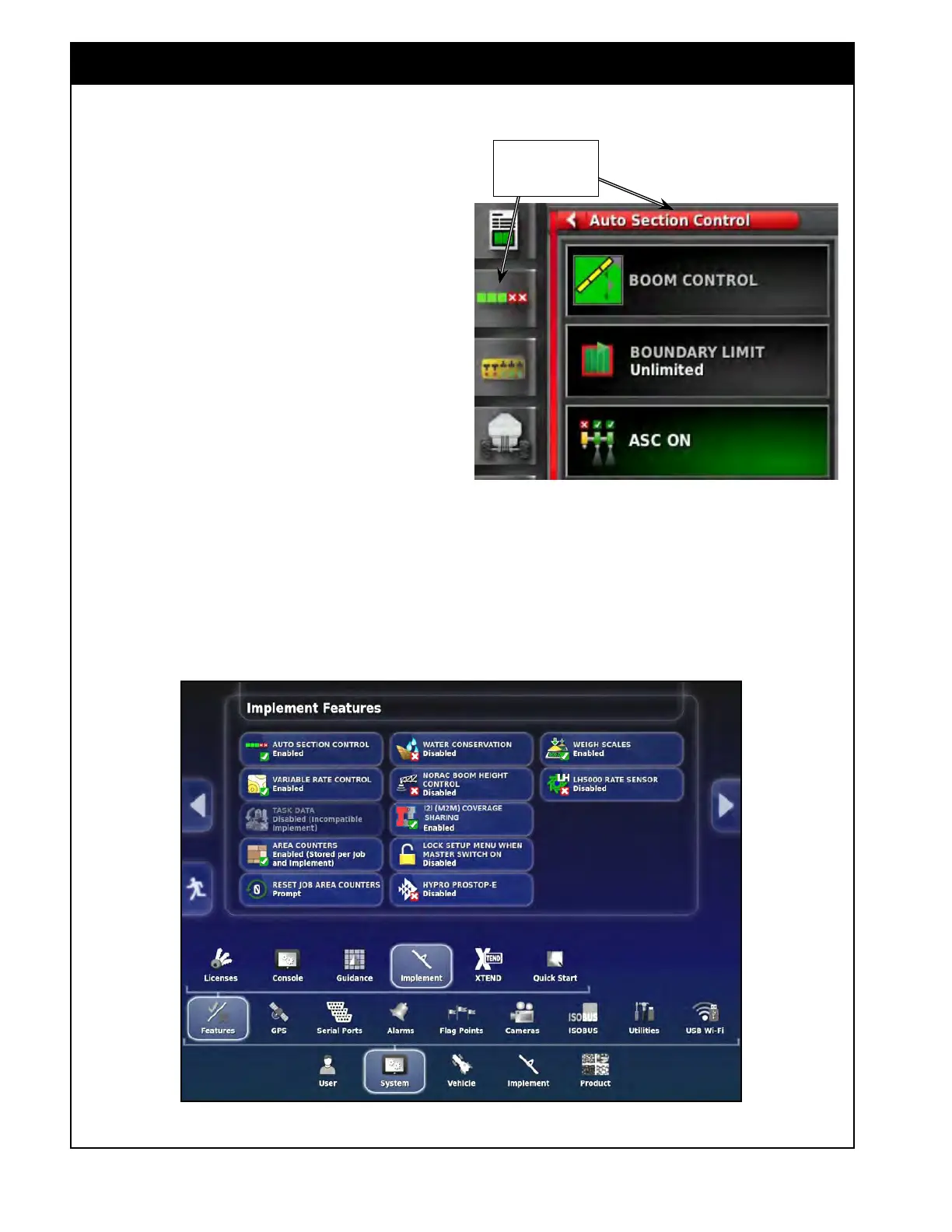
To access the implement features settings from
the Main Setup menu select System/Features/
Implement, refer to Figure 4.5.
1. Auto
Section Control (ASC) - enables or
disables auto section control. When ASC is
disabled, the ASC mini-view window (located
in the menu on the left side of the operational
screen) will not be available.
a. Auto section control allows you to
automatically turn the boom/sections on
and off.
b. The system will turn on when it detects
an area that has not been covered and it
will turn off when it detects areas that has
already been passed over.
Note
ASC applies to full width or multi section
configurations.
Figure 4.5 - Implement Features
Note
Boom is a term derived from sprayers and more
generally applies to a product being applied. In
seeding scenarios, your machine will have one
full-width granular product "boom" and might also
have one multi-section NH3/Liquid "boom" and/or
one or two multi-section granular “booms”.
Available only When
ASC enabled



 To Next Page