X35 Monitor Air Seeder Setup
6.62
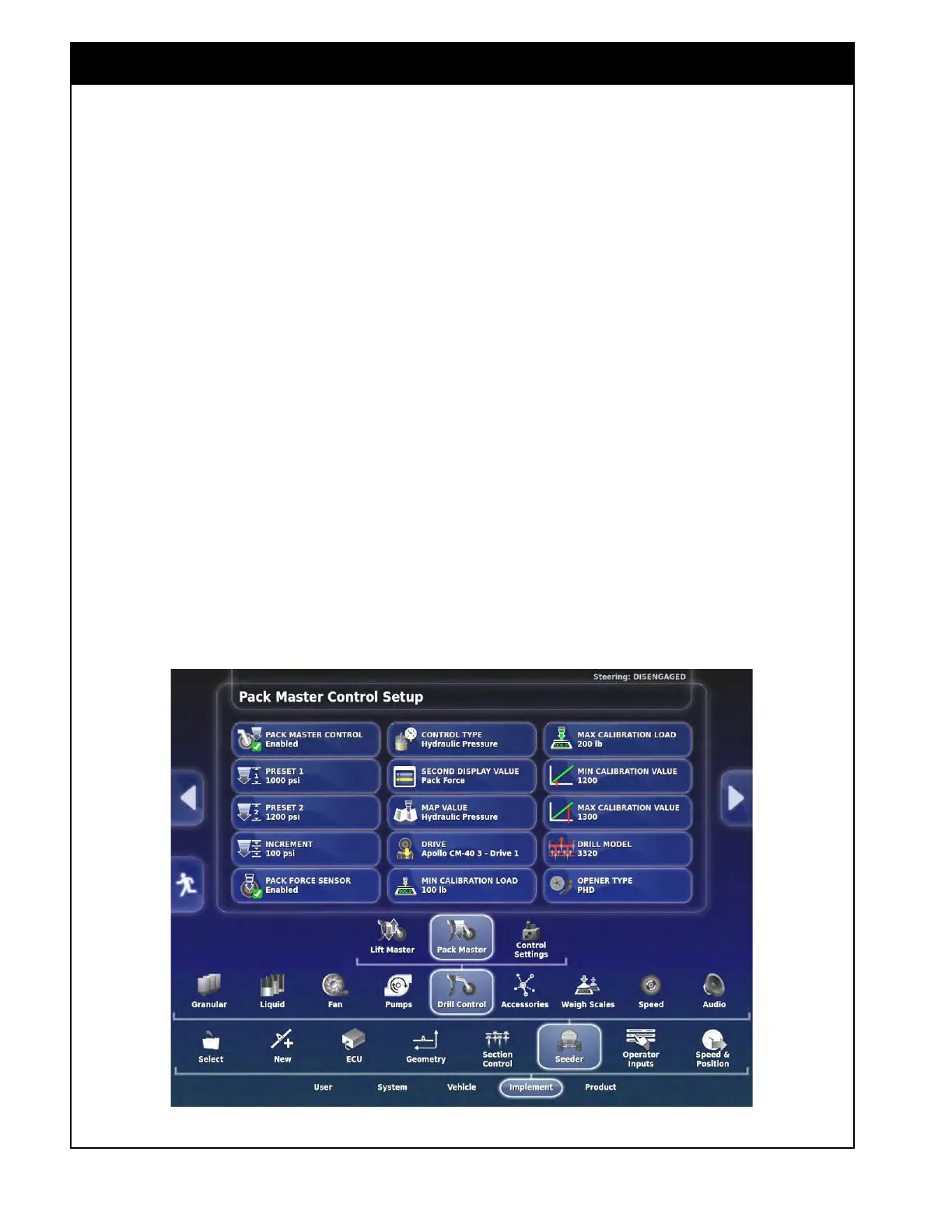
Figure 6.81 - Drill Control - Pack Master
6.7.5.2 Pack Master Settings
This feature is used to control the pressure of the
openers on the drill. It is an option to use an
extra ECU on the drill to monitor the pressure
and gives the ability to adjust it through the X35.
Also, it uses a load cell on one of the opener
packer wheels to read the actual pack force exerted
on the ground.
Refer to Section 13.2.2 - Pack Master Feature
for
harnessing
hookup and instructions on the
operation of this feature.
1. Pack Master Control - set to enabled to use
this
feature if it is installed on the drill.
2. Preset 1 - set to a value that can be used
to
immediately adjust the Pack Master value
using the preset 1 button on the operation
screen.
3. Preset 2 - set to a second value that can
be
used to immediately adjust the Pack
Master value using the preset 2 button on the
operation screen.
4. Increment - set to a value that will increase/
decrease
the Pack Master value using the
increment button on the operation screen.
5. Pack Force Sensor - set to "Enabled" to use
the
load cell installed on an opener.
a. This is used to read the actual pack force
exerted on the ground.
6. Contr
ol Type - set to the parameter to control
the
Pack Master value to.
a. Hydraulic Pr
essure - to control to a set
hydraulic pressure.
b. Pack Force - to control to a set pack force
exerted
on the ground.
7. Second Display
Value - allows you to select a
second Pack Master parameter, aside from the
control type, to display on the screen.
8. Map Value - select the Pack Master parameter
to
be mapped as a layer on the guidance
screen.



 To Next Page