X35 Monitor Air Seeder Setup
6.84
6.8.2 Keypad
This menu option will allow you to:
1. Identify and assign the correct in-cab and tank
mounted keypad;
2. Assign functions to the buttons that have no
functions assigned to them (A, B & C buttons)
3. Select how you prefer to control tanks.
There are two tabs, one for the in-cab keypad and
the other for the tank mounted keypad. Refer to
Figure 6.104.
6.8.2.1
In-Cab
Keypad
1. Keypad
ID
- allows you to select the in-cab
keypad.
a. When selected, it will display a drop down
list with keypad IDs.
i. If there is no keypad used, select
"None".
ii.
Y
ou can confirm you have the right
keypad assigned in the cab as the
LED lights will stop flashing.
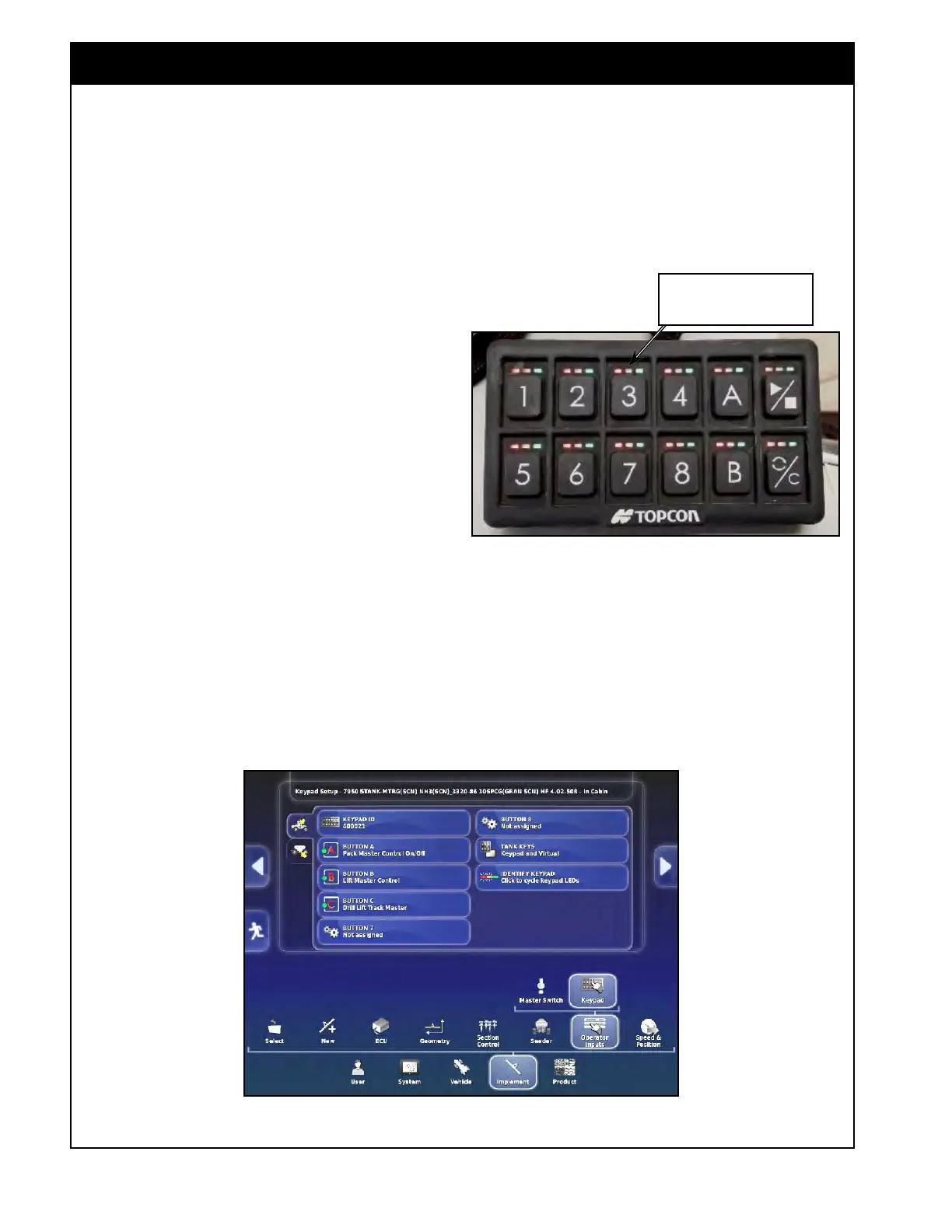
b. There is also an "Identify Keypad" button
that changes the flash sequence to confirm
you have the right one selected for the
appropriate location.
Figure 6.104 - Keypad - In-Cab
Figure 6.103 - Identifying Keypad
Green, yellow, red lights will
be flashing at different times.
2. Identify Keypad - when selected, led lights on
the keypad will flash green, yellow, red. Refer
to Figure 6.103.
a. Select this button again to stop flashing.



 To Next Page