X35 Console Monitoring & Managing Files
10.10
10.5 Viewing Diagnostics
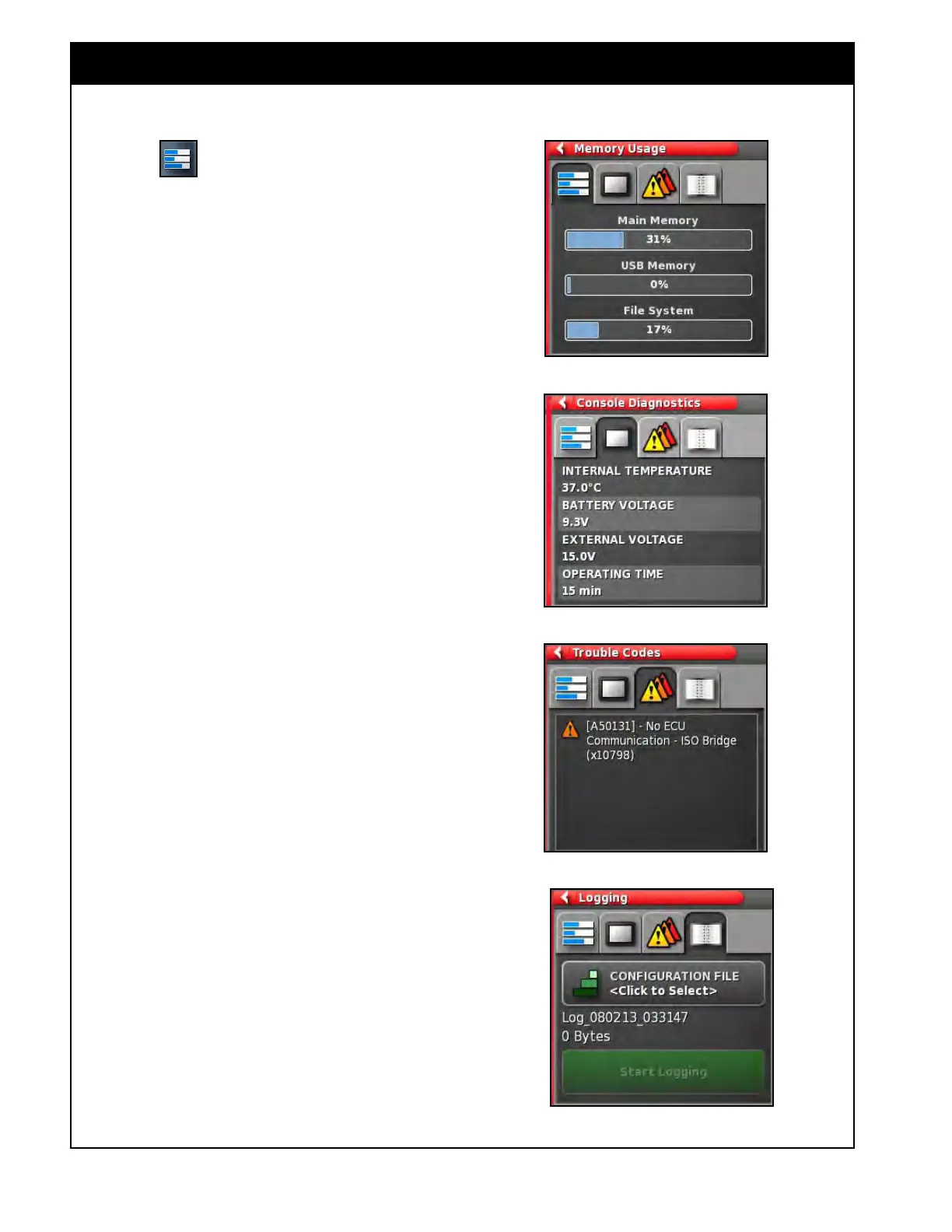
Figure 10.17 - Memory Usage
Figure 10.18 - Console Diagnostics
Figure 10.19 - Trouble Codes
Figure 10.20 - Logging
Select the button to view diagnostic
information like memory usage, console working
parameters, trouble codes, etc.
There are four tabs available, which provide
various information for customer support
technicians to use when troubleshooting:
1. Memory
Usage (Figure 10.17) - displays
the memory usage in % for the main console
memory, USB memory and file system.
2. Console
Diagnostics (Figure 10.18) - displays
the console working parameters such as
internal temperature, battery voltage, external
voltage and the time console has been turned
on.
3. T
rouble Codes (Figure 10.19) - displays
trouble codes if there are any.
a. For more information refer to the Trouble
Shooting
Guide and Trouble Codes table
in your Topcon X35 Guidance and Auto
Steering manual.
b. Many common errors can be corrected.
For persistent problems and errors not
listed in the Topcon X35 Guidance and
Auto
Steering manual ALWAYS record the
error message and the code to report to
your dealer.
4. Logging (Figure 10.20).
a.
Logging is intended for use by customer
support personnel ONLY. However,
if a logging configuration file has been
provided by the technician, it can be
loaded via USB and ran using this screen.



 To Next Page