X35 Console General Operations
8.19
8.4.2.2 6000 Series Air Seeders
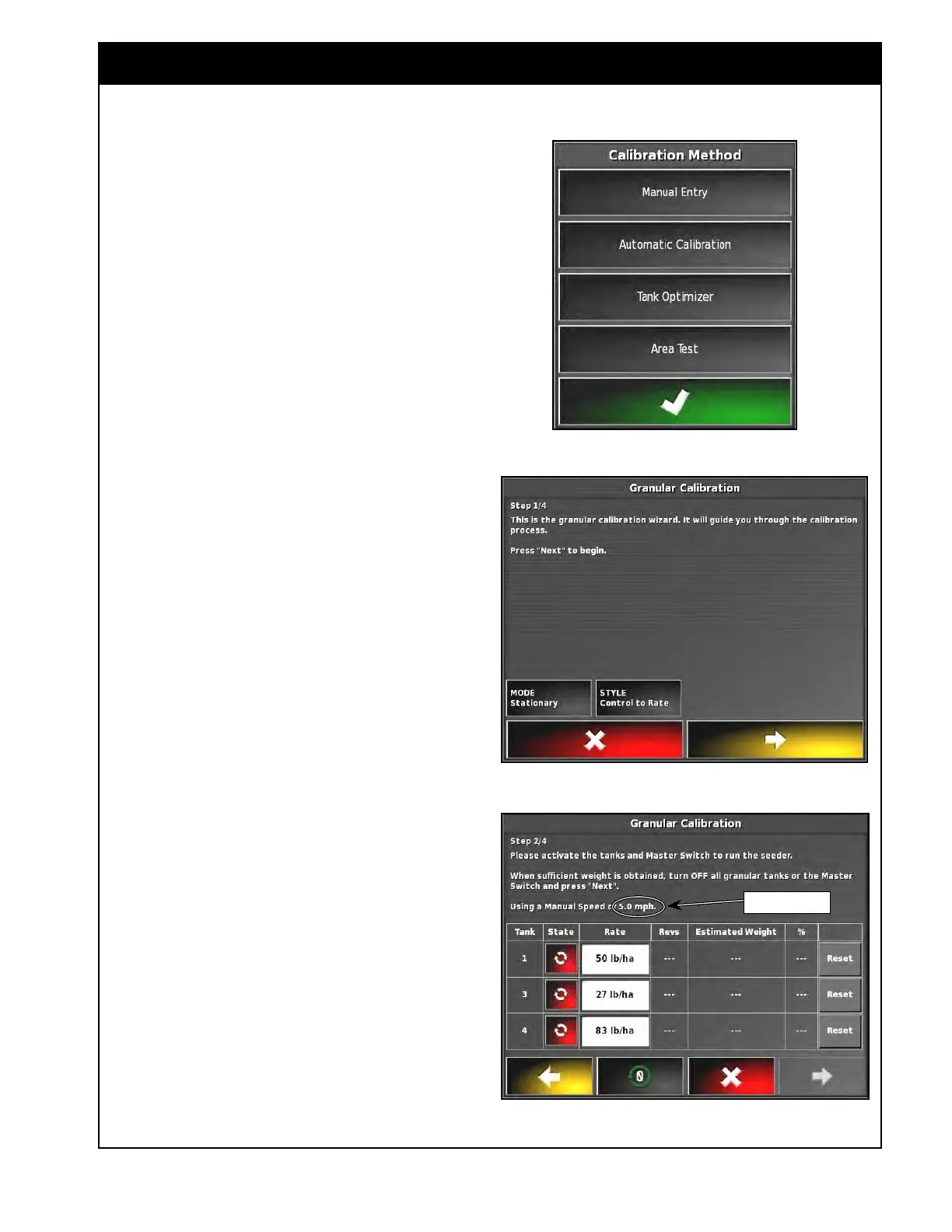
1. On the Calibration Method window, refer
Figure 8.34.
a. Select Automatic Calibration.
b.
The granular calibration wizard will start.
Refer to Figure 8.35.
2.
On this screen there are two options that can
be changed:
a. Calibration
mode:
i. Select Stationary or Rolling.
ii. The Default mode is Stationary. This
is used for calibrations when the unit
is stopped and the hydraulic motor is
used to drive the system.
iii. Rolling mode is selected when the
calibration is done with the unit in
motion and using the main clutch/
wheel to drive the system.
iv. The main clutch control is activated
only in rolling calibration mode.
b. Style:
i.
Select from Control to Rate or
Control to Extension.
ii. Select Control to Extension if you
want to control the transmission
settings rather than the rate.
c. Set calibration to Stationary and Style to
Control to Rate (steps in the procedure
below pertain to these settings).
d. Select the yellow arrow to proceed to the
next step.
Note
Ensure that the displayed manual speed is the
same as the planned seeding speed. Refer to
Figure 8.36.
Figure 8.34 - Calibration Method Window
Figure 8.35 - Calibration Wizard
Figure 8.36 - Starting Calibration
Confirm Speed



 To Next Page