X35 Console General Operations
8.13
8.4.1 Manual Entry of Calibration
Factors
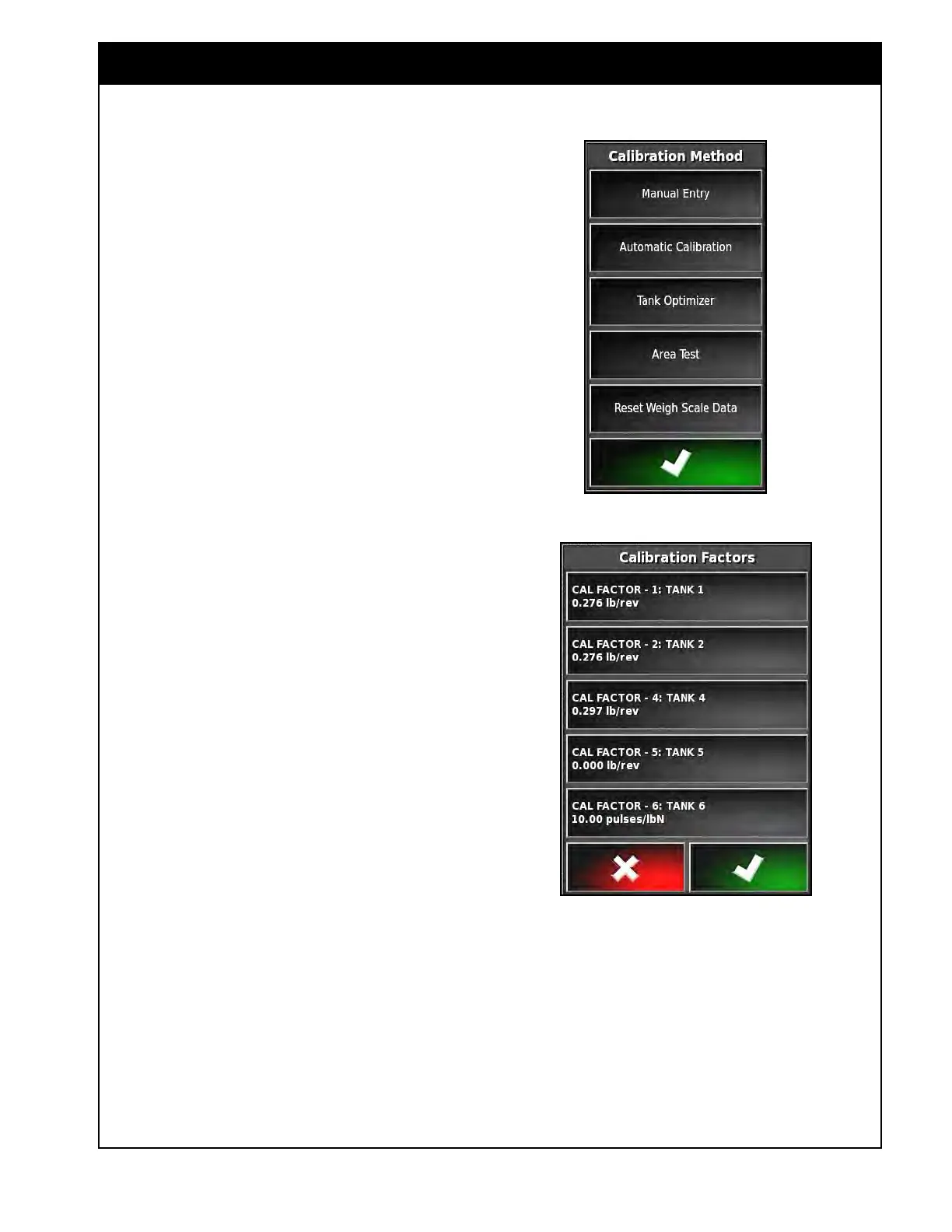
On the configuration Panel select the Multi-Tank
Calibration button (refer to Figure 8.20) to bring
up the Calibration Method window, refer to Figure
8.21.
1. Select the Manual Entry button.
a. The Calibration Factors window will
appear, refer to Figure 8.22.
2.
Buttons for the enabled tanks only will be
displayed.
a.
The Buttons title has following format:
CAL FACTOR - tank #: Tank name
3. The tank name may be displayed as Bin #,
Tank #, product name, "Empty" or custom
name, depending on the tank settings, refer
to Section 6.7.1 - Granular Setup and 6.7.2
-
NH3/Liquid Setup.
4. Select the button for the tank that you would
like
to enter calibration factor.
a. A numeric keypad will appear.
b. Enter the calibration factor value and
confirm.
5.
Repeat for the remaining tanks.
This procedure can also be used to enter the
calibration factor for NH3/liquid, if it has not
already been entered in the settings page, refer to
Section 6.7.2.2 - Flow Settings.
Figure 8.21 - Calibration Method Window
Figure 8.22 - Calibration Factors Window



 To Next Page