X35 Monitor Air Seeder Setup
6.80
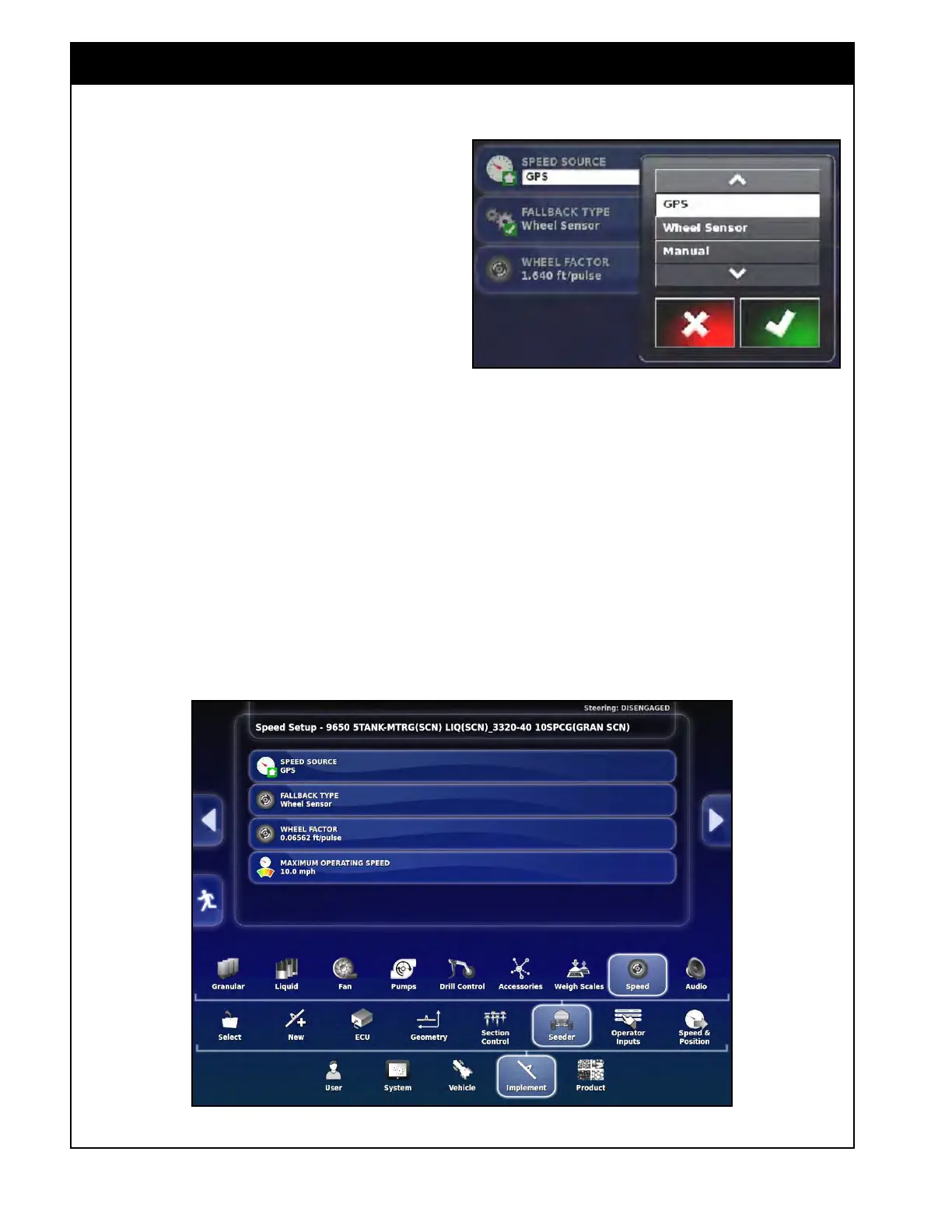
6.7.8 Speed Source
1. Speed Source - allows user to select the speed
source:
a. GPS - select to use GPS signal for speed.
b. Wheel
Sensor - select to use the wheel
sensor
on the air seeder tank for speed.
c. Manual - select to use custom manual
speed entered
in the Configuration panel
on the Seeder Controller screen. Refer to
Section 2.6.4 - Configuration Panel.
Important
For the best accuracy it is recommended to
use GPS as a speed source. If there is no
GPS equipment installed or GPS signal is not
available, Manual Speed can be used if you are
maintaining consistent speed.
Make sure to maintain the SET manual speed to
achieve the rates that have been set.
Figure 6.98 - Speed Source Setup
Figure 6.97 - Selecting Speed Source
The third choice is a Wheel sensor. Accuracy
may be affected as the tank goes from full to
empty as this will cause the tire diameter to
change, especially on the 7000 AS with large tires
where the diameter changes substantially.



 To Next Page