X35 Monitor Air Seeder Setup
6.35
3. The width and number of nozzles for each
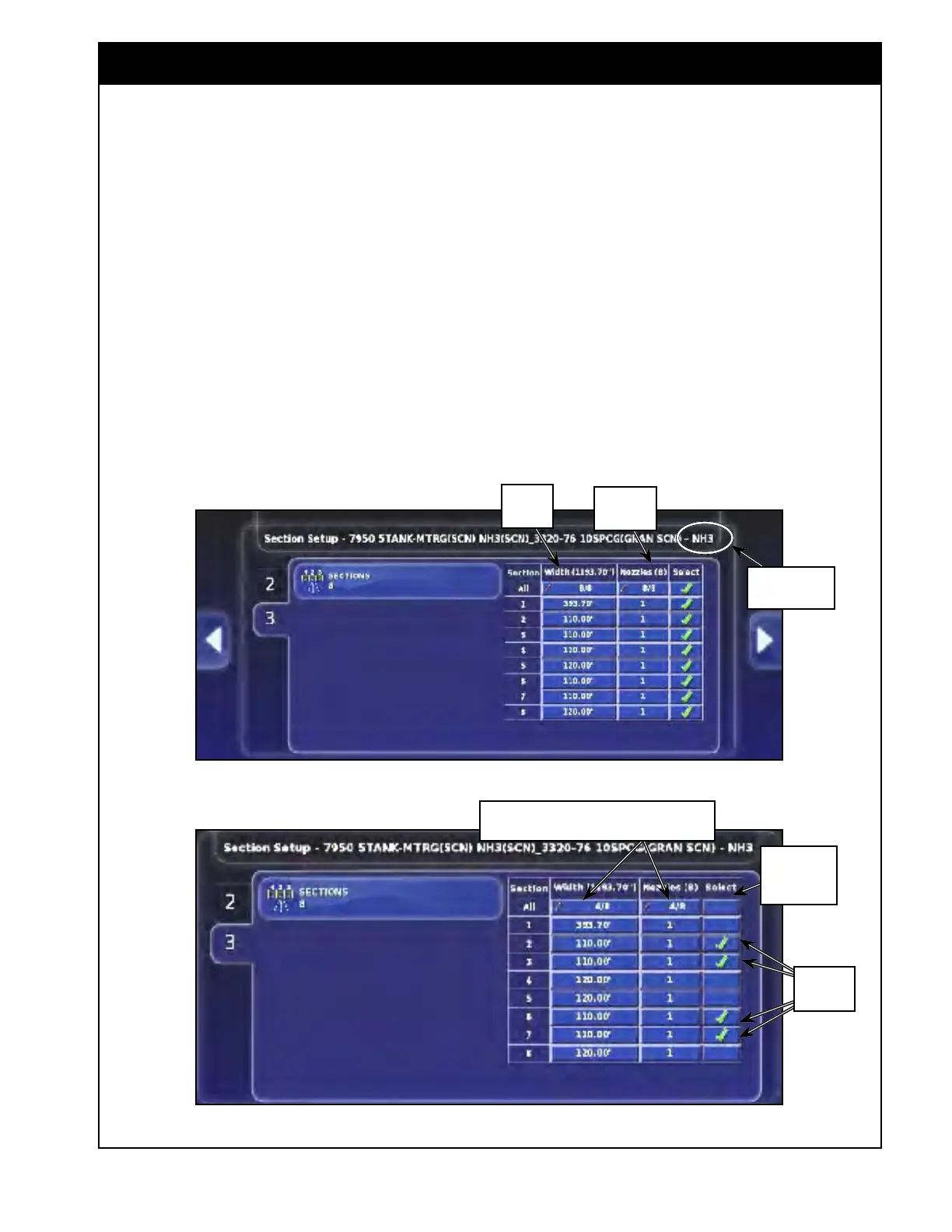
section can be entered individually by selecting
the "Width" button and the "Nozzles" button
for desired section. This will calculate the
total width of the implement and enter it into
the Geometry settings.
a. The "Width" column is the width of each
section. Refer to Figure 6.46.
i. It
is determined by the number of
openers in that section multiplied by
the spacing.
b. The "Nozzle" column only shows up for
NH3/Liquid booms. Refer to Figure 6.46.
i. It
is the number of openers in that
section.
Figure 6.46 - Section Control - NH3 Boom Settings
Important
The total width should match for all booms unless
you have a unique implement setup.
4. Alternatively, you can set width and number of
nozzles for several or all sections at once:
a. In the "Select" column check mark the
desired sections or check mark "All" to
select all sections.
i. Note, that the number of selected
sections out of all sections will be
displayed in the width and number of
nozzles column for "All". Refer to
Figure 6.47.
Select here
to select all
Sections
Selected
Sections
Figure 6.47 - Selecting Sections
Number of selected sections from total number
of section, in this example 4 out of 8
Boom Name In
The Title Bar
"Nozzles"
column
"Width"
column



 To Next Page