X35 ConsoleGeneral Operations
8.30
2. Follow the instructions.
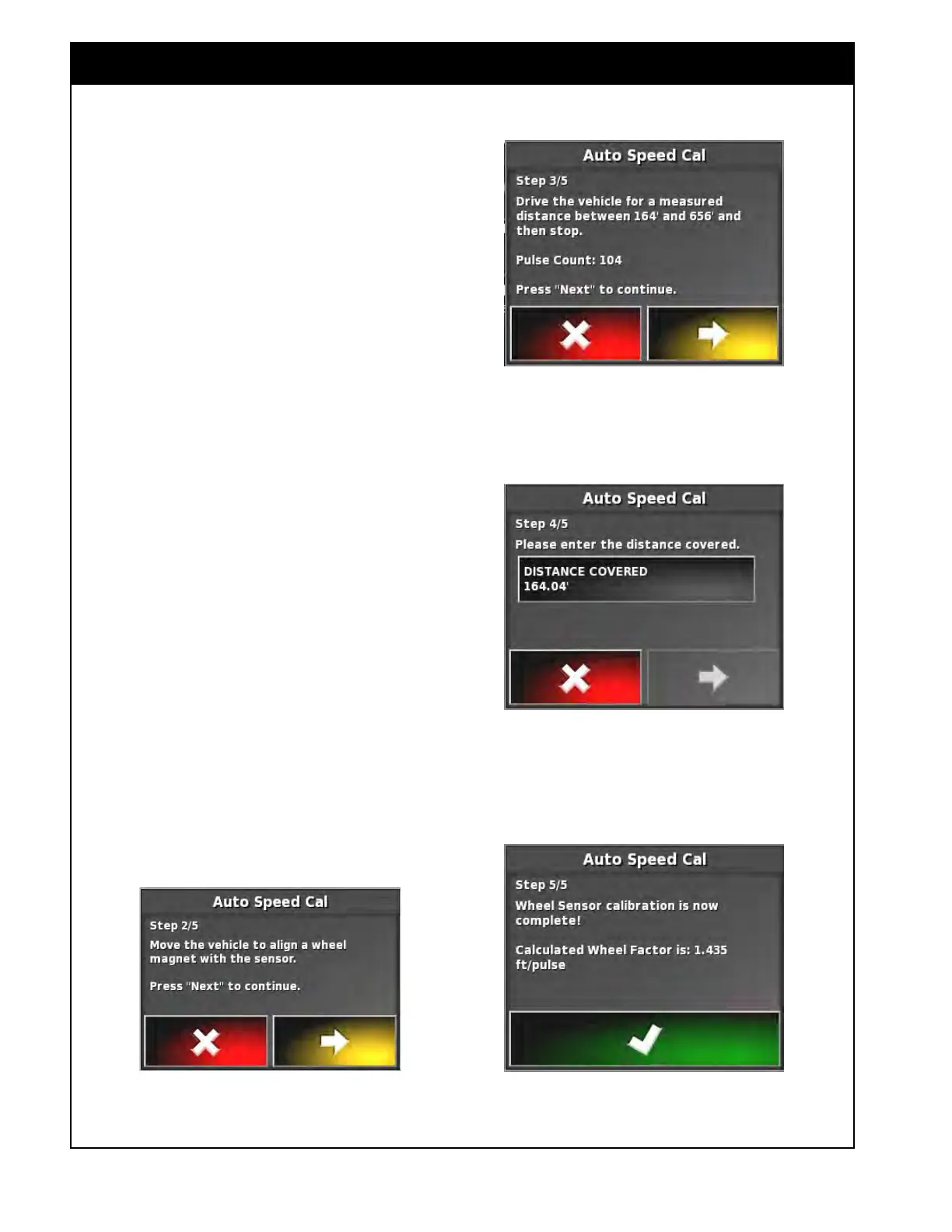
3. Move the vehicle to align a wheel magnet with
the sensor. Refer to Figure 8.58.
4.
Mark the ground alongside one of the tractor
or seeder wheels.
5. Return to the cab, on the calibration wizard
screen select yellow arrow to proceed to the
next step.
6. Refer to Figure 8.59. Drive steadily in a
straight
line.
a. Pulses will accumulate from the ground
speed sensor.
b. When you have traveled a distance 164-
656 ft (50-200 m) stop.
7. Mark the ground along side the same wheel as
was marked previously.
8. Measure the distance between the two marked
points.
a.
This is actual traveled distance.
9. On the screen, select the yellow arrow to
proceed to the next step.
10. Refer to Figure 8.60. Select the Distance
Covered
button and enter the measured
distance.
a. Select the yellow arrow to proceed to the
next step.
11. The wheel factor is then calculated and entered
automatically if accepted, refer to Figure 8.61.
Figure 8.58 - Wheel Sensor Calibration - Step 2 Figure 8.61 - Wheel Sensor Calibration - Step 5
Figure 8.60 - Wheel Sensor Calibration - Step 4
Figure 8.59 - Wheel Sensor Calibration - Step 3



 To Next Page