CAPINTEC, INC. CAPTUS
®
4000e
August 22 QUALITY ASSURANCE 5-9
14. Select the OK button to proceed with the test, or else select the Cancel button to stop the
process. As the counting progresses, the live spectra and measurement time are
displayed.
15. To stop the counting, select the Abort button or press Alt+A. The collected data is
discarded. To re-start the process, select the Start Procedure button or press Alt+S.
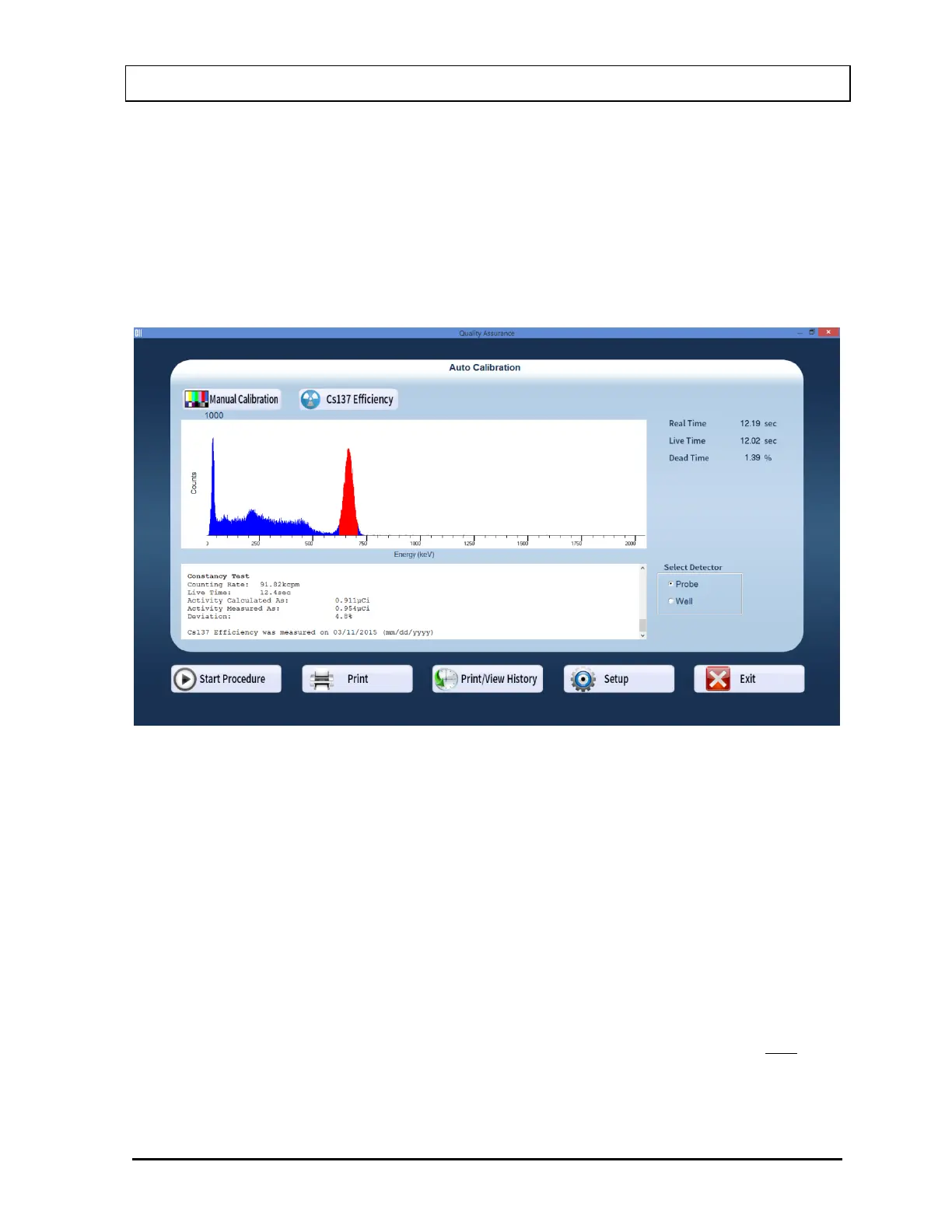
16. After the test is completed, the results of the test appear in the box below the
measurement spectrum as shown in Figure 5-10. Note the displayed Deviation value.
Figure 5-10
An unacceptable deviation is indicated in red as HIGH.
If the Deviation is indicated as HIGH, check the following:
The positioning of the rod source, especially for the Probe detector.
Ensure that there are no other sources (including dosed patients) in the area.
Select the Setup button or press Alt+T at the bottom of the Constancy Test screen.
The Calibrated Activity and Calibration Date should match your Cs137 standard.
If a problem is found with any of the three items above, then correct the problem and
repeat the Constancy Test.
If no problems are found with the above items, then the efficiency of the Cs137 standard
should be re-measured. If this does not correct the problem, contact Capintec’s only
Authorized Service Center for service.



 To Next Page