2 - 27
Chapter 2 Operation of Diag.
Version 1 2006.11.21
Option Tray Feed Motor
Alarm (DI-f)
Internal signal.
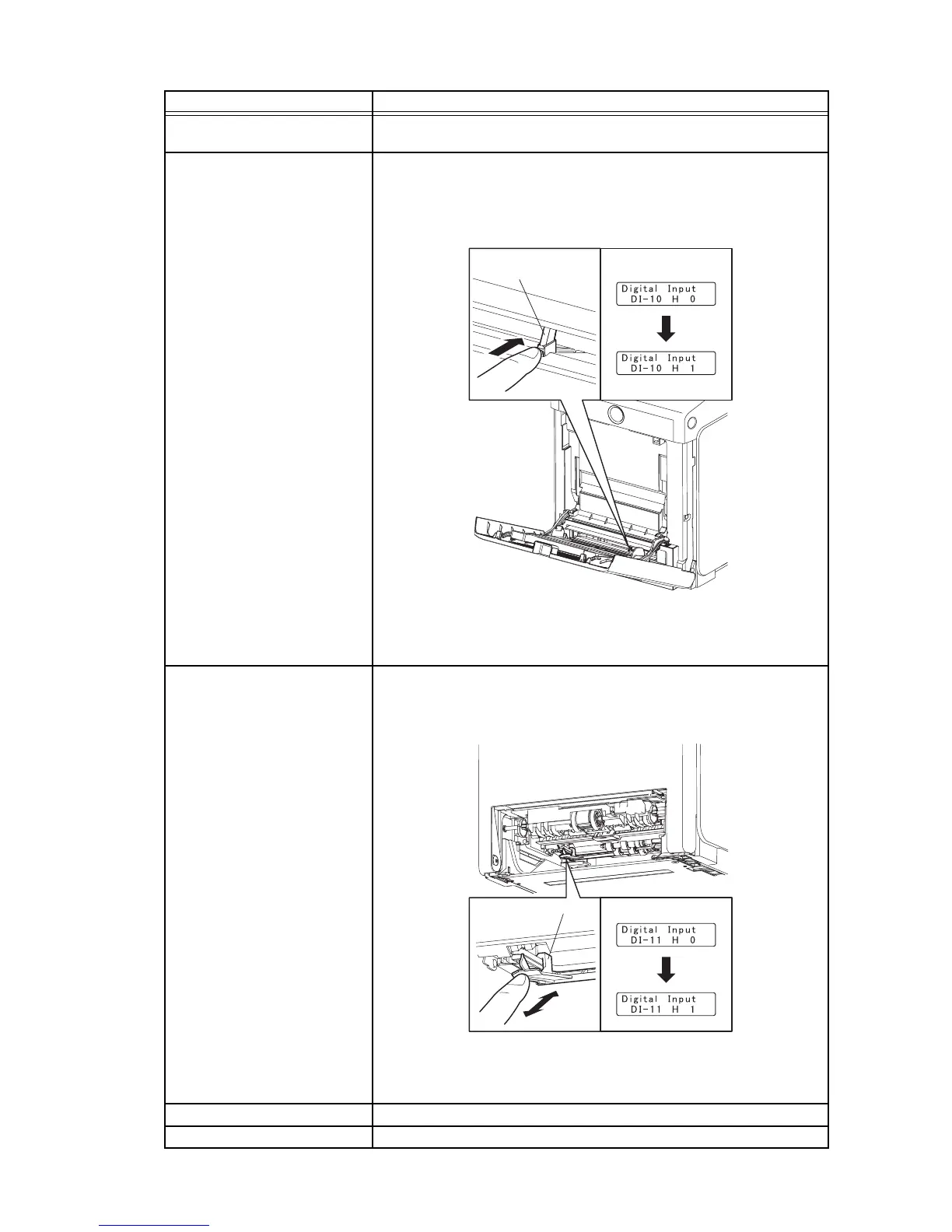
MPF No Paper Sensor (DI-10)
NOTE: Remove the paper of the MPF before executing the test.
1) Turn on the power and enter the Printer Diag.
2) Execute the DI-10.
3) Open the MPF Cover.
4) Check the sensor.
5) Press the "Cancel" key to stop the test.
6) Close the MPF Cover.
Tray 1 No paper Sensor (DI-
11)
1) Turn on the power and enter the Printer Diag.
2) Execute the DI-11.
3) Remove the paper cassette.
4) Check the sensor.
5) Press the "Cancel" key to stop the test.
6) Replace the paper cassette.
Main Motor Alarm (DI-12) Internal signal.
Sub Motor Alarm (DI-13) Internal signal.
Sensor name (Diag. Code) Confirmation procedures
Kmy02012KA
Actuator
Operator Panel
Normal
Kmy02013KA
Operator PanelActuator
Normal















 To Next Page