3 - 83
Chapter 3 Removal and Replacement Procedures (RRPs)
Version 2 2007.03.20
Removal 56 OPERATOR PANEL (PL13.2.97)
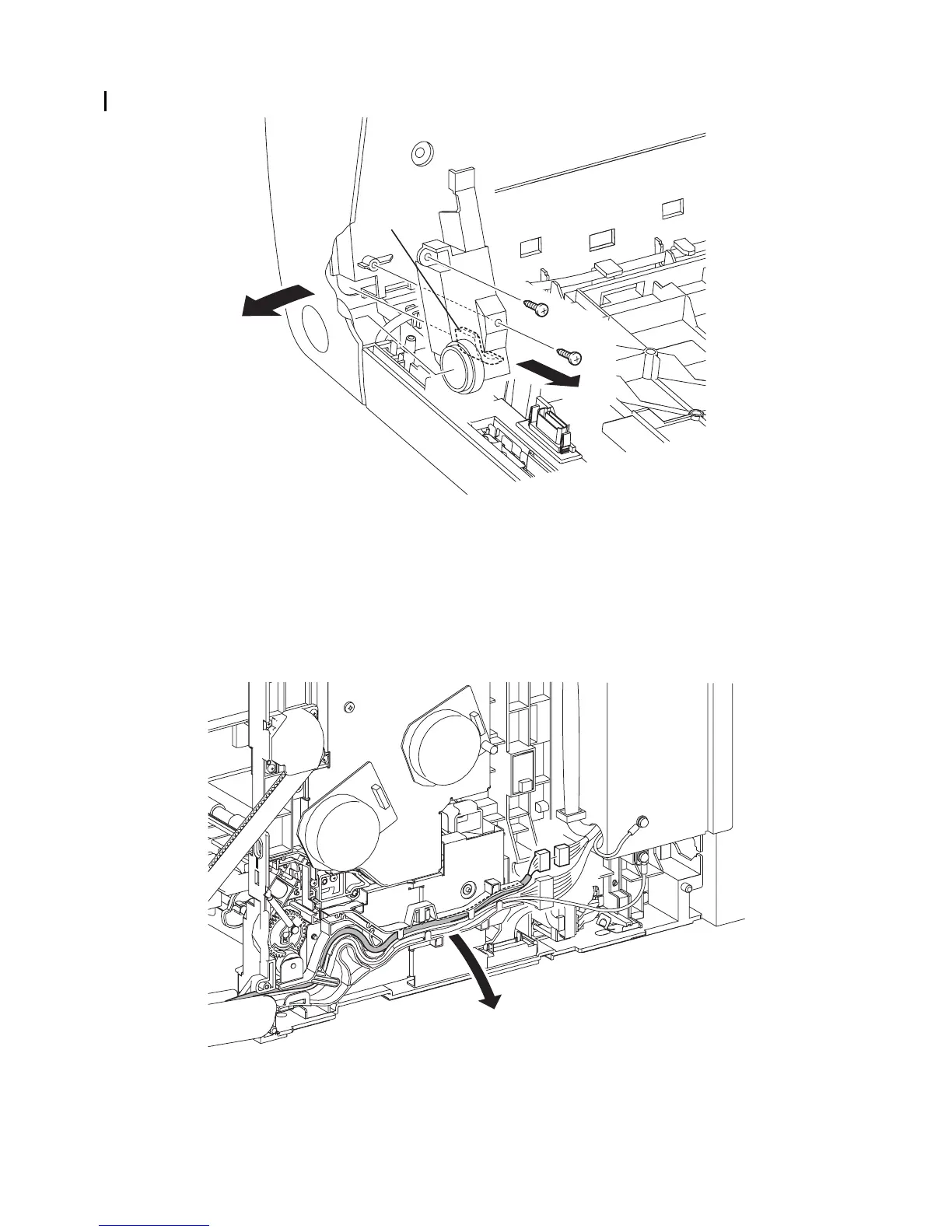
16) Remove the two screws (silver, tap, 10mm) that fix the COVER HARNESS (PL13.2.11) to the
FRONT COVER.
17) Release the rim of the BUTTON TOP from the FRONT COVER by spreading the FRONT
COVER.
18) Remove the COVER HARNESS from the FRONT COVER by releasing the rim of the COVER
HARNESS.
19) Disengage the connector (P/J5301) of the HARNESS ASSY A-OP-OPP (PL13.2.24).
20) Release the HARNESS ASSY A-OP-OPP from the DUCT DRV PH (PL8.1.8).
Continues to the next page.
Gnb03222KA
16)
16)
17)-1
18)-1
18)-2
17)-2
Gnb03162KA
19)
20)















 To Next Page