GD32VF103 User Manual
172
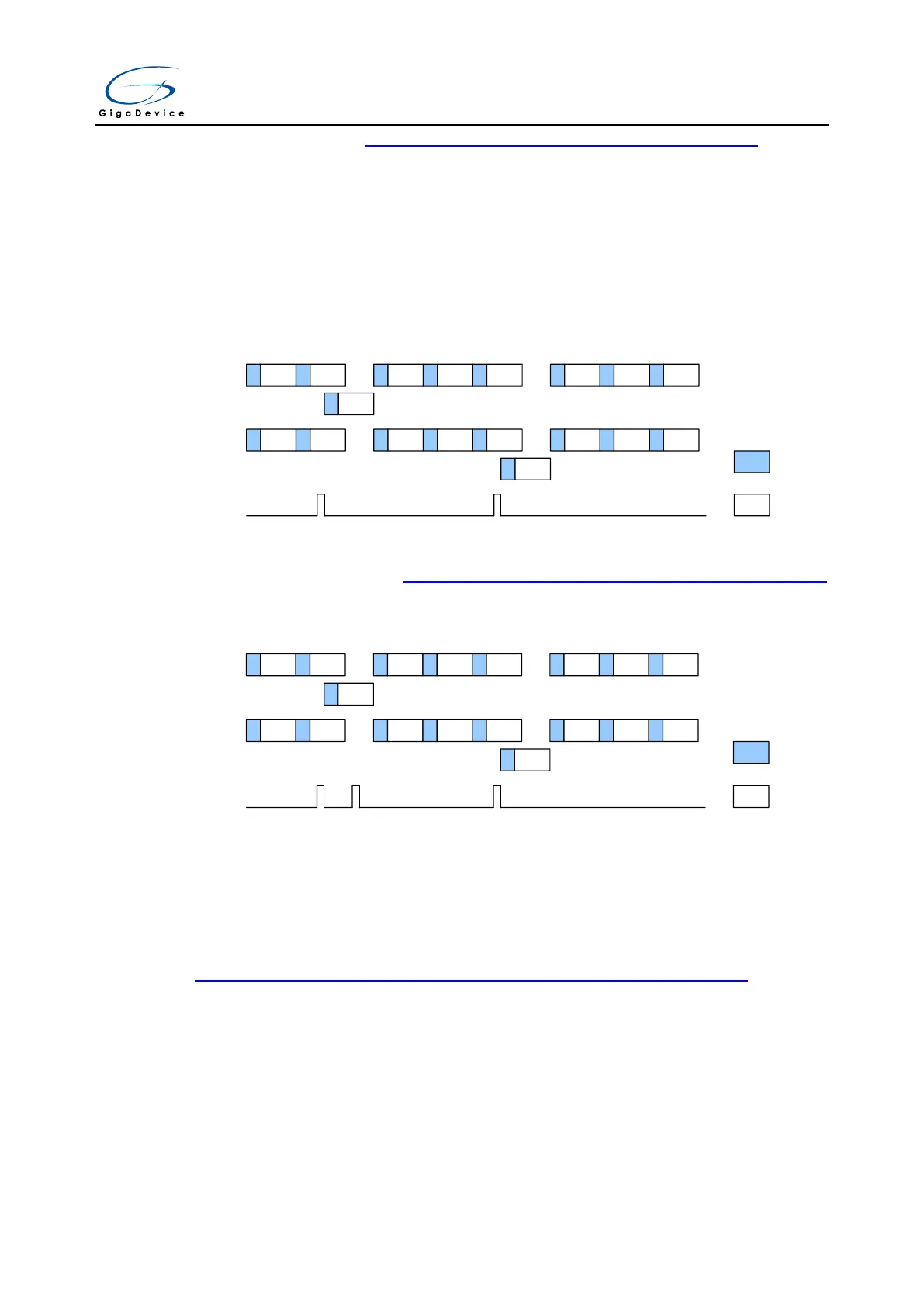
conversion shows in the Figure 11-20. Regular parallel & trigger rotation mode .
When the inserted event occurs, the inserted rotation conversion is immediately started. If
regular conversion is already running, in order to ensure synchronization after the inserted
conversion, the regular conversion of both (master/slave) ADCs is stopped and resumed
synchronously at the end of the inserted conversion.
Note: In combined regular parallel + trigger rotation mode, the sampling time for the two ADCs
should be configured the same.
Figure 11-20. Regular parallel & trigger rotation mode
CH0 CH1 CH1 CH2 CH3 CH3 CH4 CH5
CH4 CH5 CH5 CH6 CH7 CH7 CH8 CH9
ADC0
ADC1
Inserted
trigger
Sample
Convert
· · ·
· · ·
CH15
CH14
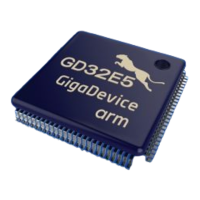
If one inserted trigger occurs during an inserted conversion that has interrupted a regular
conversion, it will be ignored Figure 11-21. Trigger occurs during inserted conversion
shows the case (the third trigger is ignored).
Figure 11-21. Trigger occurs during inserted conversion
CH0 CH1 CH1 CH2 CH3 CH3 CH4 CH5
CH4 CH5 CH5 CH6 CH7 CH7 CH8 CH9
ADC0
ADC1
Inserted
trigger
Sample
Convert
· · ·
· · ·
CH15
CH14
this trigger is
ignored
11.6.8. Combined inserted parallel & follow-up mode
It is possible to interrupt a follow-up conversion (both fast and slow) with an inserted event.
When the inserted trigger occurs, the follow-up conversion is interrupted and the inserted
conversion starts, at the end of the inserted sequence the follow-up conversion is resumed.
Figure 11-22 Follow-up single channel with inserted sequence CH1, CH2 shows the
behavior of this mode.


 To Next Page