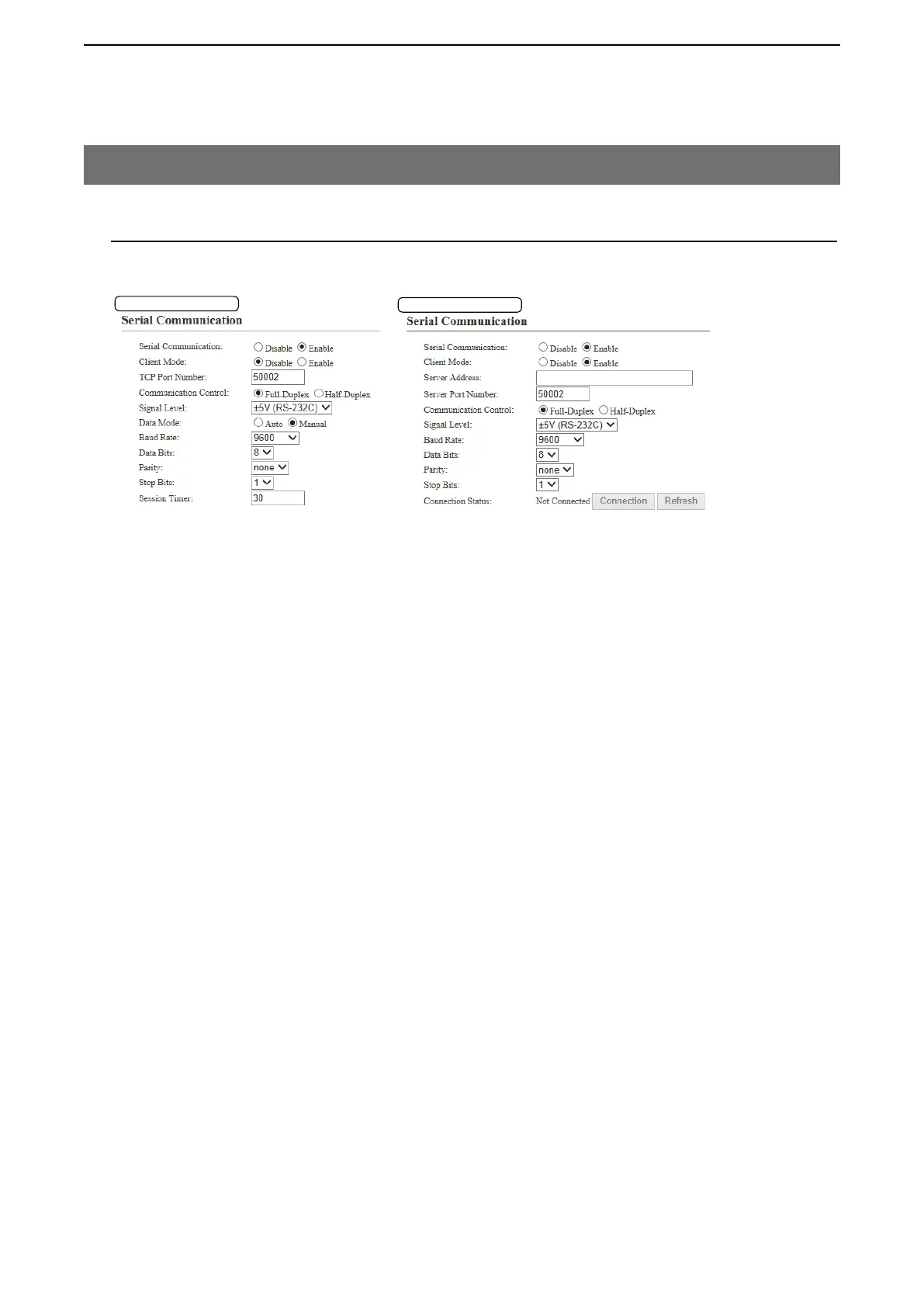
Client Mode:Enable
q
w
r
t
!4
y
u
o
!0
!1
!2
5
BRIDGE MODE SETTING SCREEN
5-98
8. [Port Settings] Menu (continued)
M Serial Communication
Set the serial communication details.
Note: The setting items appear only when “Enable” is selected in [Serial Communication].
q Serial Communication .......... Select “Enable” to use the serial communication. (Default: Disable)
w Client Mode ..........................
Select “Enable” to use the serial communication as the client.
(Default: Disable)
e TCP Port Number ................. Enter the port number between 1024 and 65535.
(Default: EXT1= 50002, EXT2= 50003)
r Server Address
Enter the destination VE-PG3’s IP address.
t Server Port Number
Enter the destination VE-PG3’s port number.
(Default: EXT1=50002, EXT2=50003
)
Range: “1024” to “65535”
y Communication Control ........ Select the communication type. (Default: Full-Duplex)
u Signal Level .......................... Select the serial communication line signal level from "±5 V (RS-232C),"
"0V/5V (Logic)" and "0V/3V (Logic)." (Default: ±5 V (RS-232C))
i Data Mode ………………… Select the communication method for the Serial Communication between a
device and the VE-PG3. (Default: Auto)
• Auto: Automatically starts the serial communication from a Virtual
Serial Port installed on your PC.
• Manual: Manually sets a serial communication method for a device.
o Baud Rate ............................. Select a serial communication speed between a device and the VE-PG3.
(Default: 9600)
!0 Data Bits
Select the number of bits for the serial communication between 5 and 8.
(Default: 8)
!1 Parity
Select a parity bit of [none], [odd], or [even]. (Default: none)
!2 Stop Bits
Select the stop bit length for the data of 1 or 2. (Default: 1)
!3 Session Timer
Set the time to cut the TCP session when there is no communication from the host.
(Default: 30)
Range: 0 to 86400 seconds *The timeout does not occur when “0” is set.
!4 Connection Status
Displays the connection status. Click “Connection” to connect the serial com-
munication.
* Appears only when “Enable” is selected in [Serial Communication].
[Port Settings]–[EXT Output 1 (EXT1)/EXT Output 2 (EXT2)]
Client Mode:Disable
*Appears only when “Manual” is selected in [Data mode].
q
w
e
y
u
i
o*
!0*
!1*
!2*
!3*


 To Next Page