6
CONVERTER MODE SETTING SCREEN
6-86
9. [Port Settings] Menu (continued)
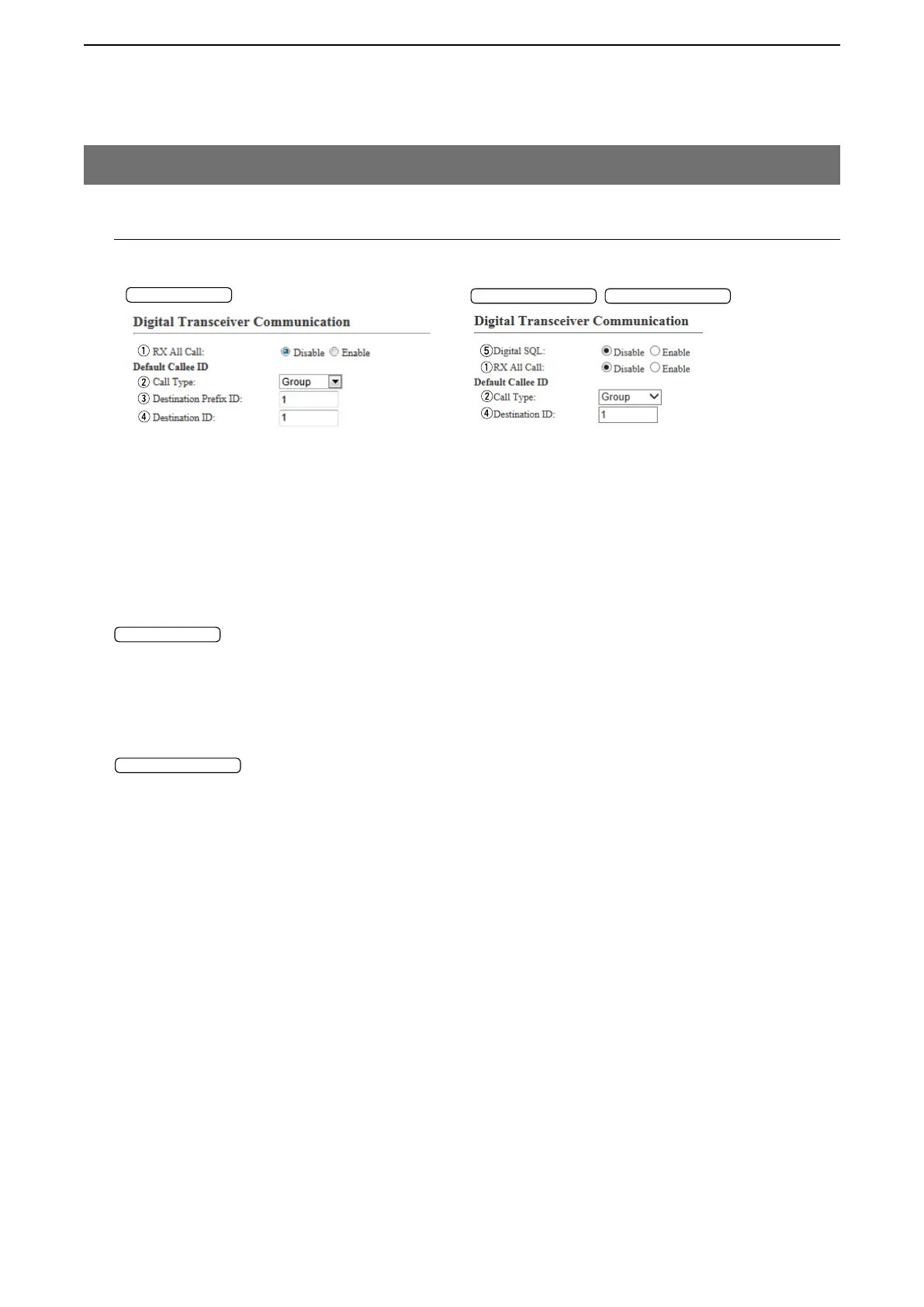
M Digital Transceiver Communication
Set the calling details.
[Port Settings]–[Digital Transceiver1 (D-TRX1)–Digital Transceiver4 (D-TRX4)]
q RX All Call ………………… Select “Enable” to permit all talkgroups to receive the call.
(Default: Disable)
Callee Designation
w Call Type ………………… Select the type of call. (Default: Individual)
• Individual: Call only specified radio.
• Group: Call all radios that belong to the specified group.
• All: Call all radios.
e Destination Prefix ID …… Enter the destination prefix ID. (Default: 1)
Setting range: (Depending on the system mode)
r Destination ID …………… Enter the destination ID. (Default: 1)
Setting range: (Depending on the system mode)
t Digital SQL ……………… Select “Enable” to use the Digital Squelch function. (Default: Disable)
• If “Enable” is selected, the squelch opens when the matched RAN and
Individual ID or Talkgroup ID are received.
"NXDN Trunking"
"NXDN Trunking"
"NXDN Conventional" "dPMR Mode2"
"NXDN Conventional"


 To Next Page